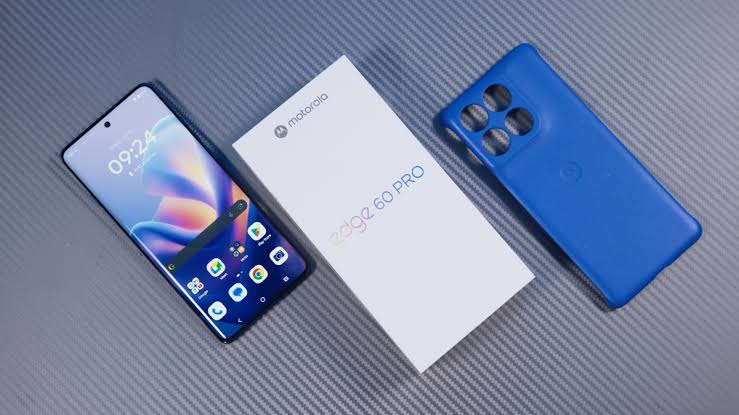
When people discuss premium Android phones, the same names often dominate the conversation. Samsung Galaxy, Google Pixel, OnePlus, and Apple receive plenty of attention. Motorola, meanwhile, can remain outside the shortlist even when it offers features worth considering.
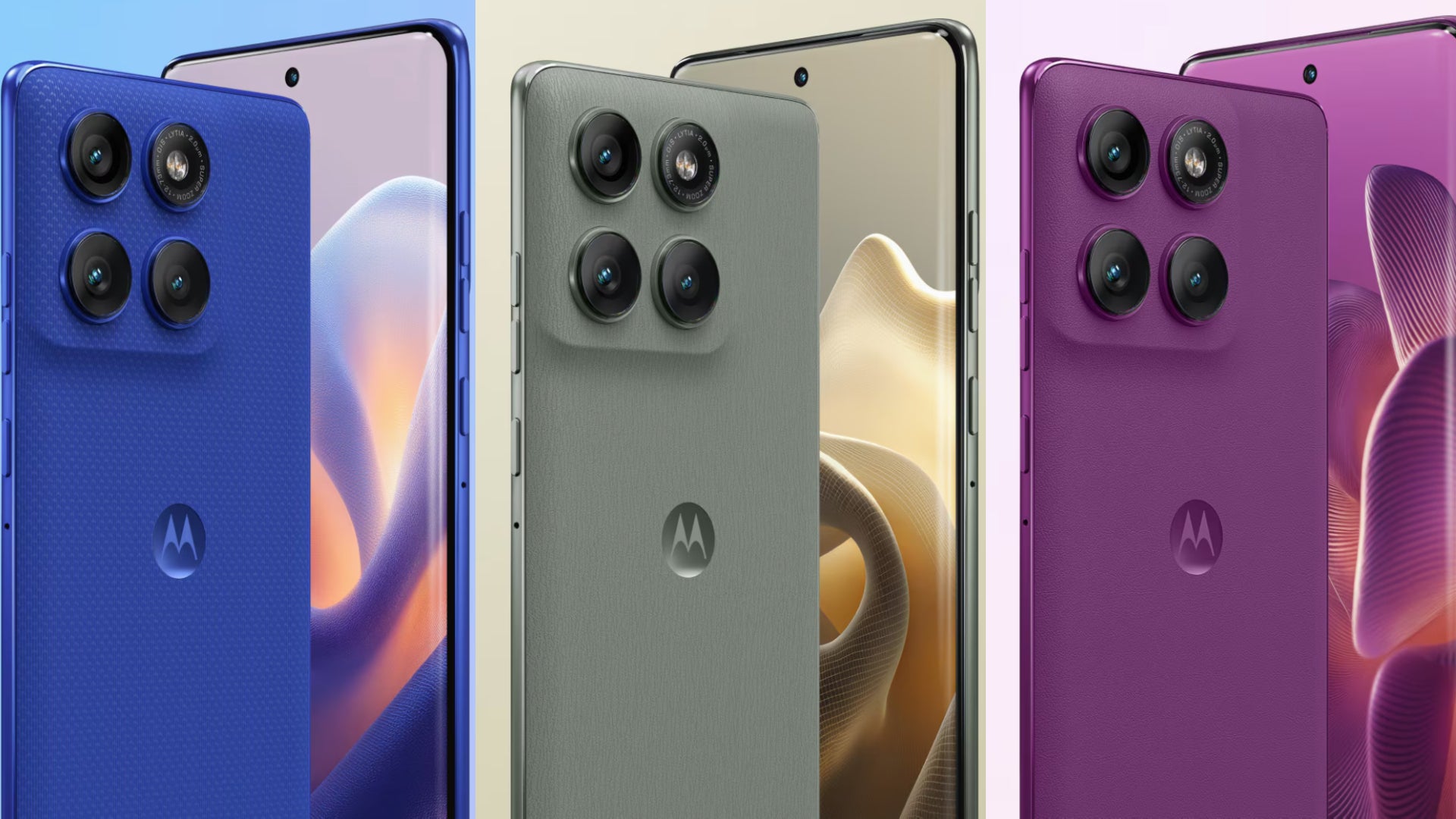
That is where the Motorola Edge 60 Pro becomes interesting. It offers a combination of features that many people want, without necessarily requiring them to buy a top-tier flagship. Still, its software-support commitment, video performance, and regional availability deserve careful attention.
This Motorola Edge 60 Pro review examines its design, display, performance, cameras, battery, software, strengths, weaknesses, and value. It also explains who should consider buying it and who may be better served by another Android phone.
Important review note: This is a specification-led editorial review informed by the manufacturer’s documentation and published independent reviews. It is not a claim that Infolandia conducted laboratory tests or personally used a retail unit. Prices, configurations, charging accessories, and certain features vary by market.
Motorola Edge 60 Pro at a Glance
| Feature | What to expect |
|---|---|
| Display | 6.7-inch pOLED, 1.5K resolution, up to 120Hz |
| Processor | MediaTek Dimensity 8350 Extreme |
| Memory | 8GB or 12GB RAM, depending on configuration |
| Storage | Common configurations include 256GB and 512GB, depending on market |
| Main rear camera | 50MP with optical image stabilisation |
| Ultrawide camera | 50MP, with macro capability |
| Telephoto camera | 10MP with 3x optical zoom |
| Front camera | 50MP |
| Battery | 6,000mAh in many markets |
| Charging | Up to 90W wired and 15W wireless, depending on the regional model and accessories |
| Software at launch | Android 15 with Motorola’s Hello UI |
| Connectivity | 5G, Wi-Fi 6E, Bluetooth 5.4 and NFC where supported |
| Durability | IP68/IP69 dust and water resistance, plus MIL-STD-810H certification |
Motorola’s official specifications page is the best place to verify the configuration sold in your country. Do not assume that every retailer offers the same memory, storage, SIM arrangement, battery capacity, or included charger.
Official specifications: Motorola Edge 60 Pro specifications.
Design and Build Quality: A Premium Look Without the Usual Bulk
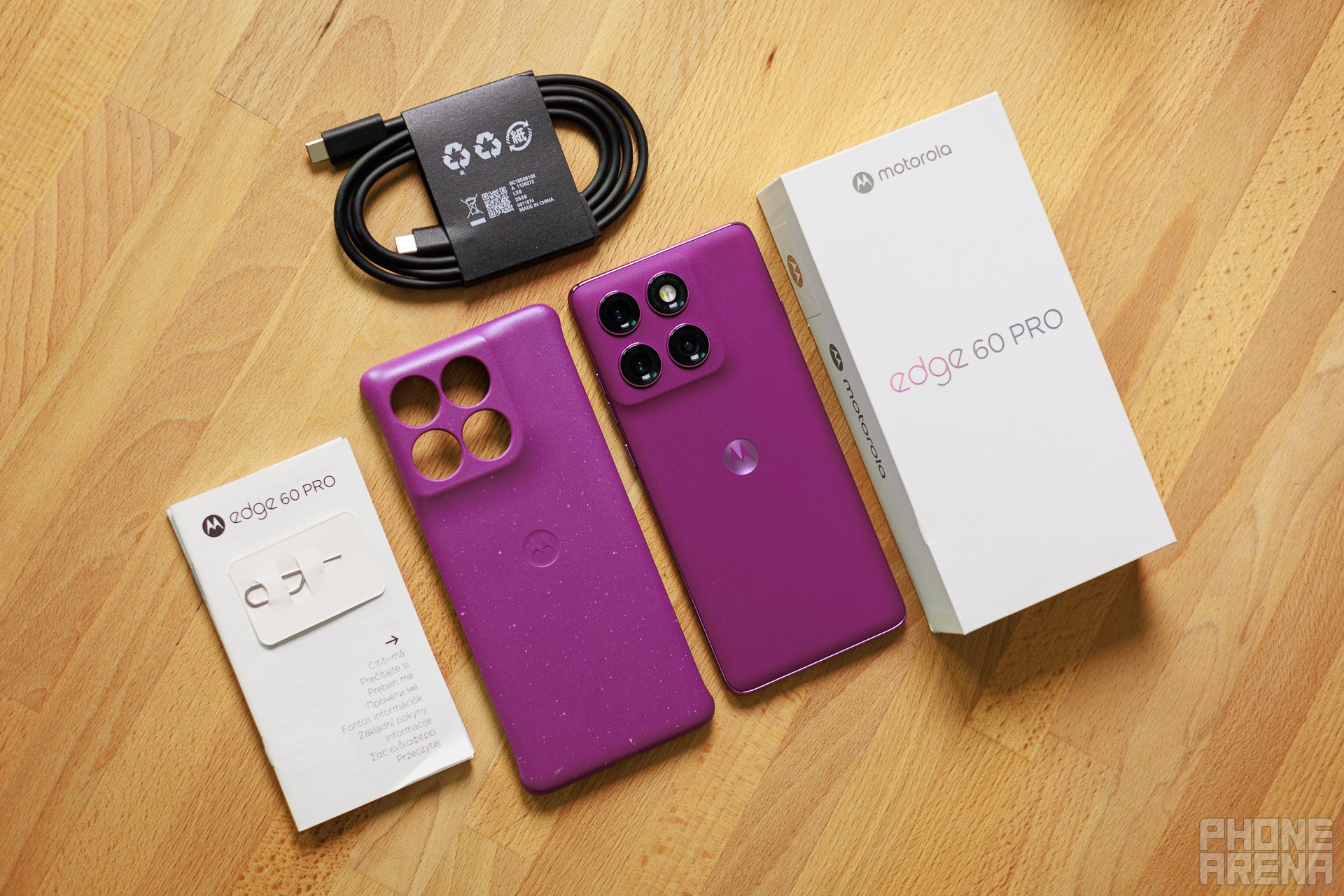
The first thing that makes the Motorola Edge 60 Pro stand out is its design. Motorola has given the phone a curved display, relatively slim body, textured rear finish, and a camera arrangement that looks contemporary without being unnecessarily complicated.
The curved edges help the device feel narrower than some competing phones with similarly sized screens. At approximately 186 grams and around 8.24mm thick in the documented configuration, it also avoids the heavy, oversized feeling that some large-battery smartphones develop.
Its rear finish is another talking point. Depending on the colour and regional variant, Motorola uses a leather-inspired or nylon-inspired texture. This adds character and can provide a more secure grip than a completely smooth glass back.
Of course, textured finishes are not automatically scratch-proof. The back can still collect marks, and the camera module remains exposed to potential scratches when you place the phone on rough surfaces. A protective case is sensible, particularly if you intend to keep the device for several years.
The front uses Corning Gorilla Glass 7i according to Motorola’s published specifications. This offers additional protection against everyday wear, but it does not make the screen indestructible. A screen protector can still be worthwhile, especially for people who carry their phones in bags or pockets with other objects.
Water and dust resistance
One of the more useful features is its IP68/IP69 rating. These ratings indicate tested protection against dust and certain water-exposure conditions. Motorola also lists MIL-STD-810H certification, which relates to specific environmental and durability tests.
These certifications are reassuring for everyday use. Nevertheless, they do not mean that the phone is waterproof under every condition. Water resistance can weaken with wear, previous repairs, impacts, or damage to seals. Liquid damage may also fall outside a manufacturer’s warranty.
For readers in Nigeria, this matters because a phone may encounter rain, dusty roads, crowded transport, and humid conditions. The Edge 60 Pro has a useful durability advantage, but I would still avoid deliberately exposing it to water or using it in situations where a drop could damage the screen.
Is the design practical?
Mostly, yes. The phone combines a large display with a body that is not excessively heavy. Its textured rear also helps it feel less slippery than some polished alternatives.
However, curved screens are not everyone’s preference. Some users experience accidental touches near the edges, while screen protectors can be more difficult to fit correctly. If you prefer a completely flat display, consider trying the Edge 60 Pro in person before buying it.
Display: One of Its Strongest Selling Points
The Motorola Edge 60 Pro features a 6.7-inch pOLED display with a resolution of 2712 x 1220 pixels. It also supports a refresh rate of up to 120Hz, HDR10+, and a wide colour gamut.
In practical terms, these specifications make it well suited to watching videos, reading long articles, browsing social media, editing photographs, and switching between applications. Text should look sharp, while photographs and compatible videos can benefit from the panel’s colour reproduction and contrast.
The 120Hz refresh rate is another advantage. Compared with a traditional 60Hz screen, it can make scrolling, animations, and supported games feel smoother. The difference is particularly noticeable when navigating menus or moving quickly through a long webpage.
However, a high refresh rate does not automatically improve every application. Some games remain limited to lower frame rates, and the phone may adjust its refresh rate to balance smoothness with power consumption.
Brightness and outdoor use
Motorola advertises peak brightness of up to 4,500 nits for this display. Peak brightness figures usually refer to specific conditions, rather than the brightness the screen maintains across its entire surface throughout the day.
Even so, the panel is designed to provide strong visibility in bright environments. This is useful when checking maps, replying to messages outside, reading on a commute, or taking photographs under daylight.
Actual outdoor visibility will still depend on sunlight, screen settings, temperature, and the content being displayed. A high advertised peak figure should therefore be treated as an indication of capability, not a guarantee that the screen will remain at that level continuously.
Is it good for streaming and gaming?
The combination of a large pOLED panel, high resolution, and HDR10+ support makes the Edge 60 Pro an appealing entertainment device. Movies look immersive, and the display provides enough space for reading, casual editing, and split-screen activities.
It also includes stereo speakers with Dolby Atmos support. These are useful for watching videos without headphones, although a phone’s speakers cannot reproduce the depth and separation of a good external audio system.
For gamers, the screen is a strong starting point. The phone can make supported games look sharp and feel responsive. However, sustained gaming performance also depends on the processor, cooling, game optimisation, and ambient temperature.
Overall, the display is a major reason to consider this device. It delivers several features people often associate with more expensive phones, while keeping the experience practical for everyday use.
Performance: Can the Dimensity 8350 Extreme Handle Everyday Work?
The Motorola Edge 60 Pro uses MediaTek’s Dimensity 8350 Extreme processor, paired with LPDDR5X memory and UFS 4.0 storage in the configurations documented by Motorola.
This hardware is designed for the upper mid-range smartphone segment. It is capable of handling common tasks such as messaging, video streaming, web browsing, navigation, online shopping, document editing, and switching between several applications.
For someone who uses a phone for work, study, or content creation, this matters more than chasing benchmark numbers. A device should open applications quickly, maintain responsive navigation, and handle a busy day without making every task feel like a struggle.
Multitasking and storage
Depending on the version, buyers can find 8GB or 12GB of RAM, alongside storage options that may include 256GB and 512GB. The exact combination varies by region.
The 12GB version is worth considering if you regularly switch between demanding applications, edit media, or keep many browser tabs open. The 8GB configuration can still be suitable for everyday use, especially if your workload is relatively light.
Storage also deserves attention. Modern applications, offline videos, photographs, games, and system updates can consume space quickly. The Edge 60 Pro does not offer a memory-card slot in the documented configurations, so choose a storage capacity that suits your habits.
If your current phone constantly runs out of space, read our guide on why phone storage keeps filling up and what actually works. It explains how to identify unnecessary files and manage storage more effectively.
Gaming performance
The Dimensity 8350 Extreme gives the phone enough processing capability to make gaming a realistic part of its use. Popular multiplayer titles and many demanding games should be playable, although the best graphics settings and frame rates will depend on the individual game.
For competitive gaming, stability matters as much as peak performance. A phone that produces high frame rates for a few minutes but becomes hot and slows down later may not be the best choice for long sessions.
Therefore, buyers who play for several hours at a time should look for independent tests of sustained performance and thermal behaviour. Do not assume that a 120Hz display means every game will run at 120 frames per second.
For more specialised advice, see our guide to smartphone requirements for gaming.
Is it a flagship killer?
The phrase “flagship killer” is often used too loosely. The Edge 60 Pro offers capable hardware and premium features, but it should not automatically be treated as equivalent to every expensive flagship.
Its processor is well suited to general performance and gaming, but buyers who prioritise the fastest available chip, advanced video recording, extensive long-term software support, or specialised camera features should compare it with more expensive alternatives before deciding.
For most everyday users, however, the available performance should be more than sufficient. The important question is whether the phone delivers enough speed for your needs at the price offered by your local seller.
Camera Review: Three Rear Cameras Give You More Flexibility
Motorola equips the Edge 60 Pro with a triple rear-camera system. The main camera has a 50MP sensor with optical image stabilisation, the ultrawide camera also uses a 50MP sensor, and a 10MP telephoto camera provides 3x optical zoom.
That combination is useful because the cameras serve different purposes. The main camera is intended for everyday photographs, the ultrawide lens captures more of a scene, and the telephoto camera brings distant subjects closer without relying entirely on digital cropping.
Main camera: 50MP with optical image stabilisation
The main camera is likely to be the one most people use. It is suited to photographs of people, buildings, food, pets, travel scenes, and ordinary daily moments.
Optical image stabilisation helps reduce the effect of small hand movements, particularly in lower light. It can also support more consistent results when the camera needs a longer exposure. However, stabilisation cannot freeze a moving subject, and it does not guarantee a sharp photograph in every situation.
Image processing remains important too. Exposure, colour balance, sharpening, and noise reduction can all influence the final result. The 50MP number alone does not tell you whether the camera will outperform a competing 12MP or 48MP camera.
Independent reviews generally describe the Edge 60 Pro as having capable cameras, although results vary by shooting conditions and reviewers have identified weaknesses in video performance. You can compare published findings in the GSMArena Motorola Edge 60 Pro review.
Ultrawide camera: Useful for travel and group photographs
The 50MP ultrawide camera has a 120-degree field of view and also supports macro photography. This gives you more flexibility when the main camera cannot capture the entire scene.
For example, an ultrawide lens can help when photographing a building from a narrow street, capturing a group of friends, or fitting more scenery into a travel photograph. It can also be useful for interior photographs when you cannot move farther away from your subject.
Macro capability offers another option for close-up subjects, although results depend on lighting, focus distance, and image processing.
One limitation to remember is that ultrawide cameras often perform differently from main cameras in low light. Even when the resolution is high, photographs may show less detail or more visible noise in difficult conditions.
Telephoto camera: A welcome feature at this price level
The 10MP telephoto camera offers 3x optical zoom and optical image stabilisation. This is one of the phone’s more useful features because it gives you a dedicated way to photograph subjects at a distance.
Optical zoom is particularly helpful for portraits, architecture, performances, and travel photography. It can also create a more natural framing for faces than standing very close to a subject with a wide-angle camera.
Motorola advertises digital zoom up to 50x. However, that figure should not be confused with 50x optical zoom. Digital zoom enlarges and processes the image, so detail and clarity can decline considerably at high magnification.
In everyday use, the native 3x optical range is a more meaningful feature than the largest advertised digital-zoom number.
Selfie camera and social media
The front camera uses a 50MP sensor and supports 4K video recording at 30 frames per second, according to the documented specifications.
This gives the Edge 60 Pro useful hardware for selfies, video calls, and short-form content. Its wide field of view can also help when you need to include more than one person in a photograph.
Nevertheless, content creators should consider more than resolution. Skin-tone processing, exposure, autofocus, audio quality, and stabilisation can make a bigger difference to the final result than the number of megapixels alone.
If your main goal is to create videos for YouTube, TikTok, Instagram, or a business account, test the front and rear cameras in the conditions where you normally record. Indoor lighting and moving subjects can expose weaknesses that are not obvious in promotional photographs.
Video recording: The area that deserves extra caution
The Edge 60 Pro supports 4K recording at 30 frames per second on its main rear camera, with additional video options available on the other cameras. That is enough for many casual creators, travel clips, and everyday recordings.
However, some independent reviewers have criticised its video stabilisation and overall video performance. This matters if you regularly record while walking, film fast-moving subjects, or need consistently polished footage without additional editing.
Video performance can also differ between camera lenses. Switching from the main camera to an ultrawide or telephoto lens may change the image quality, exposure, and stabilisation behaviour.
My recommendation is straightforward: if photography is your priority, the Edge 60 Pro deserves consideration. If video production is the main reason you are buying a phone, compare sample footage from the Motorola against your alternatives before spending your money.
Battery Life: A Major Reason to Consider This Phone
The Motorola Edge 60 Pro has a 6,000mAh battery in many markets. That is a substantial capacity for a phone with a large, high-resolution display and capable processing hardware.
Battery capacity does not determine endurance by itself, but it provides a strong starting point. Screen brightness, mobile signal strength, gaming, background applications, refresh rate, and temperature all affect how long a phone lasts between charges.
Independent reviews have highlighted battery life as one of the Edge 60 Pro’s strongest qualities. The device is designed to provide a full day of use for many people, although heavy gaming, hotspot use, prolonged navigation, or extensive video recording can drain it faster.
Why battery life matters in Nigeria and other markets
A reliable battery is useful wherever people spend long hours away from a power outlet. In Nigeria, it can be particularly valuable for commuters, students, business owners, field workers, and creators who need to stay connected throughout the day.
For example, you might use your phone to make calls, attend online meetings, send business messages, record short videos, navigate unfamiliar roads, and browse the web. A large battery gives you more flexibility between charging sessions.
Still, no battery can compensate for every situation. Using the phone as a mobile hotspot for several hours or playing demanding games at high brightness can significantly reduce endurance.
To get more from the battery, adjust screen brightness, limit unnecessary background activity, and use battery-saving settings when you do not need maximum performance. Our guide to extending smartphone battery life offers more practical advice.
90W wired charging and 15W wireless charging
Motorola lists support for up to 90W TurboPower wired charging and 15W wireless charging on relevant regional configurations. The phone also supports USB Power Delivery 3.0.
Fast wired charging is convenient when you need to top up the battery before leaving home. Wireless charging offers a different kind of convenience, particularly if you already have a compatible charging stand or pad.
However, the maximum advertised charging speed depends on the correct power adapter, cable, temperature, battery level, and charging conditions. Some retail packages may not include the charger, so check the box contents before buying.
It is also worth noting that charging speeds can be reduced as the battery fills up or the phone becomes warm. A manufacturer’s maximum wattage is not the speed the phone maintains throughout the entire charging cycle.
Software and Updates: A Significant Buying Consideration
The Motorola Edge 60 Pro launched with Android 15 and Motorola’s Hello UI. The interface keeps many familiar Android features while adding Motorola-specific tools, customisation options, security functions, and AI features.
Many people appreciate a relatively uncluttered Android experience. Motorola’s interface can feel familiar to users who prefer straightforward navigation rather than a heavily customised system. The phone also supports Smart Connect features for linking compatible devices, including PCs and other displays.
Moto AI and the dedicated AI key
The Edge 60 Pro includes Motorola’s AI-related features and a dedicated AI key. Depending on the available software version and region, these tools can assist with tasks such as summarising notifications, recording or organising information, and generating content.
These features may be useful, but they should not be the main reason to buy the phone. AI functions can change through updates, and availability may depend on language, region, internet access, account requirements, or the specific application.
Also, AI-generated summaries and answers can be inaccurate. Review important information yourself, particularly when it involves money, work, travel, or personal decisions.
How long will Motorola support it?
This is one of the most important drawbacks to consider. Published documentation and reviews describe a commitment of three major Android operating-system upgrades and four years of security updates for the Edge 60 Pro. Exact policies and delivery schedules can vary by market, so confirm the promise that applies to your model.
That commitment is reasonable for some buyers, but it is shorter than the support offered by certain competing Android phones. If you plan to keep your next device for five or six years, software support should carry considerable weight in your decision.
Security updates matter because they help address vulnerabilities discovered after a phone reaches the market. Operating-system upgrades can also bring new features and compatibility improvements. A phone may continue working after official support ends, but the risk profile changes as security updates stop.
Before buying, check Motorola’s official support information and ask the seller whether the phone is a local-market model or an import. Do not assume that every regional version follows the same update schedule.
For an additional reference, read the manufacturer’s official Edge 60 Pro documentation.
Connectivity, Security, and Everyday Features
The Edge 60 Pro supports 5G connectivity, Wi-Fi 6E, Bluetooth 5.4, GPS, and NFC where available. These features make it suitable for modern wireless accessories, fast home or office networks, navigation, and contactless services supported by the user’s market and bank.
However, 5G compatibility does not guarantee access to 5G everywhere. Network bands, carrier certification, local coverage, and SIM configuration all influence whether the phone works as expected.
This is especially important for international buyers and Nigerians purchasing imported devices. A model that works well on one carrier may lack support for a frequency band used by another. Confirm compatibility with your network before making payment.
For security, Motorola includes an in-display fingerprint reader, face unlock, and security-related software features. These options are convenient for unlocking the phone and protecting ordinary access to your device.
As with other Android phones, you should still use a strong screen lock, install updates promptly, and enable suitable account-protection measures. Fingerprint or face unlock does not replace the need to secure your Google account and sensitive applications.
The USB-C port is listed as USB 2.0 in the published specifications. That is worth remembering if you regularly transfer large video files to a computer using a cable. Charging and wireless connectivity may be excellent, but wired data-transfer capabilities are not necessarily flagship-level.
Motorola Edge 60 Pro Price: What Should You Pay?
There is no single worldwide price for the Motorola Edge 60 Pro. The phone’s cost depends on its country, storage configuration, seller, import duties, currency movements, warranty, and whether it is new, refurbished, or used.
In Nigeria, imported phones can have substantial price differences between sellers. One retailer may offer a lower price but provide limited warranty support, while another may charge more for a verified unit and clearer return terms.
Rather than relying on a price copied from an old article, compare current offers for the exact RAM and storage version. Check the seller’s reputation, whether the device is sealed, the warranty terms, and whether the included accessories match the advertised package.
What to check before buying in Nigeria
- Exact model: Confirm the regional version and supported network bands.
- RAM and storage: Make sure you are paying for the configuration you actually want.
- Battery and charging: Verify the battery specification, included adapter, and supported charging speed.
- Warranty: Ask whether the warranty is manufacturer-backed or supplied by the shop.
- Condition: For used or refurbished devices, check the screen, cameras, charging port, speakers, and battery behaviour.
- Return policy: Understand what happens if the phone has a fault shortly after purchase.
- Network compatibility: Confirm that your SIM and carrier will work correctly with the device.
Our guides to checking refurbished devices before buying and comparing used and brand-new phones cover related checks that can help you make a more informed purchase.
Motorola Edge 60 Pro vs the Competition
The Edge 60 Pro makes the most sense when you compare it with phones at a similar price rather than treating it as a direct substitute for every flagship.
Motorola Edge 60 Pro vs Samsung Galaxy A56 5G
The Samsung Galaxy A56 5G is a useful comparison for buyers who want a well-rounded Android phone from a major manufacturer. The Samsung offers a familiar interface and a strong emphasis on software support, while the Motorola stands out with its dedicated 3x optical telephoto camera, high-resolution curved display, and large battery in relevant markets.
Samsung may be more appealing if you value its ecosystem, update policy, and the familiarity of One UI. The Motorola may be more attractive if you prefer its design, want a dedicated telephoto lens, and find it at a competitive price.
Neither phone is automatically the better choice for everyone. Compare the current prices and the software-support terms for both devices. You can read our Samsung Galaxy A56 5G review for more detail.
Motorola Edge 60 Pro vs OnePlus 13R
The OnePlus 13R is another alternative for buyers who prioritise performance and battery life. It is worth comparing if you play demanding games, multitask heavily, or want a phone that feels responsive during intensive use.
The Motorola’s dedicated telephoto camera, curved design, and 6,000mAh battery are compelling features. The OnePlus may appeal to people who prefer its performance profile, software experience, or the price available in their region.
Check independent camera comparisons before choosing between them. A specification sheet cannot tell you which phone produces better photographs of moving subjects, handles indoor video more reliably, or maintains performance during extended gaming.
Motorola Edge 60 Pro vs Google Pixel phones
Google Pixel phones are worth considering if photography processing, Google’s software features, and update support are high priorities. The Edge 60 Pro counters with a versatile camera arrangement, fast charging, and a large battery.
The right choice depends on the specific Pixel model and the prices available to you. A newer Pixel may offer a longer support window, while a discounted Motorola may deliver better hardware value for your money.
For a fair comparison, match the devices by price, storage, warranty, software support, and camera needs. Avoid comparing the Edge 60 Pro with a much more expensive flagship and then assuming that any difference in performance makes the Motorola a poor purchase.
Who Should Buy the Motorola Edge 60 Pro?
The Edge 60 Pro is a sensible option for several types of users.
1. People who want a strong all-round Android phone
If your daily routine involves calls, messaging, browsing, video streaming, navigation, online banking, and social media, the Edge 60 Pro offers hardware suited to those tasks. Its display and battery are especially attractive for people who use their phones frequently throughout the day.
2. Travellers and heavy phone users
The large battery and durable design can benefit people who spend hours outside, move between locations, or use their phones for maps and communication. The ultrawide and telephoto cameras also provide useful flexibility when photographing different scenes.
3. Casual photographers and social media users
The three rear cameras provide more framing options than a phone with only a main camera and an ultrawide lens. The front camera also offers a high-resolution sensor for selfies and video calls.
However, people who create professional video content should test the device carefully before buying it. Its video performance is not as convincing as its headline camera specifications might suggest.
4. Buyers who want premium features without paying flagship prices
The Edge 60 Pro offers a high-refresh-rate display, fast wired charging, wireless charging, IP68/IP69 protection, and a dedicated telephoto camera. If a local retailer prices it competitively, that combination can make it a strong value proposition.
Who Should Avoid It?
Despite its strengths, the Motorola Edge 60 Pro is not the ideal phone for everyone.
- Long-term users who prioritise extended software support: Compare its update commitment with competing devices before buying.
- Video-first creators: Review independent footage and stabilisation tests before committing.
- People who dislike curved displays: A flat-screen alternative may be more comfortable.
- Buyers who need expandable storage: The documented configurations do not include a microSD card slot.
- People who need guaranteed local servicing: Confirm repair options and parts availability before purchasing an imported model.
- Buyers paying close to flagship prices: Compare newer alternatives, especially if they offer longer software support or better video features.
The phone is most appealing when its strengths align with your daily needs and the price leaves room for its compromises.
Is the Motorola Edge 60 Pro Still Worth Buying in 2026?
Because the Edge 60 Pro launched in 2025, buyers in 2026 should evaluate it as an established model rather than a newly released phone. That can work in your favour if retailers have reduced the price, but it also makes software support and stock condition more important.
First, compare its current price with newer alternatives. A substantial discount can make the Edge 60 Pro attractive, especially if you value battery life, display quality, charging speed, and the telephoto camera.
Second, check how much official support remains for the exact model. The original update commitment does not restart when you buy the phone from a retailer. If you purchase it well after launch, some of its promised support period has already elapsed.
Third, consider whether a newer model offers a meaningful improvement in the areas that matter to you. A newer processor alone may not justify paying much more, but a significantly longer support policy, better video recording, or a more suitable camera system could.
Finally, consider availability. The Edge 60 Pro may be easier to find in some markets than others. A phone with impressive specifications is not necessarily a good purchase if the seller cannot verify its condition, network compatibility, or warranty.
Final Verdict: A Phone More People Should Consider
The Motorola Edge 60 Pro deserves more attention from Android buyers who want a balanced smartphone rather than a device chosen solely for brand recognition.
Its strongest features are clear: a sharp 6.7-inch 120Hz pOLED display, capable upper mid-range performance, a large battery in many markets, fast wired charging, wireless charging, a versatile three-camera setup, and useful dust and water resistance. Together, these features make it a compelling everyday device.
Its weaknesses are equally important. The software-support commitment is shorter than that of some rivals, video performance has received criticism from independent reviewers, and regional differences can complicate purchasing decisions. The phone also lacks expandable storage and uses USB 2.0 for wired data transfer.
My verdict is that the Motorola Edge 60 Pro is worth considering if you can find the right configuration at a competitive price. It is especially appealing to people who prioritise battery life, display quality, everyday performance, and photographic flexibility.
However, I would not recommend buying it blindly. Compare current prices, confirm the remaining software-support period, check network compatibility, and look at real camera samples. If video recording or long-term updates are your biggest priorities, another phone may offer better value.
Bottom line: The Motorola Edge 60 Pro is not perfect, but it combines enough practical strengths to deserve a place on your Android shortlist. The best reason to buy it is not the Motorola name or a long list of specifications. It is the possibility of getting the features you actually use every day at a price that makes sense.
Frequently Asked Questions
Is the Motorola Edge 60 Pro a flagship phone?
It is positioned in the premium mid-range segment. It offers several features associated with expensive phones, but it does not match every flagship in processing power, video capabilities, or software-support duration.
Does the Motorola Edge 60 Pro support 5G?
Yes. The phone supports 5G, but compatibility depends on the regional model, supported network bands, carrier, and local coverage. Confirm these details before purchasing an imported unit.
How good is the Motorola Edge 60 Pro camera?
It has a 50MP main camera with optical image stabilisation, a 50MP ultrawide camera, and a 10MP telephoto camera with 3x optical zoom. This is a versatile setup for everyday photography, although independent reviews have identified weaknesses in video performance.
How long does the Motorola Edge 60 Pro battery last?
The 6,000mAh battery in many regional versions is a major strength, and independent reviews have reported good endurance. Actual battery life depends on brightness, gaming, network conditions, background activity, and other usage patterns.
Does the Motorola Edge 60 Pro support wireless charging?
Motorola lists 15W wireless charging for relevant configurations. Check the specifications for the exact regional model and confirm whether the accessories you need are sold separately.
Is the Motorola Edge 60 Pro waterproof?
It has IP68/IP69 dust and water-resistance ratings in the documented specifications. These ratings do not make it waterproof under all conditions, and resistance may decline with wear or damage. Avoid deliberately exposing it to water.
How many Android updates will it receive?
Published information describes three major Android OS upgrades and four years of security patches. Check Motorola’s official support information for your market and confirm the update policy applicable to your particular device.
Can I buy the Motorola Edge 60 Pro in Nigeria?
Availability depends on local retailers and import channels. Before paying, verify the precise model, supported network bands, warranty, condition, RAM, storage, and charging accessories. Prices can vary considerably between sellers.
Should I buy the Motorola Edge 60 Pro or a Samsung phone?
Choose based on the exact models and prices available. The Motorola offers a dedicated 3x telephoto camera and a large battery, while a comparable Samsung may appeal more to buyers who prioritise its software experience, ecosystem, and update policy. Compare both devices rather than choosing on brand name alone.
More Guides From Infolandia
If you are still comparing Android phones, these Infolandia guides may help you narrow your options:
- Best smartphones to buy in Nigeria: 2026 buying guide
- Best phones under ₦200,000 in Nigeria
- What to know before buying a UK-used phone in Nigeria
- Seven signs your phone needs replacing
- Practical tips for extending smartphone battery life
If you are a content creator or small business owner who wants to turn your knowledge into a digital product, you can also read our guide to selling digital products with Selar. It explains a separate way to package and sell digital resources online.
Editorial note: Specifications and software commitments should be verified against Motorola’s official documentation for the exact regional variant. Prices and availability change over time. Infolandia should update this review when reliable new information materially changes the buying recommendation.