As someone who spends a lot of time working online, I have experienced those frustrating moments when electricity goes off right when I am trying to finish something important. Sometimes the laptop battery is already low. Other times, the router goes off and I lose internet access completely. Then there is the heat, which can make sitting down to work for several hours even more difficult.
For a long time, I thought the only real solution was to buy a large solar system. The problem was the cost. A complete solar installation can require a significant amount of money, especially when you start adding panels, batteries, an inverter, installation and other components.
Eventually, I started looking at the problem differently.
I realised that I did not necessarily need solar power for everything in the house. I mainly needed enough backup power to keep the things that allowed me to work running.
That meant my laptop, internet connection, phone, lights and fan became the priority.
This change in thinking helped me understand why smaller solar gadgets and portable backup devices can make sense for someone working remotely on a limited budget.
Why Power Became Part of My Work Setup
When you work online, electricity is part of your working equipment whether you like it or not.
A person working in an office may not think much about electricity because the company usually provides it. When you work from home, however, you become responsible for keeping your own workspace operational.
I noticed that a power outage could affect several things at once.
- My laptop battery would start dropping.
- The Wi-Fi router could shut down.
- My phone would need charging.
- The room could become uncomfortable without a fan.
- Working at night could become difficult without lighting.
Remote workers can also lose more than comfort when power fails. An internet connection can disappear during an online meeting, work can be interrupted and an important deadline can become harder to meet.
That is why I started treating backup power as part of my work setup rather than simply another household expense.
I Learned That I Didn’t Need to Power the Whole House
This was probably the biggest change in my thinking.
When I first thought about solar, I imagined powering everything: television, refrigerator, fan, lights, laptop, phones and other appliances.
But when I looked at my actual work needs, I realised that I could start much smaller.
A laptop can often consume considerably less power than appliances such as electric kettles, irons or air conditioners. A Wi-Fi router also uses relatively little power compared with many household appliances.
One Nigerian solar buyer’s guide, for example, lists a typical laptop at around 65W and a Wi-Fi router around 15W, although actual consumption varies by device and usage. :contentReference[oaicite:0]{index=0}
That made me realise something simple: I should size my backup power around what I actually need to run.
This is also something I discussed when writing about solar power and price ranges in Nigeria. You don’t necessarily have to start with the biggest system you can afford.
1. A Laptop Power Bank Can Be a Good Starting Point
The first gadget I would consider for a remote worker on a tight budget is a laptop-compatible power bank.
This is different from the ordinary small power bank many people use to charge their phones. A laptop power bank needs to provide the appropriate output for the laptop, whether through USB-C Power Delivery or another compatible connection.
I like this approach because it focuses directly on the most important piece of equipment for remote work: the laptop.
If your laptop has good battery life and you only need a few extra hours during an outage, you may not need a large power station immediately.
However, you must check the laptop’s charging requirements before buying one. Do not simply see a large mAh number and assume that the power bank will charge your laptop.
The output voltage, wattage, connector and charging protocol all matter.
2. A Mini UPS for the Router Is One of the Most Useful Additions
Another lesson I learned is that keeping the laptop powered is only half the battle.
You can have 100% battery on your laptop and still be unable to work online if your router has no electricity.
That is where a mini UPS for a compatible router can become useful.
Instead of connecting the router to a large inverter or power station, a small backup unit can keep the router running during a short outage.
This can be especially useful for someone whose main work involves browsing, writing, social media management, online research or other internet-based tasks.
For me, the idea is simple: keep the internet alive even when the main electricity supply disappears.
Before buying any mini UPS, however, check the router’s voltage and power requirements. Compatibility matters more than simply buying the cheapest device available.
3. A Rechargeable Fan Is More Important Than I Initially Thought
Power problems are not only about electronics.
If you live somewhere that gets hot, trying to work for several hours without a fan can become uncomfortable very quickly.
I eventually started seeing a rechargeable fan as part of a remote-work backup system rather than just a household gadget.
The advantage is that you can charge the fan when electricity or solar power is available and use its internal battery when the power goes out.
Some solar power systems are specifically designed around low-power appliances such as fans, lights, routers and laptops. For example, Gramosolar’s smaller systems list laptops, Wi-Fi routers, fans, LED bulbs and phone chargers among their intended loads. :contentReference[oaicite:1]{index=1}
That combination makes sense for a basic home office.
4. Solar or Rechargeable LED Lighting
This is probably the simplest gadget on my list, but it can make a big difference.
A rechargeable LED lamp can keep your workspace illuminated when electricity goes off, without requiring you to start a generator.
I particularly like the idea of separating lighting from the main laptop power system.
If you are using a small power bank or power station mainly for your laptop and internet connection, you don’t want to waste valuable battery capacity powering a light that could have its own rechargeable battery.
That is one of the principles I have learned from trying to build a budget-friendly setup: use the smallest suitable power source for each job.
5. A Portable Power Station Is Where Things Get More Interesting
When the budget allows, a portable power station can bring several of these needs together.
A power station is essentially a rechargeable battery system with various outputs. Depending on the model, you may get AC outlets, USB ports and DC outputs, while some models can recharge from mains electricity, a vehicle or solar panels.
This is particularly useful for remote workers because one device can potentially support a laptop, router, phone and fan.
For example, EcoFlow’s Nigerian range includes portable power stations with capacities from around 256Wh to 768Wh, with the company providing estimated runtimes for laptops, routers, fans and lights. Actual runtime depends on the device and operating conditions. :contentReference[oaicite:2]{index=2}
There are also smaller and more affordable options. A current Nigerian retail example is the EDEN 300W portable power station, which has a 296Wh battery and is marketed for laptops, routers, phones and small fans. :contentReference[oaicite:3]{index=3}
I would not choose a power station simply because it has the biggest wattage number on the box. I would first calculate what I actually need.
6. Adding a Solar Panel Can Change the Setup
A portable power station is useful even without solar panels because you can charge it from the mains when electricity is available.
But adding a compatible solar panel can make the setup much more useful during prolonged outages.
Instead of simply using stored battery energy, you can recharge the battery from sunlight when conditions allow.
This is why I now see solar panels as part of a larger system rather than a standalone gadget.
The basic idea is:
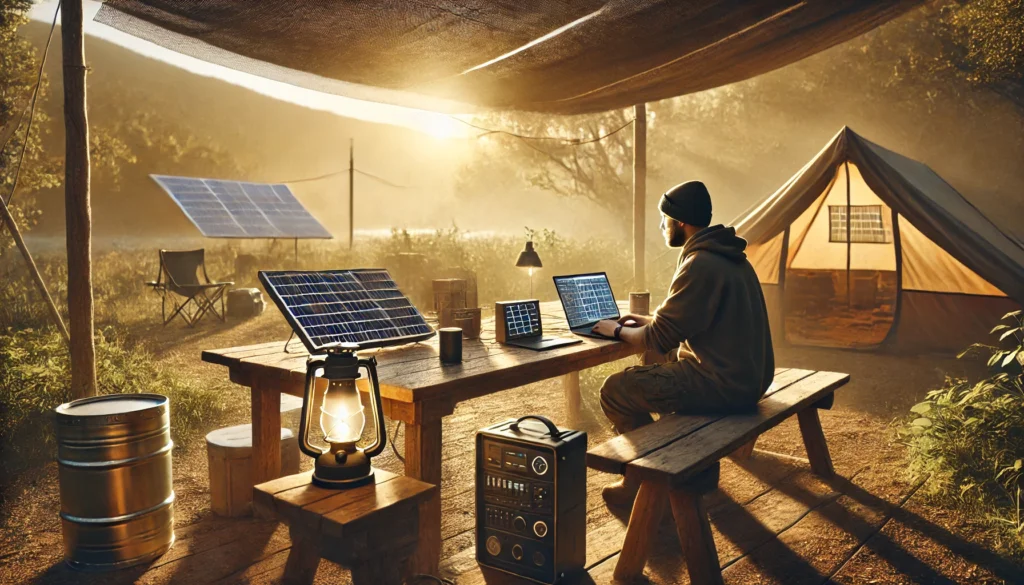
Solar panel → charge controller/power station → stored energy → laptop, router, phone, fan and lights.
The exact connection depends on the equipment, so I would always follow the manufacturer’s specifications rather than connecting panels randomly.
Jackery’s current guidance for portable solar charging stations also recommends calculating your actual energy consumption before selecting the battery and panel capacity. :contentReference[oaicite:4]{index=4}
What My Ideal Budget Remote-Work Setup Looks Like
If I were starting from scratch with limited money, I would not immediately try to build a complete home solar system.
I would build it gradually.
Stage 1: The cheapest practical setup
- Laptop with a healthy battery
- Laptop-compatible power bank
- Mini UPS for the router
- Rechargeable LED light
This setup focuses almost entirely on work essentials.
Stage 2: Add cooling
- Rechargeable fan
- Better laptop power bank or additional backup battery
This makes long work sessions much more comfortable.
Stage 3: Move to a portable power station
- Portable power station
- Laptop
- Router
- Fan
- Lights
- Phone charging
At this point, one battery system can handle several essential devices.
Stage 4: Add solar charging
- Compatible solar panel
- Portable power station with solar input
This is where the setup becomes much more independent from the grid.
Why I Wouldn’t Start With an Air Conditioner
This might sound obvious, but it is an important point for anyone working with a limited budget.
Air conditioners consume considerably more power than the basic devices used in a small home office.
A Nigerian solar sizing guide shows how quickly energy requirements increase when high-power appliances such as air conditioners enter the calculation. :contentReference[oaicite:5]{index=5}
That is why I would not build a small remote-work solar setup around an air conditioner.
My priority would be laptop, internet, lighting, phone and fan.
If I eventually had the money for a larger solar installation, then I could consider adding bigger appliances.
One Mistake I Would Tell Other Remote Workers to Avoid
Don’t buy a solar system before calculating your load.
This is one of the easiest ways to waste money.
Write down the devices you actually need to run. Find their wattage. Then estimate how many hours you want to use each one.
For example, imagine a simple setup:
- Laptop: 60W
- Router: 15W
- Fan: 40W
- LED light: 10W
- Phone charging: 10W
That is roughly 135W if everything operates at the same time. Your actual energy consumption will depend on how long each device runs and how efficiently the system converts stored energy.
This is why I don’t look at the number of gadgets alone. I look at watts and watt-hours.
A useful Nigerian solar buyer’s guide recommends listing appliances, checking their wattage, estimating daily operating hours and calculating total watt-hours before sizing a system. :contentReference[oaicite:6]{index=6}
My Experience Changed How I Think About Solar
One thing I have learned from dealing with power problems is that you don’t always need the biggest solution.
Sometimes you simply need the right solution for the problem in front of you.
If your main problem is that your laptop dies during a three-hour blackout, a laptop power bank may solve the immediate problem.
If your router keeps going off, a mini UPS might be the smarter first purchase.
If heat makes working uncomfortable, a rechargeable fan could be more useful than spending your entire budget on a bigger inverter.
And if you regularly experience long outages, a portable power station with solar charging may make more sense as your budget grows.
That gradual approach is what I would recommend to anyone working remotely and trying to manage costs.
What I Would Buy First on a Tight Budget
If money were very limited, I would rank the priorities this way:
- Keep the laptop healthy and fully charged whenever electricity is available.
- Get a compatible backup solution for the router.
- Add a rechargeable fan.
- Add rechargeable lighting.
- Upgrade to a portable power station when possible.
- Add solar panels once the power station can accept them.
This approach avoids spending a huge amount of money at the beginning.
It also gives you something important: backup power that grows with your needs.
Final Thoughts: Solar Doesn’t Have to Start Big
My biggest lesson from trying to keep working through Nigerian power problems is that backup power should be approached practically.
I don’t need to power every appliance in my home just because I work online.
What I really need is enough dependable power to keep my work going.
For a remote worker on a budget, that can mean starting with a laptop power bank, router UPS, rechargeable fan and rechargeable light. Later, a portable power station can bring everything together, and a compatible solar panel can provide a way to replenish the battery using sunlight.
Current portable power products in Nigeria show that manufacturers are increasingly designing smaller systems around exactly these kinds of loads. For example, some systems specifically list laptops, routers, fans, lights and phone charging among their intended uses. :contentReference[oaicite:7]{index=7}
The important thing is not to buy the most expensive solar gadget you can find. Buy according to the work you actually need to keep running.
That is the approach I would take today, and it is the approach I would recommend to another remote worker trying to build a reliable backup-power setup without spending everything at once.
If you are also dealing with laptop power issues, you may find my guide on extending battery life useful, while anyone working extensively from a laptop can also check my guide to laptops for professional writers and bloggers in Nigeria.
And if you are considering a bigger solar setup rather than portable gadgets, my earlier guide on solar power and price ranges in Nigeria is a good place to start.