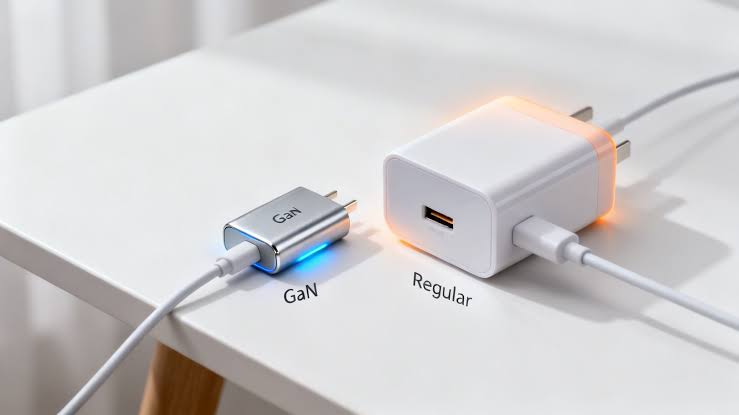
That can make a simple question surprisingly confusing: what is the difference between a normal phone charger and a GaN charger?
I have also noticed that many people focus on the wattage printed on the charger and assume that a 65W charger must automatically charge every phone faster than a 20W or 25W charger. That is not how charging works.
A GaN charger is not a completely different type of charging technology from USB-C or fast charging. GaN refers primarily to the semiconductor material used inside the charger. The charging protocols, output power, number of ports, cable, and compatibility still matter.
In this guide, I will break down phone chargers vs GaN chargers, explain what GaN actually means, compare charging speed, size, heat, efficiency, safety, price and compatibility, and explain which type makes more sense for different users in Nigeria.
If you are currently deciding whether to spend extra money on a GaN charger, this is the comparison I would use before buying.
Phone Charger vs GaN Charger: The Basic Difference
First, there is an important distinction that many charger advertisements do not make clear.
“Phone charger” describes what the charger is being used for. “GaN charger” describes technology used in the charger itself.
A traditional charger may use conventional silicon-based power electronics. A GaN charger uses gallium nitride semiconductor components in its power-conversion circuitry.
GaN technology can allow manufacturers to build compact chargers capable of handling relatively high power while maintaining good efficiency and thermal characteristics.
However, a GaN charger is not automatically better simply because it says “GaN” on the box.
A well-designed traditional charger can be perfectly suitable for a phone. Likewise, a poorly designed or questionable GaN charger is not something I would recommend simply because the packaging advertises 100W or 120W.
What matters is the complete charging system:
- The charger’s supported charging standards
- The maximum output power
- The voltage and current profiles
- Whether it supports USB Power Delivery (USB PD)
- Whether it supports PPS when your phone needs it
- The charging cable
- Your phone’s own charging limits
- The charger’s safety and compliance features
- How many devices you want to charge simultaneously
USB Power Delivery is particularly important because it allows compatible devices and chargers to negotiate power instead of simply forcing the maximum advertised wattage into the device. USB-IF explains that USB PD allows a powered device to request the power it requires and supports much higher power levels than older USB charging implementations.
What Exactly Is a GaN Charger?
GaN stands for gallium nitride.
It is a semiconductor material that can be used in power electronics. In chargers, GaN components can help manufacturers create smaller and more efficient power supplies.
Traditional chargers commonly rely on silicon-based semiconductor technology. GaN allows designers to operate power-conversion circuits at higher switching frequencies and can help reduce the size of some components used in the charger.
The result is one of the biggest advantages you will notice as a buyer: GaN chargers can deliver substantial power from a relatively small body.
For example, you might find a compact GaN charger capable of powering a phone, tablet and compatible laptop, depending on its design and port configuration.
This is particularly useful if you travel frequently or work from different locations.
Instead of carrying several large charging bricks, you may be able to carry one multi-port GaN charger and the appropriate cables.
However, remember that GaN does not determine the charger’s wattage by itself. A GaN charger could be 30W, 45W, 65W, 100W or higher. The exact output depends on the charger’s design.
What Is a Traditional Phone Charger?
A traditional phone charger is simply a conventional power adapter designed to supply electrical power to a phone or another device.
Older chargers often use USB-A ports and may provide relatively modest power. Some modern chargers use USB-C but still rely on conventional silicon-based power components rather than GaN.
That does not automatically make them slow or unsafe.
For example, a good 20W USB-C charger can be an excellent choice for a phone that does not require more power.
Apple itself documents 20W USB-C charging as a fast-charging option for several iPhone generations, while compatible third-party USB-C PD adapters can also be used.
Google similarly documents the use of USB-C chargers and USB Power Delivery adapters with Pixel phones.
So, the fact that a charger is not GaN does not mean it is obsolete.
GaN vs Normal Charger: Is GaN Actually Faster?
This is probably the biggest misconception about GaN chargers.
GaN itself does not automatically make your phone charge faster.
Suppose your phone supports a maximum wired charging rate of 25W. If you connect it to a 25W conventional charger and a 100W GaN charger, the 100W GaN charger will not necessarily charge the phone at 100W.
The phone determines how much power it can accept based on its charging system, battery condition, temperature and supported charging protocol.
The charger provides the available power within its capabilities, and the phone takes an appropriate amount.
That is why buying a 100W charger does not automatically transform a phone into a 100W-charging phone.
USB Power Delivery is designed around this kind of negotiation. USB-IF notes that USB PD allows a device to request the power it needs rather than simply receiving the maximum possible output.
A Simple Example
Imagine you have a phone that supports 25W charging.
- 20W charger: potentially limited by the charger
- 25W charger: capable of meeting the phone’s maximum under suitable conditions
- 45W charger: potentially more than the phone needs
- 65W GaN charger: still potentially more than the phone needs
- 100W GaN charger: does not mean the phone will charge at 100W
Therefore, when shopping, I would not start with the question, “How many watts is this GaN charger?”
I would start with “What charging standard and wattage does my phone actually support?”
Does a GaN Charger Charge Phones Faster?
Sometimes, but not because it is GaN.
A GaN charger can be faster when the charger also supports the appropriate high-power charging protocol and output required by the phone.
For example, a 65W GaN USB-C PD charger can provide considerably more power than a basic 10W or 12W charger.
But the phone still has to support the relevant charging technology.
Apple states that iPhone 15 and later models can use a USB-C Power Delivery charger and USB-C cable for faster wired charging.
Google’s Pixel documentation similarly lists USB PD and PPS-compatible adapters as options for supported Pixel devices.
So, if your current charger is slow because it does not support the appropriate protocol, moving to a modern USB-C PD charger can make a noticeable difference.
That charger may happen to use GaN technology, but the protocol and power capability are what matter to the phone.
GaN Charger vs Normal Charger: Size
This is where GaN chargers have a very obvious advantage.
Traditional high-power chargers can become relatively large because the internal components required for power conversion, filtering and thermal management take up space.
GaN technology can help manufacturers reduce the physical size of some components and produce compact high-power designs.
That means a modern GaN charger can sometimes provide considerably more power than you might expect from its physical size.
This becomes especially useful when you travel.
Imagine carrying:
- A phone charger
- A laptop charger
- A tablet charger
- A smartwatch charger
Depending on your devices, a multi-port GaN charger may allow you to consolidate some of those charging needs into one adapter.
That can reduce the number of power bricks in your backpack.
For people who work remotely, this can be a genuine convenience. If you are interested in building a portable work setup, you may also find my guide on solar gadgets for a remote worker on a budget useful.
Are GaN Chargers More Energy Efficient?
GaN technology can contribute to efficient power conversion, although the exact performance depends on the charger design.
This is important because “GaN” is not a magic efficiency label.
Two GaN chargers can perform differently.
Likewise, a conventional charger from a reputable manufacturer can still be efficient and well engineered.
The charger contains several components beyond the GaN or silicon switching devices. The overall design, power-management circuitry, transformer, capacitors, thermal design and control system all influence performance.
Therefore, I would treat GaN as a technology advantage, not as a guarantee of a particular efficiency level.
Which Charger Produces More Heat?
Charging naturally produces heat.
Your phone battery, charging circuitry, cable and power adapter can all become warm during charging.
GaN chargers can have thermal and efficiency advantages because of the characteristics of GaN power components. However, temperature still depends on the charger’s design and how hard you are pushing it.
There is another important point: the charger being cool does not necessarily mean the phone will stay cool.
Your phone itself has charging circuitry and a battery that generate heat.
Apple notes that iPhone charging speed can be reduced under some conditions, including when temperatures become too high or too low.
Google also advises keeping Pixel phones in a cool place while charging and notes that charging can slow or pause when temperatures become too high.
That is why I would not judge a charger only by whether its body feels warm.
GaN Charger vs Normal Charger for Battery Health
Another common claim is that GaN chargers are automatically better for your phone’s battery.
That needs some clarification.
GaN does not automatically make a charger healthier for your battery.
Battery health depends on many factors, including temperature, charging behaviour, battery chemistry, the phone’s charging management and how the device handles power.
A properly designed charger that follows the appropriate charging standards should communicate correctly with a compatible device.
Your phone also controls charging.
For example, modern phones can reduce charging power as the battery approaches a high state of charge, and many devices include battery-protection features.
If you want to get more life from your phone battery, you can also read my guide on how to extend your smartphone battery life.
Is a 65W GaN Charger Safe for a Phone?
Generally, a properly designed and compatible 65W charger can be used with a phone that requires less power.
The key is that the charger must support the appropriate charging standards and be made to proper safety requirements.
A 65W label does not mean the charger will force 65W into every connected device.
USB Power Delivery is specifically designed to support power negotiation between compatible equipment. USB-IF describes USB PD as a system that allows devices to request the power they require.
However, I would not use the phrase “any 65W charger is safe”.
Quality matters.
A poorly made charger can have inadequate insulation, thermal protection, electrical protection or component quality regardless of whether it uses GaN.
Apple’s support documentation also advises using compliant third-party power adapters that meet applicable regulations and safety standards.
When buying a charger, therefore, look beyond the wattage printed in large letters on the packaging.
Why the Charging Cable Matters More Than Many People Realize
You can buy an excellent charger and still experience disappointing charging performance because of the cable.
The cable is part of the charging system.
Different cables support different current and power capabilities.
For higher-power USB-C charging, you need a cable appropriate for the power level and charging standard involved.
This becomes especially important when using chargers rated at 60W, 100W or more.
Apple recommends compatible USB-C cables for faster charging on newer iPhones, while Google similarly tells Pixel users to use compatible USB-C cables.
So if your new GaN charger seems no faster than your old charger, do not immediately blame the charger.
Check the cable.
Also check whether the phone actually supports the charger’s charging protocol.
USB-C Does Not Automatically Mean GaN
This is another distinction worth remembering.
USB-C, USB Power Delivery and GaN are three different things.
USB-C describes a connector and cable ecosystem.
USB Power Delivery is a charging and power-management protocol.
GaN describes semiconductor technology used in some chargers.
A charger can therefore be:
- USB-C without being GaN
- USB-C with USB PD without being GaN
- GaN without having every charging protocol you need
- USB-C + USB PD + GaN
The last combination is what many people now mean when they talk about a modern GaN fast charger.
USB-IF maintains compliance and testing information for USB Type-C and USB Power Delivery products.
Phone Charger vs GaN Charger for iPhone
If you use an iPhone, the choice becomes fairly straightforward.
First, identify your iPhone model and its charging connector.
Apple says iPhone 15 and later use USB-C and can use USB-C Power Delivery chargers for faster wired charging. Earlier Lightning-based models can also use compatible USB-C power adapters with the appropriate cable.
You do not necessarily need a GaN charger.
A good USB-C PD charger with enough power for your iPhone can work perfectly well.
However, if you also carry an iPad, MacBook or another USB-C device, a multi-port GaN charger can become more attractive.
For example, instead of carrying separate charging bricks, you might use one charger with multiple USB-C ports, provided its power distribution meets the requirements of your devices.
Apple also notes that when multiple devices are connected to a multi-port charger, the maximum output available to each device can change depending on combined power requirements and system conditions.
Phone Charger vs GaN Charger for Samsung Galaxy
Samsung users should pay close attention to charging protocols rather than simply choosing the highest wattage.
Different Galaxy devices have different charging capabilities.
A high-wattage charger may be useful if you own multiple devices, but your phone will only use the charging power and protocol it supports.
That means a 100W GaN charger is not automatically a better purchase than a 25W charger if your particular Galaxy phone is designed around a lower charging rate.
However, a multi-port GaN charger can become useful if you regularly charge a Samsung phone alongside a tablet, laptop, earbuds or another USB-C device.
If you are comparing Samsung phones, you can also see some of the phone-specific content already available on Infolandia, including the Samsung Galaxy A56 5G review and Samsung Galaxy S26 Ultra review.
Phone Charger vs GaN Charger for Android Phones
Android is a huge ecosystem, so there is no single charging speed that applies to every Android phone.
Some phones support USB PD.
Others support PPS.
Some manufacturers also have proprietary fast-charging systems that can require specific chargers or cables to reach their highest advertised charging rates.
This is why I recommend checking the charging specifications for your exact phone before buying a charger.
Google, for example, lists USB PD and PPS-compatible options for supported Pixel devices and explains that actual charging speeds can vary depending on the device and conditions.
If you are using a budget Android phone, you may not benefit from spending heavily on an extremely powerful GaN charger.
On the other hand, if you have a premium phone plus several USB-C accessories, the extra flexibility may be worthwhile.
GaN Charger vs Normal Charger for Laptops
This is where GaN becomes much more interesting.
A normal phone charger may be designed for something like 10W, 15W, 20W or 25W.
A higher-power GaN charger can potentially provide enough USB-C PD power for some laptops, depending on the laptop’s requirements.
That means one compact charger could potentially handle your phone during the day and your laptop when you sit down to work.
USB Power Delivery has evolved to support much higher power levels. USB-IF states that USB PD Revision 3.1 extends supported power delivery up to 240W under the appropriate USB-C and cable requirements.
Of course, this does not mean every USB-C laptop accepts 240W.
Always check the laptop’s charging requirements.
If you are shopping for a laptop in Nigeria, you may also want to see my guide to the best laptops to buy in Nigeria.
For buyers considering UK-used machines, my UK-used laptop buying checklist can also help you inspect the machine before paying.
Multi-Port GaN Chargers: Are They Worth It?
For many people, this is actually the biggest reason to buy GaN.
Imagine arriving at a hotel or workspace with:
- Your smartphone
- Your laptop
- Your wireless earbuds
- Your tablet
Instead of carrying four separate power adapters, you could potentially use one multi-port charger.
But there is an important catch.
Do not assume the advertised wattage is available at every port simultaneously.
A charger might advertise 100W total, while distributing that power differently when two or three ports are occupied.
Google’s 67W dual-port charger documentation provides a good illustration of this principle: its power distribution changes when two devices are connected.
Therefore, when buying a multi-port GaN charger, check the power distribution table, not just the biggest number printed on the front.
Traditional Charger vs GaN Charger: Size Comparison
| Feature | Traditional Charger | GaN Charger |
|---|---|---|
| Technology | Usually silicon-based power components | Uses gallium nitride components in the power stage |
| Physical size | Can be larger at higher power levels | Often smaller for comparable high-power designs |
| Charging speed | Depends on output and protocol | Depends on output and protocol |
| Efficiency | Depends on design | Can offer efficiency and switching advantages |
| Heat | Depends on design and load | Can have thermal advantages, but still generates heat |
| Multiple devices | Some models support multiple ports | Many modern models offer multiple USB-C ports |
| Price | Often cheaper | Often more expensive |
| Travel convenience | Good for basic charging | Excellent for compact multi-device setups |
Is a GaN Charger Worth the Extra Money?
It depends on how you use your devices.
If you only have one smartphone and your existing charger already charges it at the speed you need, buying an expensive GaN charger may not make much practical difference.
In that situation, a reliable conventional charger may be enough.
However, the calculation changes if you use several devices.
A GaN charger becomes more attractive if you:
- Travel regularly
- Work remotely
- Use a USB-C laptop
- Own several USB-C devices
- Want to reduce the number of chargers you carry
- Need several ports at once
- Want a compact high-power charging setup
For me, the biggest advantage is not simply “faster charging.”
It is having more charging capability in a smaller package.
When a Normal Phone Charger Makes More Sense
There is nothing wrong with buying a conventional charger if it meets your needs.
A normal charger can make more sense if:
- You only charge one phone.
- Your phone does not support very high charging speeds.
- You do not travel much.
- You already own a reliable charger.
- You want to spend as little as possible.
- You do not need laptop-level USB-C power.
In fact, buying a charger with dramatically more power than you need can be unnecessary.
If your phone accepts 20W and you have no other USB-C devices, a good 20W charger may provide everything you need.
When I Would Consider a GaN Charger
I would seriously consider GaN when the charger is solving a real problem.
For example, suppose you work with a laptop and phone every day.
Carrying two large chargers can become annoying.
A compact multi-port GaN charger can potentially replace both, depending on the power requirements of your equipment.
The same applies if you frequently work from cafés, coworking spaces, hotels or different rooms in your home.
Less equipment in the bag can make a surprisingly big difference.
This is also relevant for people working in environments where electricity supply can be unpredictable. I previously wrote about what I learned from working without reliable power in my guide to solar gadgets for remote workers.
What Wattage Should You Choose?
There is no single correct wattage for everybody.
Instead, think about your devices.
20W to 30W
This range can make sense for people who primarily charge smartphones and smaller USB-C devices.
It can be a practical choice if you do not need to charge a laptop from the same adapter.
45W to 65W
This range becomes more versatile.
A 45W or 65W USB-C PD charger can be useful for smartphones, tablets and some compatible laptops.
For many people who want one compact charger for several devices, this is a useful middle ground.
90W to 100W
This is more appropriate for people who want substantial laptop charging capability alongside phones and tablets.
It can be particularly useful for users with USB-C laptops that require more power.
140W and above
At this level, you are moving into higher-power laptop and multi-device territory.
You also need to pay closer attention to cable ratings, charger specifications and the actual power requirements of your devices.
USB-IF’s USB PD 3.1 documentation explains how the standard extends USB PD to higher power levels, but the charger, cable and device must all support the relevant capabilities.
Don’t Buy a GaN Charger Just Because It Says 100W
This is probably my biggest buying tip.
Marketing numbers can be impressive.
A charger labelled “100W Super Fast GaN Charger” looks more exciting than a simple 25W adapter.
But that does not tell you everything you need to know.
Before buying, check:
- USB PD support
- PPS support if required by your device
- Port configuration
- Power output for each port
- Total output when multiple ports are used
- Input voltage range
- Safety certifications or compliance information
- Brand reputation
- Cable requirements
- Warranty or return policy
A 65W charger with excellent compatibility can be more useful than a questionable 120W charger.
How to Choose a Safe Charger in Nigeria
There is another factor Nigerian buyers should not overlook: mains electricity conditions.
Your charger is connected directly to the wall supply, so build quality matters.
I would avoid choosing a charger solely because it is the cheapest option available.
Look for a reputable manufacturer and clear technical specifications.
Also be suspicious of chargers with exaggerated claims, poor packaging, missing specifications or unclear manufacturer information.
Apple, for example, says its power adapters undergo safety and reliability testing and are designed to meet applicable government safety standards.
That does not mean you have to buy Apple-branded chargers for every device. A reputable third-party charger can be perfectly suitable. The important point is to buy from a trustworthy manufacturer and verify that the charger complies with relevant safety and charging requirements.
Can You Use a Laptop GaN Charger to Charge Your Phone?
Yes, provided the charger and phone are compatible.
This is one of the useful features of USB-C charging.
A USB-C laptop charger can often be used with phones and other compatible USB-C devices.
Apple explicitly notes that a higher-wattage USB-C power adapter, including one supplied with a Mac laptop, can be used with an iPhone for faster charging.
Google likewise documents USB-C power adapters for Pixel phones.
The important thing is that the phone and charger negotiate an appropriate power level.
You should still use a suitable cable.
Can a Phone Charger Charge a Laptop?
Sometimes.
This depends on the charger’s output power and the laptop’s requirements.
A basic 20W phone charger is generally not what I would choose for a laptop that expects substantially more power.
However, a powerful USB-C PD charger designed for laptops can charge many compatible laptops.
This is another reason I like looking at chargers as part of an entire device ecosystem rather than calling something simply a “phone charger.”
USB Power Delivery has expanded the range of devices that can share USB-C power adapters. USB-IF specifically describes USB PD use cases involving laptops, monitors, hubs and other equipment.
Why Your Phone May Still Charge Slowly With a Powerful GaN Charger
You bought a 65W GaN charger.
You connected your phone.
It is still charging slowly.
What happened?
There are several possibilities.
1. Your phone has a lower charging limit
The phone may simply not support the charger’s maximum output.
2. The charger does not support your phone’s protocol
The charger may have a high wattage but lack the particular charging technology your phone expects.
3. The cable is limiting charging
The cable may not support the required power level.
4. The phone is hot
Charging can slow when temperatures rise.
5. You are using the phone heavily
Gaming, video recording, navigation and other demanding workloads can increase power consumption while charging.
Apple specifically notes that processor-intensive activity can reduce charging speed.
6. Multiple devices are connected
On a multi-port charger, the available power may be redistributed between devices.
7. The power source is limiting you
Using a laptop USB port, hub or another low-power source can result in slower charging than using a suitable wall charger. Google specifically recommends a proper wall outlet for faster Pixel charging.
Phone Charger vs GaN Charger: What About Power Banks?
The same principles apply when choosing a power bank.
A power bank may advertise 20W, 30W, 65W or even higher USB-C output.
Again, the number does not automatically determine the charging speed of your phone.
You need compatibility between the phone, power bank, cable and charging protocol.
If you spend a lot of time away from a wall outlet, a good power bank can complement your charger setup. However, do not assume that every power bank with a USB-C port supports USB PD at the same power level.
GaN Charger vs Normal Charger for Students
For a student who only owns a smartphone, I would not consider an expensive high-power GaN charger essential.
A reliable charger that matches the phone’s requirements may be all that is needed.
However, a student who uses a laptop, phone, tablet and earbuds may benefit from a multi-port GaN charger because it can reduce the number of adapters they need to carry.
If you are a student deciding which devices to buy, you may also want to see Infolandia’s guide to the best tablets for students in Nigeria and the best phones for university students.
GaN Charger vs Normal Charger for Remote Workers
Remote workers are among the users who can benefit most from GaN chargers.
If your work setup includes a laptop, smartphone, earbuds, tablet and other USB-C accessories, a multi-port charger can simplify the entire setup.
Instead of plugging several adapters into a wall extension, you may be able to consolidate charging into one unit.
That can be especially useful when moving between home, office, coworking spaces and travel locations.
If your laptop is part of your income-generating setup, you can also read my guide on using a laptop to earn in dollars as a virtual assistant.
GaN Charger vs Normal Charger for Travelling
This is another area where GaN makes a lot of sense.
Travel luggage has limited space.
A compact charger that can handle several compatible devices can be more convenient than carrying separate power bricks.
If you travel around Nigeria frequently, you may also want to look at my guide to gadgets every Nigerian traveller should own.
However, always check the charger’s input voltage range if you are travelling internationally.
Many modern chargers support a broad input range, but you should verify the specifications of the exact model you own.
What About Cheap GaN Chargers?
This is where I would be careful.
GaN technology has become much more common, so seeing “GaN” on a charger box does not automatically mean you are getting a premium product.
A charger still needs proper engineering.
When comparing cheap and expensive models, look beyond the GaN label.
Check the manufacturer, specifications, charging protocols, port behaviour, safety information and warranty.
If the charger has no meaningful specifications beyond a huge wattage number, I would treat that as a reason to investigate further before buying.
Phone Charger vs GaN Charger: My Practical Buying Rule
If I were helping someone choose between the two, I would use a simple rule.
If you only need to charge one phone, buy a reliable charger that supports your phone’s required charging standard and power level.
If you need to charge several devices or want laptop-level USB-C power in a compact package, a good GaN charger becomes much more attractive.
That rule prevents you from spending extra money simply because “GaN” sounds more advanced.
What I Would Check Before Buying Any Charger
Before paying for a charger, I would check these ten things:
- Phone compatibility: Does it support your phone’s charging method?
- Wattage: Is the output appropriate for your devices?
- USB PD: Does it support USB Power Delivery where needed?
- PPS: Does your phone require or benefit from PPS?
- Ports: Are there enough ports for your devices?
- Power sharing: What happens when multiple ports are occupied?
- Cable: Is the included or existing cable suitable?
- Safety: Is the product from a reputable manufacturer and designed to relevant standards?
- Size: Does the physical design suit your needs?
- Price: Are you paying for useful capability rather than a marketing number?
Phone Charger vs GaN Charger: Final Comparison
| Category | Traditional Phone Charger | GaN Charger |
|---|---|---|
| Best for | Basic phone charging | Phones, tablets and compatible laptops |
| Compactness | Good at lower power | Often excellent at higher power |
| High-power charging | Available on some models | Common in modern designs |
| Fast charging | Depends on protocol and wattage | Depends on protocol and wattage |
| Multiple devices | Depends on model | Many models are designed for this |
| Travel | Good | Often more convenient |
| Price | Usually lower | Usually higher |
| Does GaN guarantee faster charging? | No | No |
| Does wattage alone determine charging speed? | No | No |
So, Should You Buy a GaN Charger?
A GaN charger is not automatically necessary for every phone user.
If your current charger works properly, provides the charging speed you need and comes from a trustworthy manufacturer, there may be no urgent reason to replace it simply because newer chargers use GaN.
However, GaN becomes much more interesting when you want a compact charger that can handle several modern devices.
For example, if you have a smartphone, tablet and USB-C laptop, a properly selected multi-port GaN charger can potentially simplify your entire charging setup.
The biggest mistake is to buy based only on the largest wattage number.
A 100W GaN charger is not automatically better for a phone than a 25W charger.
The phone decides how much power it can use. The charger needs to support the appropriate protocol. The cable needs to support the required power. Temperature and device usage can also affect the actual charging speed.
USB Power Delivery is designed to manage this relationship between the charger and connected device, while manufacturers such as Apple and Google provide device-specific charging requirements and recommendations.
So, if you are buying your first charger, focus on compatibility, safety, charging protocol and appropriate wattage before worrying about whether the box says GaN.
If you already have several devices and want to reduce the number of chargers you carry, then a good GaN charger can be one of those accessories that genuinely makes everyday technology more convenient.
And if you are building a complete tech setup, you can explore more practical buying guides here on Infolandia, including our guides to smartphones in Nigeria, laptops in Nigeria, and affordable tech gadgets for Nigerians.
You can also visit the Infolandia Bookstore for more technology and learning resources.
Frequently Asked Questions
Is a GaN charger better than a normal charger?
Not automatically. GaN can allow manufacturers to build compact, high-power chargers, but the overall charger design, charging protocols, safety and compatibility matter more than the GaN label alone.
Will a 65W GaN charger damage my phone?
A properly designed and compatible charger does not simply force its maximum advertised wattage into the phone. Charging systems negotiate power according to the supported standards and device requirements. USB Power Delivery is specifically designed to support this type of power negotiation.
Can I charge my phone with my laptop’s GaN charger?
Yes, if the charger and phone use compatible charging standards and the appropriate cable. USB-C PD makes this type of device sharing much easier.
Does GaN mean fast charging?
No. GaN refers to the semiconductor technology used in the charger. Fast charging depends on the charger’s output, charging protocol, cable and the device’s own charging capabilities.
Is a 100W charger too powerful for a phone?
Not necessarily. The important issue is whether the charger is properly designed and compatible with the phone. The phone does not automatically charge at 100W simply because the charger can provide up to 100W.
Do I need a special cable for a GaN charger?
Not because it is GaN. However, you may need a cable capable of supporting the power level and charging standard you want to use, particularly with higher-power USB-C PD charging.
Can a GaN charger charge a laptop and phone at the same time?
Some multi-port GaN chargers can do this. Check the charger’s power-distribution specifications because available output can change when multiple devices are connected. Google’s multi-port charger documentation demonstrates how output can be redistributed between connected devices.
Is GaN worth it for a student?
If the student only charges one phone, a conventional reliable charger may be enough. If they carry a phone, tablet, laptop and other USB-C devices, a multi-port GaN charger can be more useful.
Is GaN worth it for remote workers?
It can be, especially when compactness and multi-device charging matter. A suitable GaN charger can reduce the number of power adapters needed for compatible laptops, phones and other USB-C devices.
What is more important: GaN or USB PD?
For compatibility, the charging protocol can be more important. GaN is the power-electronics technology used inside the charger, while USB PD defines how compatible devices and chargers manage power delivery.
What should I check before buying a GaN charger?
Check the supported charging protocols, wattage, port configuration, power distribution, cable requirements, safety information, manufacturer reputation and warranty. Do not choose based on wattage alone.