Then USB-C became increasingly common.
Android phones use it. Laptops use it. Tablets use it. Power banks use it. Wireless earbuds use it. Even newer iPhones now use USB-C.
That change has created a simple question for many buyers in Nigeria:
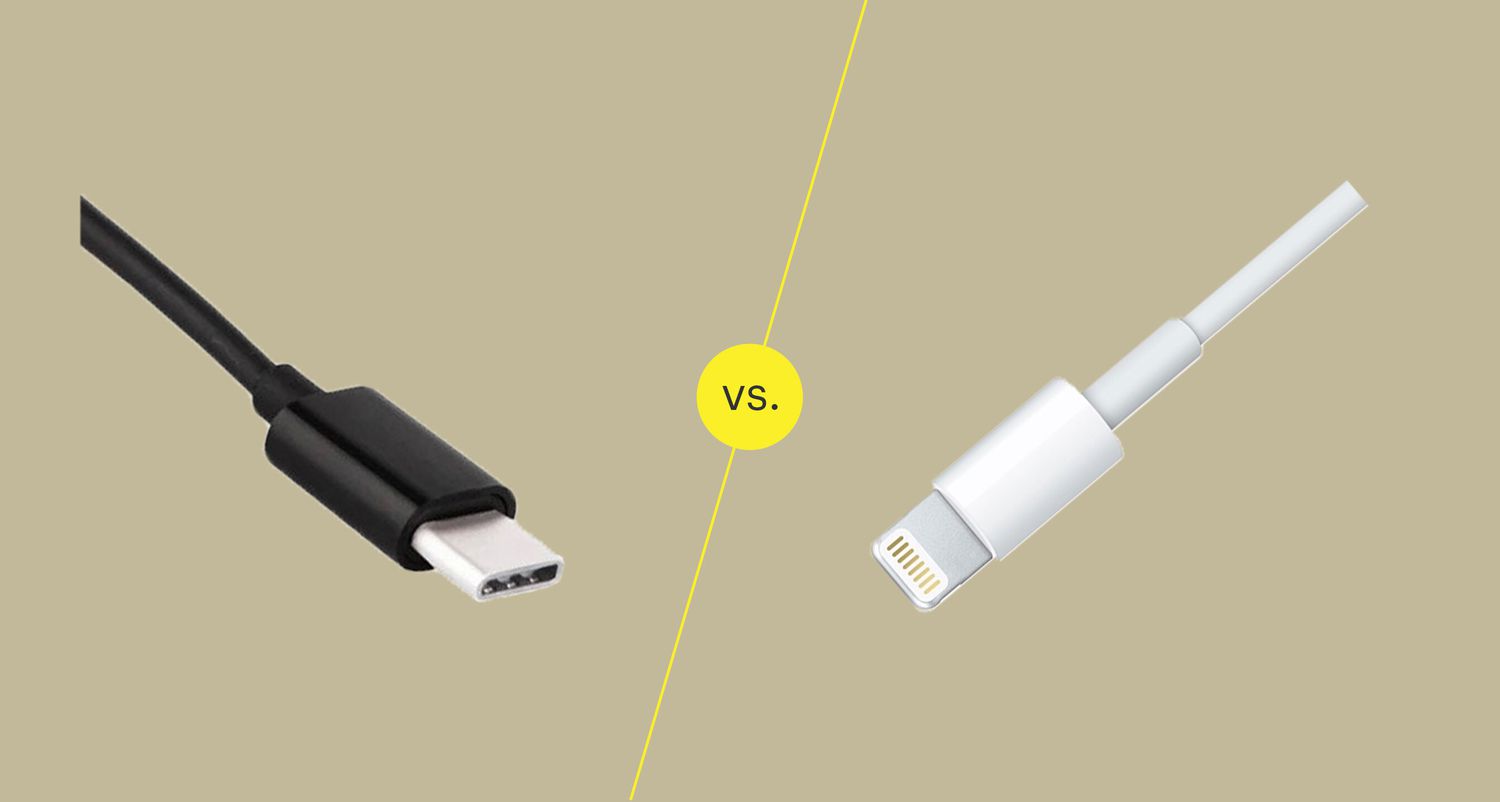
USB-C vs Lightning: which one is actually better?
The answer depends on what you mean by “better.” If you only care about charging an older iPhone, Lightning can still do the job. If you want one cable that can work across your phone, laptop, tablet, power bank and other modern devices, USB-C has a major practical advantage.
There is another important point that many people miss. USB-C is a connector shape, not a guarantee of a particular charging speed or data-transfer speed. Two USB-C cables can look identical while offering very different capabilities.
That matters when you are buying cables, chargers, power banks or a new phone.
In this guide, I will break down USB-C vs Lightning from a practical Nigerian buyer’s perspective. We will look at charging, data transfer, compatibility, durability, accessories, cost, laptops, iPhones, Android phones and what I would check before spending money on either cable.
If you are already researching phones, you may also want to see our 2026 guide to the best smartphones to buy in Nigeria before making your next purchase.

USB-C vs Lightning: The Basic Difference
Let’s start with the simplest explanation.
Lightning is Apple’s proprietary connector that was introduced with the iPhone 5 and subsequently appeared on many Apple devices and accessories.
USB-C is an industry-standard connector designed for a much wider ecosystem of devices. The USB Implementers Forum describes USB Type-C as a reversible connector designed for modern devices while supporting scalable power and performance.
Both connectors can be used for charging and data transfer. However, USB-C has become much more universal.
Think about your typical desk today.
You could have:
- An Android smartphone
- An iPhone
- A laptop
- A tablet
- A power bank
- Wireless earbuds
- A portable SSD
- A USB-C monitor
- A USB-C charger
With a modern USB-C setup, one family of cables can potentially serve several of those devices.
Lightning is much more closely tied to Apple’s older ecosystem.
What Is USB-C?
USB-C refers to the physical connector and port design used by many modern electronic devices.
One of its most obvious features is that the connector is reversible. You do not need to worry about inserting the plug upside down.
That sounds like a tiny convenience until you have tried connecting a cable in the dark.
USB-C also supports different generations of USB technology and different capabilities. That is why simply seeing “USB-C” on a cable package does not tell you everything about what the cable can do.
Depending on the device, cable and standard involved, USB-C can support charging, data transfer, displays and other accessories.
USB Power Delivery is another major part of the USB-C ecosystem. The USB Implementers Forum says USB Power Delivery allows flexible power delivery and data over a single cable, with the specification supporting power levels up to 240W for suitable full-featured USB-C implementations.
That does not mean your phone will suddenly charge at 240W simply because it has USB-C.
The phone, charger and cable all need to support the required technology and power level.
What Was Lightning?
Lightning was Apple’s compact connector for many generations of iPhones and other Apple devices.
It was reversible, which was one of its biggest advantages over older USB connectors.
You could plug a Lightning connector into an iPhone without checking which side was facing upward.
For years, that made Lightning a convenient part of Apple’s ecosystem.
However, Lightning’s biggest weakness from a modern perspective is ecosystem compatibility.
If you owned an older iPhone with Lightning and an Android phone using USB-C, you often needed different cables for the two devices.
The same could happen with accessories.
Meanwhile, USB-C increasingly became the common connector across smartphones, laptops, tablets, cameras, gaming accessories, storage devices and other electronics.
USB-C vs Lightning for Charging
Charging is probably the first thing most people think about when comparing these connectors.
But here is where things can become confusing.
The connector alone does not determine charging speed.
A USB-C phone can charge slowly if the charger or cable does not support the required charging technology. Likewise, a Lightning iPhone can charge at the speed supported by that particular iPhone and charger combination.
USB-C’s major advantage is the broader charging ecosystem.
For example, you might already own a USB-C charger for your laptop. Depending on the charger’s specifications, that same charger can potentially charge your phone, tablet, earbuds and other compatible devices.
Apple itself says iPhone 15 and later models can charge through USB-C, including with USB Power Delivery-compatible adapters. Apple also notes that a 20W or higher USB-C power adapter can be used for faster charging on compatible iPhones.
This is particularly useful when travelling.
Instead of carrying several different charging bricks, you may be able to carry one capable USB-C charger and the necessary cables.
Is USB-C Faster Than Lightning?
This question needs a careful answer.
USB-C itself is not automatically faster than every Lightning implementation.
The important thing is the underlying USB or data standard supported by the device and cable.
This distinction is especially important with iPhones.
For example, Apple states that certain newer iPhone Pro models support USB 3 speeds of up to 10 Gbit/s when using an appropriate USB 3 cable. Apple also warns that the USB-C cable included with an iPhone may only support USB 2 speeds, depending on the model and cable.
So you could have:
- A USB-C phone
- A USB-C cable
- A USB-C computer
and still get relatively slow data transfer if the cable or device only supports USB 2.
This is why I recommend checking the actual specification rather than buying a cable simply because the package says “USB-C.”
USB-C vs Lightning for Data Transfer
This is where the difference can become important for people who move large files.
If you only transfer a few photographs occasionally, the difference may not bother you.
However, imagine that you are transferring:
- 4K videos
- Large photo libraries
- RAW images
- Video projects
- Large documents
- Backups
- Files to an external SSD
Transfer speed becomes much more important.
USB-C can support much faster USB standards on compatible hardware. Apple’s current support documentation specifically identifies newer iPhone Pro models that can reach up to 10 Gbit/s with a suitable USB 3 cable.
That can make a noticeable difference when moving large files.
If you are someone who edits videos on a phone, this is one of the areas where USB-C can be particularly useful.
Our guide to phone requirements for video editing explains why storage, processing power and connectivity all matter when choosing a device for serious mobile editing.
USB-C vs Lightning for External Storage
Modern USB-C devices can connect to a variety of external accessories.
Apple’s documentation says compatible USB-C iPhones can connect to external storage devices, monitors, microphones, SD-card adapters and USB-to-Ethernet adapters.
That opens up interesting possibilities.
For example, someone recording large video files could connect compatible external storage and move footage without relying entirely on the phone’s internal storage.
This can also be useful for creators who regularly move files between a phone and laptop.
If storage is already becoming a problem on your phone, take a look at our guide on why phone storage keeps filling up and what actually works.
USB-C vs Lightning for Connecting to Monitors
Another important USB-C advantage is its ability to support displays on compatible devices.
Apple says compatible iPhones can connect to USB-C displays, while adapters can also be used for HDMI displays and TVs.
This means USB-C can become more than a charging port.
It can become part of a larger workstation.
Imagine taking your phone, connecting it to a suitable display, transferring files to external storage and charging the phone through compatible equipment.
The exact functionality depends on the phone and accessories, but the broader USB-C ecosystem makes these types of setups easier to build.
One Cable for More Devices
This is probably the biggest practical reason I prefer USB-C for a modern setup.
Let’s say you have a USB-C phone.
Your laptop uses USB-C.
Your power bank uses USB-C.
Your wireless earbuds use USB-C.
Your tablet uses USB-C.
Now your cable bag becomes much simpler.
You can still need different cables in certain situations, especially where USB-A ports or older accessories are involved. But the number of different device-specific connectors can fall dramatically.
With Lightning, an older iPhone may require a Lightning cable even if almost everything else you own has moved to USB-C.
What About iPhone 15 and Newer iPhones?
This is where the USB-C vs Lightning debate changed significantly for iPhone buyers.
Apple moved the iPhone to USB-C starting with the iPhone 15 generation.
Apple’s current documentation states that iPhone 15 and later models use a USB-C connector for charging, data and connecting accessories.
That means newer iPhone buyers can participate more directly in the wider USB-C ecosystem.
If you already own an Android phone, USB-C laptop and USB-C power bank, buying a newer USB-C iPhone can simplify your charging setup.
However, if you still own older Lightning accessories, you may need an adapter or a replacement cable.
Apple says a USB-C to Lightning adapter can be used with existing Lightning accessories for power, data and audio.
USB-C vs Lightning for Android Users
For Android users, USB-C is already familiar.
Most modern Android smartphones use USB-C.
That means an Android buyer choosing between phones will usually not be deciding between USB-C and Lightning. The more important question becomes which USB-C capabilities the phone actually supports.
For example, two phones may both advertise USB-C while offering different:
- Charging speeds
- USB data speeds
- Display support
- OTG capabilities
- Accessory compatibility
So don’t stop at the port.
Look at the complete specification.
If you are shopping for an affordable phone, our guide to phones under ₦200,000 in Nigeria can help you think about the broader buying decision.
USB-C vs Lightning: Durability
Both connectors can last for years when handled properly.
The cable itself is often more vulnerable than the connector.
A cheap cable can develop exposed wiring, loose connections or charging problems regardless of whether the connector is USB-C or Lightning.
One thing I would always check is the quality of the cable rather than simply looking at the connector.
A ₦2,000 cable and a ₦20,000 cable may both have USB-C connectors, but that does not mean they are built to the same standard.
Look for reputable manufacturers, clear specifications and appropriate certification or compliance information where applicable.
The USB-IF maintains a compliance programme for USB Type-C products and publishes specifications for the ecosystem.
Why Cheap USB-C Cables Can Be Confusing
This is one of the biggest traps for buyers.
You walk into a shop and see:
“Premium USB-C Fast Charging Cable.”
It sounds impressive.
But what does it actually support?
Does it support USB 2?
USB 3?
USB Power Delivery?
High-wattage charging?
Video output?
Thunderbolt?
There can be major differences between cables that look almost identical.
That is why you should buy according to the requirement rather than the appearance.
If you only need to charge a basic phone, you may not need an expensive high-speed data cable.
If you transfer large video files between a phone and SSD, however, buying the cheapest USB-C cable may become a false economy.
USB-C vs Lightning for Power Banks
USB-C is particularly convenient with modern power banks.
A USB-C power bank can often charge multiple compatible devices using the same general cable ecosystem.
Some power banks also use USB-C for input and output, meaning the same port can be involved in charging the power bank and charging another device, depending on the design.
This reduces the number of cables you need when travelling.
For Nigerian users dealing with frequent power interruptions, power banks and alternative charging solutions can be especially useful.
We have also covered solar gadgets for remote workers and solar power in Nigeria if you are building a more reliable backup-power setup.
USB-C vs Lightning for Laptops
USB-C becomes even more useful when a phone and laptop share the same connector family.
Modern laptops can use USB-C for charging, data transfer and accessories. Some models can also use USB-C or Thunderbolt-compatible ports for external displays and high-speed peripherals.
That creates a much more unified setup.
For example, you could use USB-C between your phone and laptop to move files, while the laptop charger also uses USB-C.
If you are currently choosing a laptop, our best laptops to buy in Nigeria guide is worth checking before you make a decision.
USB-C vs Lightning for Content Creators
For ordinary phone users, connector differences may not be a major concern.
For content creators, they can be.
Suppose you record a lot of video.
You may need to move footage from your phone to:
- A laptop
- An external SSD
- A desktop computer
- A tablet
- A video-editing workstation
The faster the compatible data connection, the less time you can spend waiting for transfers.
However, remember the key rule:
USB-C does not automatically mean maximum USB speed.
Your phone, cable, computer and storage device must all support the required speed.
This is particularly important when buying cables advertised for “10Gbps” or higher.
USB-C vs Lightning for Travelling
Travel is another area where USB-C makes practical sense.
Imagine packing:
- Phone charger
- Laptop charger
- Power bank
- Earbuds
- Tablet
- Smartwatch
If several devices use USB-C, one charging ecosystem can reduce the number of cables and adapters you need.
That does not eliminate every cable. Some devices still use proprietary charging systems.
But the overall setup can become simpler.
For Nigerian travellers, that can be useful whether you are moving between Lagos, Abuja, Port Harcourt or travelling internationally.
Our article on gadgets Nigerian travellers should own covers some other useful travel technology.
USB-C vs Lightning: Which Is More Convenient?
For a person who owns only an older iPhone and a few Lightning accessories, Lightning can still be perfectly convenient.
There is no need to replace functioning equipment simply because USB-C exists.
However, if you are building a new device ecosystem today, USB-C offers a broader compatibility advantage.
You can potentially use the same type of connector across phones, tablets, laptops, storage devices and chargers.
That is difficult to ignore.
USB-C vs Lightning: What About Audio?
Both connector types can be used with compatible audio accessories.
Lightning headphones existed for years in the Apple ecosystem.
USB-C headphones and adapters are now increasingly common.
Apple’s current documentation says compatible USB-C iPhones can use wired USB-C headphones and other audio accessories.
For people who already own Lightning accessories, an adapter can help bridge the transition.
Again, compatibility matters more than the shape of the connector alone.
USB-C vs Lightning: Cost of Accessories in Nigeria
Accessory prices vary considerably in Nigeria.
You can find very cheap cables, mid-range cables and premium cables.
I would not recommend choosing solely based on price.
A cable is a relatively small purchase compared with the cost of replacing a phone, power bank or other device damaged by poor-quality accessories.
Check:
- Manufacturer reputation
- Charging specifications
- Data-transfer specification
- Cable length
- Connector quality
- Warranty where available
- Whether it supports the device you actually own
We previously looked at the truth about original chargers in Nigeria, which is useful background if you are trying to avoid questionable charging accessories.
Don’t Confuse USB-C With USB-A
This is another common source of confusion.
USB-A is the traditional rectangular USB connector that has been used on countless computers and chargers.
USB-C is the smaller reversible connector used on many newer devices.
You can buy cables with:
- USB-A to USB-C
- USB-C to USB-C
- USB-A to Lightning
- USB-C to Lightning
So when shopping, look at both ends of the cable.
A cable being “USB-C” does not necessarily mean both ends are USB-C.
USB-C vs Lightning: What Should You Buy?
If you have an older Lightning iPhone and your current cable works properly, you do not necessarily need to replace it immediately.
If you are buying a newer iPhone, USB-C is part of the current iPhone ecosystem.
If you are buying an Android phone, USB-C is the normal choice on modern devices.
If you are building a setup involving a laptop, tablet, phone, SSD and power bank, USB-C can simplify your cable collection.
If you are a content creator, pay close attention to the actual USB data specification rather than simply buying the first USB-C cable you see.
My Practical USB-C Buying Checklist
Before buying a USB-C cable, I would ask these questions:
- What device am I connecting?
- Do I only need charging?
- Do I need fast data transfer?
- Do I need video output?
- What charging power does my device support?
- Does the cable support that power?
- What USB data speed does the cable support?
- Is the cable from a reputable manufacturer?
- Do I need USB-C on both ends?
- Am I buying the cable for today or for a specific future setup?
These questions can save you from buying something that looks right but does not perform the way you expect.
USB-C vs Lightning: Quick Comparison
| Feature | USB-C | Lightning |
|---|---|---|
| Reversible connector | Yes | Yes |
| Used across many brands | Yes | Mostly Apple ecosystem |
| Modern Android phones | Yes | No |
| Newer iPhones | Yes | No |
| Charging | Yes | Yes |
| High-speed data options | Yes, depending on device/cable | More limited depending on device |
| External displays | Supported on compatible devices | More dependent on adapters/accessories |
| External storage | Supported on compatible devices | Possible with compatible accessories |
| Cross-device compatibility | Very broad | Primarily Apple-focused |
Why USB-C Is Becoming the Default Connector
The biggest story here is not simply that USB-C replaced Lightning on newer iPhones.
The bigger story is convergence.
Phones, laptops, tablets, monitors, storage devices, chargers and accessories increasingly share the same connector family.
That can reduce cable clutter and make charging more convenient.
The USB-IF designed USB Type-C specifically for modern computing platforms and describes it as a connector capable of supporting scalable power and performance.
That flexibility is one reason USB-C has become so widespread.
What USB-C Does Not Guarantee
This is worth repeating because it can save you money.
USB-C does not automatically guarantee:
- Fast charging
- Fast data transfer
- Video output
- Thunderbolt support
- High-wattage charging
- USB 3 speeds
The device and cable specifications matter.
For example, Apple specifically notes that the USB-C cable supplied with compatible iPhones may support USB 2 speeds, while higher-speed USB 3 transfers require a suitable USB 3 cable.
That is a perfect example of why buyers should read the specification rather than assume every USB-C accessory performs the same way.
Should You Still Buy Lightning Accessories?
If you already own a Lightning iPhone, there is nothing wrong with buying a good Lightning cable for it.
The important thing is to buy one that is compatible with your device and meets your charging requirements.
However, if you are investing heavily in new accessories and your devices are moving toward USB-C, it may make sense to gradually standardise your setup around USB-C where practical.
There is no reason to throw away perfectly functional accessories simply to follow a connector trend.
USB-C and Your Next Phone Purchase
When buying your next phone, don’t make the connector your only buying criterion.
Look at the entire device.
Check the processor, RAM, storage, display, cameras, battery, software support, charging system and repairability.
For example, if you are comparing budget phones, our Redmi 15C vs Tecno Spark 40 comparison shows the kind of broader evaluation you should make rather than choosing a phone based on one specification.
You can also read our individual Redmi 15C review and Tecno Spark 40 review before making a purchase.
Can USB-C Help You Save Money?
Potentially, yes.
The saving does not necessarily come from USB-C cables being cheaper.
The advantage is that one cable family can work across more of your devices.
Suppose you have:
- One USB-C phone
- One USB-C laptop
- One USB-C power bank
- One USB-C tablet
- One USB-C pair of earbuds
You may be able to carry fewer spare cables and chargers.
That is a small saving at first, but it becomes useful over time.
It also makes travelling easier.
How This Can Become a Digital Product Opportunity
There is another side to the USB-C discussion that I think creators and tech entrepreneurs should notice.
People are constantly confused about chargers, cables, phone specifications, laptop specifications and accessories.
That confusion creates an opportunity for useful educational products.
For example, someone with strong technology knowledge could create:
- A smartphone buying checklist
- A USB-C cable buying guide
- A laptop buying checklist
- A phone accessories guide
- A digital-device maintenance ebook
- A beginner’s technology guide
- A printable gadget comparison worksheet
These are the kinds of practical digital products that can solve a specific problem.
If you are interested in selling digital products, you can also read our guide on using Selar to sell digital products in Nigeria.
How Selar Can Fit Into a Tech Content Business
If you create useful technology guides, you don’t necessarily have to rely only on advertising.
You can package deeper knowledge into a digital product.
For example, imagine creating a downloadable “Smartphone Buying Checklist for Nigerians.”
Instead of simply publishing a short article, you could create a more detailed PDF containing:
- Processor checklist
- RAM checklist
- Storage checklist
- Display checklist
- Camera checklist
- Battery checklist
- Charging checklist
- USB-C checklist
- Network compatibility checklist
- Used-phone inspection checklist
Selar is designed to let creators and entrepreneurs sell digital products and other products online. Its own documentation describes products such as ebooks, courses, templates, checklists, memberships and physical products as possible offerings.
That makes a practical technology checklist a natural type of product to consider.
Selar also provides a storefront and payment infrastructure, allowing creators to share product links with customers.
If you already have knowledge people repeatedly ask you about, packaging that knowledge into a structured product can be more useful than simply publishing another generic article.
USB-C vs Lightning: What I Would Choose for a New Setup
If I were building a new technology setup today, I would generally prefer USB-C.
The reason is not that Lightning was useless.
It isn’t.
The reason is simply ecosystem flexibility.
USB-C works across a much wider range of modern hardware, including phones, laptops, tablets, storage devices and accessories.
It can also support a wide range of power and data capabilities when the device and cable are designed for them.
That makes it more convenient for someone who owns several different types of technology.
Still, I would not tell someone to replace a perfectly good Lightning setup just because USB-C exists.
Use what works until there is a practical reason to change.
Final Verdict: USB-C vs Lightning
The USB-C vs Lightning debate is less complicated once you stop looking only at the physical connector.
Lightning was convenient, compact and reversible, and it served Apple’s ecosystem for many years.
USB-C has a much broader ecosystem and can support charging, data transfer, displays and many other accessories depending on the device, cable and USB standard.
For newer devices, USB-C also offers the convenience of using one connector family across more of your technology.
For me, that is the biggest advantage.
However, remember the most important lesson from this entire comparison:
Never buy a USB-C cable simply because it says “USB-C.”
Check the charging power, USB data speed and other capabilities you actually need.
If you are transferring large files, look for the appropriate high-speed specification. If you only need basic charging, you may not need an expensive high-speed cable.
And if you are buying a new phone, evaluate the entire device rather than making the connector your only deciding factor.
For more smartphone buying advice, check out our complete smartphone buying guide for Nigeria, our seven mistakes Nigerians make when buying smartphones, and our guide to UK-used versus brand-new phones.
Frequently Asked Questions About USB-C vs Lightning
Is USB-C better than Lightning?
For a modern multi-device ecosystem, USB-C offers broader compatibility and more potential capabilities. However, the actual performance depends on the device and cable specifications.
Does USB-C charge faster than Lightning?
Not automatically. Charging speed depends on the phone, charger, cable and charging technology supported by the complete setup.
Is every USB-C cable fast?
No. USB-C describes the connector, while cables can support different data speeds and power capabilities.
Can USB-C transfer files faster?
It can, but only when the phone, computer, storage device and cable support the required USB standard. Some compatible iPhone Pro models, for example, support USB 3 speeds up to 10 Gbit/s with an appropriate cable.
Can I use a USB-C laptop charger to charge my phone?
Often, yes, if the charger and phone support compatible USB-C charging standards. Apple specifically states that compatible USB-C iPhones can be charged using USB-C power adapters, including USB Power Delivery adapters.
Can an older Lightning iPhone use USB-C?
You cannot simply change the phone’s built-in Lightning port to USB-C. However, compatible adapters and USB-C-to-Lightning cables can connect Lightning devices to USB-C chargers and other equipment.
Should I buy USB-C to USB-C or USB-A to USB-C?
It depends on the ports on your charger and computer. USB-C to USB-C is useful when both devices have USB-C ports. USB-A to USB-C remains useful for older chargers and computers that still have USB-A ports.
Does USB-C mean the phone supports external monitors?
No. External-display support depends on the device. USB-C makes certain display connections possible, but the phone must support the relevant functionality.
Is Lightning completely useless now?
No. Many older Apple devices and accessories still use Lightning, and those accessories can continue working normally. The important point is that newer devices are increasingly using USB-C.
Where can I learn more about selling digital products?
You can read our Selar guide for Nigerian digital creators. Selar also provides its own documentation explaining how creators can create stores, upload products and sell online.
More From Infolandia
If you found this USB-C vs Lightning comparison useful, continue exploring Infolandia for practical Nigerian technology guides, product reviews and digital-skills content.
You can start with our tech gadgets under ₦30,000, our guide to original chargers, and our smartphone battery-life tips.
You can also visit the Infolandia Bookstore to explore our available digital resources and products.
Sources and Further Reading
For technical specifications, always check the manufacturer or standards organisation rather than relying solely on a cable seller’s description. Useful references include Apple’s official USB-C support documentation for iPhone and the USB Implementers Forum USB Type-C specification information.
For USB Power Delivery information, see the USB-IF USB Power Delivery documentation.
Disclaimer: Product specifications and accessory compatibility can change. Always confirm the exact specifications of your phone, charger and cable before purchasing. Prices and availability in Nigeria can also change over time.