Not necessarily.
A bigger number does not automatically mean a better power bank for your situation. A 30,000mAh model can be excellent for long trips, heavy phone use, tablets and some USB-C laptops. However, it can also be unnecessarily heavy for somebody who simply wants enough backup power to get through a normal working day.
There is another important detail that many buyers miss: the mAh printed on a power bank is not the same as the amount of energy your phone or laptop will actually receive.
That is where this guide comes in.
In this article, I will break down what power-bank capacity really means, explain the differences between 10,000mAh, 20,000mAh and 30,000mAh models, show you how to convert mAh into watt-hours, explain charging losses, discuss fast charging, and help you decide what makes sense for everyday use in Nigeria.
If you are also comparing affordable gadgets, you can browse our guide to tech gadgets for Nigerians that cost less than ₦30,000 for more ideas.
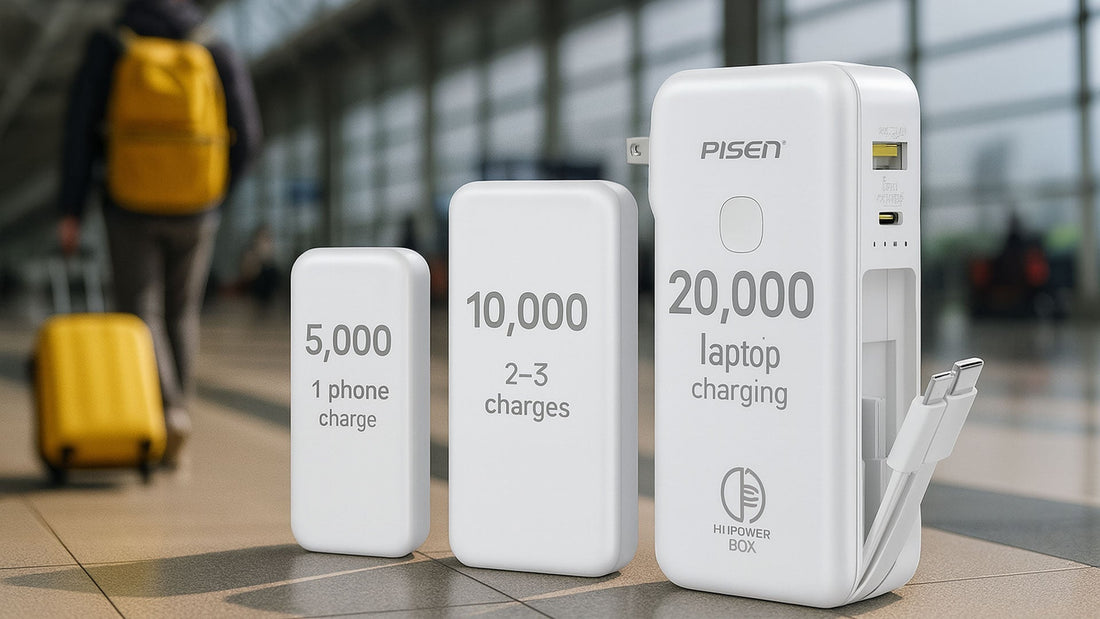
What Does mAh Actually Mean on a Power Bank?
mAh means milliampere-hour. It is a measurement of electrical charge capacity.
In simple terms, it tells you how much electrical charge the battery cells inside the power bank are rated to store.
For example, a 10,000mAh power bank contains battery cells with a combined rated capacity of 10,000 milliampere-hours under the manufacturer’s specified conditions.
A 20,000mAh model has roughly twice that rated charge capacity, while a 30,000mAh model has roughly three times the rated charge capacity of a 10,000mAh model.
However, mAh alone does not tell you the complete energy capacity.
That is because electrical energy also depends on voltage. The Federal Aviation Administration explains watt-hours using the relationship between voltage and amp-hours: Wh = V × Ah.
This is why two batteries with the same mAh rating can have different watt-hour capacities if their voltages differ.
mAh vs Wh: The Difference You Need to Understand
If you remember only one technical concept from this article, remember this:
mAh tells you about charge capacity, while Wh tells you about energy.
To convert a power bank’s rated mAh into approximate watt-hours, you can use:
Wh = (mAh ÷ 1,000) × battery voltage
Most conventional lithium-ion power banks use cells with a nominal voltage around 3.6V to 3.7V. That means a simplified comparison can use 3.7V.
10,000mAh
10,000mAh = 10Ah
10Ah × 3.7V = approximately 37Wh
20,000mAh
20,000mAh = 20Ah
20Ah × 3.7V = approximately 74Wh
30,000mAh
30,000mAh = 30Ah
30Ah × 3.7V = approximately 111Wh
So, on a simple energy basis:
| Power Bank | Approx. Cell Energy at 3.7V | General Use |
|---|---|---|
| 10,000mAh | 37Wh | Everyday phone backup |
| 20,000mAh | 74Wh | Heavy phone use and multiple devices |
| 30,000mAh | 111Wh | Long trips, multiple devices and higher-capacity backup |
These are approximate internal energy figures, not guaranteed energy delivered to your phone.
Why Your 20,000mAh Power Bank Does Not Give You 20,000mAh at the USB Port
This is one of the biggest sources of confusion when buying a power bank.
You might buy a 20,000mAh model, connect your phone and notice that the phone does not receive enough energy to behave as though you transferred a full 20,000mAh.
That does not automatically mean the manufacturer lied.
The power bank stores energy inside its battery cells at one voltage. The USB output then has to convert that energy to the voltage required by your device. Some energy is lost during the conversion process.
There can also be losses caused by the charging cable, heat, the power bank’s electronics and the device itself.
Anker explains that power banks commonly deliver around 60%–70% of their rated capacity to connected devices, although actual results vary.
That gives us a more realistic way to think about capacity.
Approximate usable energy
| Rated Capacity | Approx. Internal Energy | Illustrative 60%–70% Usable Range |
|---|---|---|
| 10,000mAh | 37Wh | 22.2–25.9Wh |
| 20,000mAh | 74Wh | 44.4–51.8Wh |
| 30,000mAh | 111Wh | 66.6–77.7Wh |
These figures are useful for understanding the principle, but they should not be treated as a guarantee for every product. Real-world efficiency depends on the power bank, output voltage, temperature, cable, charging protocol and connected device.
10,000mAh Power Banks: Small, Portable and Convenient
A 10,000mAh power bank is often the easiest size to live with.
It is usually compact enough to carry in a small bag, backpack or even a larger pocket. For someone who spends most of the day near a wall charger but wants emergency backup, that can be more useful than carrying a much larger battery.
Who should buy 10,000mAh?
- Students who need emergency phone charging.
- People commuting around Lagos or other Nigerian cities.
- Office workers who occasionally run out of battery.
- People who mainly charge one smartphone.
- Travellers who want a lightweight backup.
- People who already have access to electricity during most of the day.
For example, if your smartphone has a battery around 4,500–5,500mAh, a 10,000mAh power bank can provide useful backup. However, do not assume that 10,000mAh means exactly two full charges. Conversion losses and the phone’s own charging requirements reduce the amount that reaches the battery.
This is also why I recommend looking beyond capacity when buying. A 10,000mAh power bank with poor output can be less useful than a well-designed model with the same capacity and better charging performance.
The biggest advantage of 10,000mAh
Portability.
You are more likely to carry a smaller power bank every day because it does not feel like extra luggage.
And that matters.
A power bank sitting at home because it is too heavy is not much help when your phone reaches 15% battery while you are outside.
20,000mAh Power Banks: The Practical Middle Ground
If 10,000mAh feels too small but 30,000mAh sounds excessive, 20,000mAh is often the middle ground.
It roughly doubles the cell capacity of a 10,000mAh model without reaching the theoretical 111Wh internal energy level associated with a 30,000mAh pack at 3.7V.
For many people, that balance makes sense.
Who should consider 20,000mAh?
- Heavy smartphone users.
- Students spending long hours on campus.
- Remote workers dealing with unreliable electricity.
- Content creators who use their phones for recording and editing.
- People who regularly travel long distances.
- People who need to charge two or more devices.
- People who want more backup without carrying the largest power bank available.
A 20,000mAh model also becomes more interesting when you have devices such as wireless earbuds, smartwatches, tablets or other USB-powered gadgets.
If you work heavily from a laptop, however, do not stop at mAh. Check the power bank’s USB-C output wattage and whether it supports the charging protocol required by your laptop.
Our article on laptops for professional writers and bloggers in Nigeria is useful if your work depends on a laptop and you are building a mobile setup.
30,000mAh Power Banks: Maximum Capacity Comes With Trade-Offs
30,000mAh sounds impressive because it is a large number.
And it can be genuinely useful.
But this is where buyers should slow down and think about how they actually use their devices.
A 30,000mAh power bank can store approximately 111Wh of energy when calculated at a nominal 3.7V. That makes it substantially larger in energy terms than a 10,000mAh or 20,000mAh model.
Who might need 30,000mAh?
- People who spend long periods away from mains electricity.
- Travellers with several USB devices.
- Remote workers who need extended backup.
- Users who regularly charge phones, tablets and other devices.
- People using high-capacity smartphones heavily throughout the day.
- Users with compatible USB-C laptops who choose a power bank designed for laptop charging.
However, there is a major consideration: size and travel restrictions.
The FAA says spare lithium-ion batteries and power banks up to 100Wh are generally permitted in carry-on baggage, while 101–160Wh batteries require airline approval and are subject to additional limits. Power banks must be carried in carry-on baggage rather than checked baggage.
That means a 30,000mAh power bank rated around 111Wh at 3.7V can cross the 100Wh threshold used by the FAA.
So if you travel by air, do not simply buy a 30,000mAh power bank and assume you can take it on every flight. Check the power bank’s printed Wh rating and your airline’s current rules before travelling.
International airline policies can differ, and airlines may impose stricter requirements than the baseline rules.
10,000mAh vs 20,000mAh vs 30,000mAh: Direct Comparison
| Feature | 10,000mAh | 20,000mAh | 30,000mAh |
|---|---|---|---|
| Approx. cell energy at 3.7V | 37Wh | 74Wh | 111Wh |
| Portability | Very good | Good | Lower |
| Everyday phone backup | Excellent fit | Very good | Often more than necessary |
| Multiple devices | Limited | Good | Very good |
| Long trips | Moderate | Good | Very good |
| Laptop potential | Depends heavily on output | Good with compatible USB-C output | Good with compatible USB-C output |
| Weight | Usually lowest | Moderate | Usually highest |
| Air-travel consideration | Usually straightforward | Usually below 100Wh | May exceed 100Wh depending on actual rating |
Do Not Confuse Capacity With Charging Speed
This is another mistake I see people make.
Capacity and charging speed are two different things.
A 30,000mAh power bank can have a low-power output, while a 10,000mAh power bank can have a much faster USB-C output.
Imagine you have two power banks:
- Power Bank A: 20,000mAh but only 10W output.
- Power Bank B: 10,000mAh with 30W USB-C Power Delivery.
Power Bank A has more stored energy. Power Bank B may charge a compatible phone much faster.
So when shopping, look for both capacity and output power.
USB Power Delivery, commonly called USB PD, allows compatible USB-C devices and chargers to negotiate appropriate power levels. The USB Implementers Forum explains that USB PD supports flexible power delivery and, in newer specifications, much higher power levels than older USB charging implementations.
For everyday smartphone use, you do not necessarily need the maximum wattage available. What matters is whether the power bank supports the charging standard and power level your device can actually use.
Why a 100W Power Bank Is Not Automatically Better
You may see power banks advertised with outputs such as 20W, 30W, 45W, 65W or even 100W.
It is tempting to think that the biggest number must be the best.
But think about your device first.
If your smartphone only accepts a certain charging level, buying a much higher-output power bank will not magically force the phone to consume unlimited power.
Likewise, a laptop may require a particular USB-C Power Delivery profile. A power bank can have a large capacity and still fail to charge a laptop properly if its output does not meet the laptop’s requirements.
Therefore, check:
- USB-C output wattage.
- USB Power Delivery support.
- Supported voltage and current profiles.
- Number of output ports.
- Whether maximum output changes when multiple devices are connected.
- Cable compatibility.
That last point is easy to overlook. A high-powered charger or power bank paired with an unsuitable cable may not deliver the performance you expect.
How Many Times Can a Power Bank Charge Your Phone?
There is no single answer because smartphones have different battery capacities and charging systems.
However, you can make a rough estimate.
Suppose your phone has a battery rated around 5,000mAh. You might initially think a 20,000mAh power bank should charge it four times.
That calculation ignores voltage differences and conversion losses.
A more useful approach is to compare energy.
A hypothetical 5,000mAh smartphone battery at 3.85V contains approximately:
5Ah × 3.85V = 19.25Wh
A 20,000mAh power bank at 3.7V has approximately 74Wh of internal energy.
If only 60%–70% of that energy reaches the phone after conversion and other losses, you could have roughly 44–52Wh available to the connected device under the simplified assumptions above.
That would be enough for more than two full battery-equivalent charges in energy terms, but the actual number can differ substantially depending on charging conditions.
This is why manufacturers sometimes advertise a specific number of charges for specific devices rather than simply saying, “20,000mAh equals four charges.”
What About Fast Charging While Using the Phone?
This is another real-world factor.
If you charge your phone while it is sitting idle, more of the incoming energy goes toward filling the battery.
If you are simultaneously:
- playing a demanding game,
- recording video,
- using GPS navigation,
- sharing a mobile hotspot,
- editing video, or
- using a bright display outdoors,
the phone is consuming power while the power bank is supplying it.
So the net battery increase can be much slower.
This is particularly relevant if you use your phone for content creation. If you are interested in using a phone for heavier creative work, our phone requirements for video editing guide provides more context.
Power Bank Capacity for Students
For many students, I would start the decision at 10,000mAh or 20,000mAh.
A 10,000mAh model makes sense if you mainly need emergency charging between lectures or while commuting.
A 20,000mAh model makes more sense if you spend most of the day on campus, use mobile data heavily, watch videos, attend online classes, use your phone as a hotspot or regularly charge other small devices.
If you already use a tablet for schoolwork, the extra capacity of 20,000mAh becomes more useful.
You can also see our guide to the best tablets for students in Nigeria if you are building a more mobile study setup.
Power Bank Capacity for Remote Workers
Remote work changes the calculation.
If your phone is simply a communication device, 10,000mAh may be enough.
But if your phone acts as a hotspot, backup communication device, authentication device and work tool, you may want more capacity.
For laptop users, however, capacity is only half of the story.
You should check the laptop’s charging requirements and the power bank’s USB-C output.
A large 30,000mAh power bank that cannot deliver the appropriate USB-C PD output may not solve your laptop power problem.
In other words:
Do not buy a power bank for a laptop based on mAh alone.
Check the laptop’s required charging wattage and the power bank’s supported output profiles.
If you work from home in Nigeria and electricity reliability is a major concern, you may also want to read my experience-based article on solar gadgets for a remote worker on a budget.
Power Bank Capacity for Travellers in Nigeria
For road travel, capacity can be more flexible because airline restrictions are not the same issue.
If you are travelling between cities by road and expect long periods without access to a wall socket, 20,000mAh can provide a useful balance.
A 30,000mAh unit can make sense if you are supporting several devices or spending very long periods away from electricity.
For air travel, however, pay attention to watt-hours.
The FAA’s current guidance states that spare lithium-ion batteries and power banks must be carried in carry-on baggage. Batteries up to 100Wh are generally allowed, while 101–160Wh batteries require airline approval and are subject to additional restrictions.
Since a 30,000mAh battery can calculate to approximately 111Wh at 3.7V, check the actual label and airline rules before travelling.
How to Identify a Good Power Bank Before Buying
Capacity is only one part of the buying decision.
1. Check the actual specifications
Do not rely solely on the large “30,000mAh” number printed on the front.
Look at the small specifications on the back.
Check the rated capacity, input, output, USB-C capability and supported charging standards.
2. Check the wattage
If fast charging matters to you, look for the actual output wattage.
A large capacity with slow output may not suit a heavy user.
3. Check USB-C
USB-C is increasingly important because many modern phones, tablets and laptops use it.
However, simply having a USB-C port does not automatically mean the power bank supports high-speed USB Power Delivery.
4. Check the brand and warranty
A cheap power bank is not necessarily a bargain if its cells degrade quickly or its electronics are poorly designed.
Look for a reputable manufacturer, clear specifications and a meaningful warranty.
5. Avoid suspiciously huge capacity claims
If an extremely small power bank claims an extraordinary capacity at an unbelievably low price, be cautious.
Compare its physical size, weight, specifications and manufacturer information.
If the numbers do not make sense together, investigate before spending your money.
6. Consider the weight
This sounds obvious, but it matters.
Capacity usually comes with additional battery cells and weight. If you want a power bank for everyday commuting, carrying a large brick in your bag every day may become annoying.
Why Cheap Power Banks Can Become Expensive
The cheapest power bank is not always the cheapest option over time.
Suppose you buy an extremely cheap model and its real performance is poor. You may end up replacing it quickly, buying another charging cable, or carrying a second power bank because you do not trust the first one.
That changes the real cost.
A better buying question is:
“How much reliable backup power am I getting for the money?”
That is a more useful question than simply asking which power bank has the biggest mAh number.
This approach is similar to how I recommend comparing laptops. For example, I explained why I stopped buying laptops based on Core i5 alone. The same principle applies here: one specification rarely tells the whole story.
Do Power Banks Lose Capacity Over Time?
Yes.
Rechargeable batteries do not maintain their original performance forever.
As the battery ages and goes through charge and discharge cycles, its available capacity can decline.
Heat can also affect battery longevity and performance.
That means an older 20,000mAh power bank may not behave like a new 20,000mAh power bank.
This is another reason to buy from a manufacturer that provides clear specifications and sensible safety features rather than choosing purely on capacity.
How to Store and Use a Power Bank Safely
Power banks contain lithium-based rechargeable batteries, so treat them as electrical devices rather than ordinary accessories.
- Do not deliberately expose the power bank to excessive heat.
- Do not use a visibly swollen or damaged power bank.
- Keep it away from water unless it is specifically designed for that environment.
- Use compatible charging accessories.
- Do not crush, puncture or attempt to open the battery pack.
- Stop using a power bank if it becomes unusually hot, swollen or damaged.
The FAA notes that lithium-ion batteries can experience thermal runaway and specifically warns about batteries that become damaged, overheated, swollen or otherwise unsafe.
For air travel, remember that spare power banks belong in carry-on baggage under FAA guidance, not checked luggage.
What Capacity Should You Buy?
Here is the simple version.
Choose 10,000mAh if:
- You mainly need emergency smartphone charging.
- You value portability.
- You commute daily.
- You normally have access to electricity.
- You do not regularly charge several devices.
Choose 20,000mAh if:
- You use your phone heavily.
- You spend long hours away from a socket.
- You need to charge multiple smaller devices.
- You travel frequently by road.
- You work remotely and want a stronger backup.
- You want a balance between capacity and portability.
Choose 30,000mAh if:
- You regularly need extended battery backup.
- You use several devices.
- You need substantial energy storage for long periods away from electricity.
- You have compatible USB-C equipment that benefits from the additional capacity.
- You are comfortable with the additional size and weight.
But remember the air-travel consideration. A 30,000mAh power bank can exceed 100Wh depending on the battery’s nominal voltage, so check its actual Wh rating and your airline’s rules before flying.
My Practical Recommendation for Most Nigerian Buyers
If I were buying a power bank primarily for everyday Nigerian use, I would not start by asking, “What is the biggest capacity I can afford?”
I would ask, “What devices do I actually need to keep running?”
For a normal smartphone user, 10,000mAh is often enough.
For a heavy smartphone user, student, commuter, content creator or remote worker, 20,000mAh can offer a better balance.
For someone who genuinely needs extended backup across multiple devices, 30,000mAh can make sense, provided the additional weight and travel restrictions are acceptable.
Most importantly, look at mAh + Wh + output wattage + charging protocol + build quality.
That combination tells you much more than the big capacity number on the front of the box.
Power Bank Capacity Is Only One Part of Your Mobile Setup
A power bank becomes even more useful when you build a sensible mobile technology setup around it.
For example, if you use your phone for work, communication and content creation, you should think about storage, charging, connectivity and battery health together.
Our guide on why phone storage keeps filling up covers another common problem for heavy smartphone users.
You can also learn practical ways to extend your smartphone battery life. A good power bank should be backup power, not an excuse to ignore battery health.
If your current phone is becoming unreliable, our guide to seven signs your phone needs replacement can help you decide whether the problem is the battery, the device itself or simply your usage pattern.
Where Does Selar Fit Into All This?
There is also a business lesson hidden inside something as simple as a power bank.
People do not only buy products. They buy solutions to problems.
Someone buying a 20,000mAh power bank is not really buying “20,000mAh.” They are buying longer access to their phone, fewer interruptions and more confidence when electricity or charging points are unavailable.
The same principle applies if you are a creator trying to sell knowledge online.
Instead of simply selling “an ebook,” you can package useful information into a practical solution.
For example, if you know a lot about smartphone buying, you could create a downloadable Nigerian Smartphone Buying Checklist. If you understand freelancing, you could create a beginner guide. If you know WordPress, you could create a setup checklist.
Platforms such as Selar allow creators and businesses to sell digital products, courses and services online. Selar’s own documentation explains that creators can create products, set up payment details and share their product or store links with customers.
That means an article like this can do more than generate page views. With the right product behind it, useful educational content can also introduce readers to something they can purchase.
How to Turn a Helpful Article Into a Sales Funnel
This is where content and sales can work together without making the article feel like an advertisement.
Imagine someone searches Google for “10,000mAh vs 20,000mAh power bank.”
They arrive here because they want an answer.
First, give them the answer.
Then, help them understand the buying decision.
After that, you can offer a relevant product, checklist or guide.
For example, an Infolandia digital product could be:
- The Nigerian Gadget Buying Checklist
- Smartphone Buying Guide for Nigerian Buyers
- Remote Work Setup Checklist
- Beginner’s Guide to Choosing Tech Accessories
- Digital Skills Starter Guide
Instead of aggressively telling readers to buy something, the sales message should answer one question:
“What additional problem does this product solve for you?”
That is the difference between a useful sales funnel and a page full of advertisements.
Selar’s current documentation also explains that merchants are responsible for sharing their product links and marketing their products, while the platform provides the infrastructure for customers to access products after purchase.
So if you create a useful Infolandia digital product, you can connect it naturally to relevant articles instead of relying only on social media.
You can also explore the Infolandia Bookstore if you are looking for more resources and digital content.
How to Sell Without Making the Article Look Spammy
This is important if you are building a content website.
Do not put a sales button after every paragraph.
Do not repeat the same affiliate link ten times.
Do not turn every informational article into a product advertisement.
Instead, place sales opportunities where they genuinely help the reader.
For example:
- Explain power-bank capacity.
- Help the reader choose between 10,000mAh, 20,000mAh and 30,000mAh.
- Explain what to check before buying.
- Offer a downloadable checklist for someone who wants a quick buying reference.
- Link to relevant Infolandia guides for deeper research.
That creates a natural path from search → information → trust → useful product.
And that is much more sustainable than simply pushing a sale.
Final Verdict: 10,000mAh vs 20,000mAh vs 30,000mAh
There is no universal winner because these capacities serve different needs.
10,000mAh is about portability and everyday emergency backup.
20,000mAh is about balance. It gives you significantly more energy without reaching the size and travel considerations of larger models.
30,000mAh is about extended backup and supporting multiple devices, but the extra capacity comes with more weight and potentially important airline restrictions.
The biggest lesson is this: never buy a power bank based on mAh alone.
Check the watt-hours, output wattage, USB-C and Power Delivery support, build quality, warranty, physical size and your actual devices.
For many Nigerian smartphone users, 10,000mAh or 20,000mAh will provide a sensible balance. A 30,000mAh model makes more sense when you genuinely need the additional energy and are prepared for the added size and travel considerations.
And if you are a creator, remember that the same principle applies to selling digital products: do not sell a big number just because it sounds impressive. Sell a useful solution that solves a real problem.
That is ultimately what makes both a good power bank and a good digital product worth paying for.
Quick Power Bank Buying Checklist
- ☐ Check the mAh capacity.
- ☐ Check the watt-hour rating where available.
- ☐ Check USB-C output.
- ☐ Check maximum wattage.
- ☐ Check USB Power Delivery support if needed.
- ☐ Check whether multiple ports reduce maximum output.
- ☐ Check the physical size and weight.
- ☐ Check manufacturer reputation.
- ☐ Check warranty information.
- ☐ Avoid suspiciously cheap products with unrealistic specifications.
- ☐ If flying, check the Wh rating and current airline rules.
- ☐ Match the power bank to your actual devices instead of buying the biggest capacity automatically.
In short: buy 10,000mAh for portability, 20,000mAh for a balanced everyday setup, and 30,000mAh when you genuinely need extended capacity. Then look beyond the number on the box and examine the technology behind it.