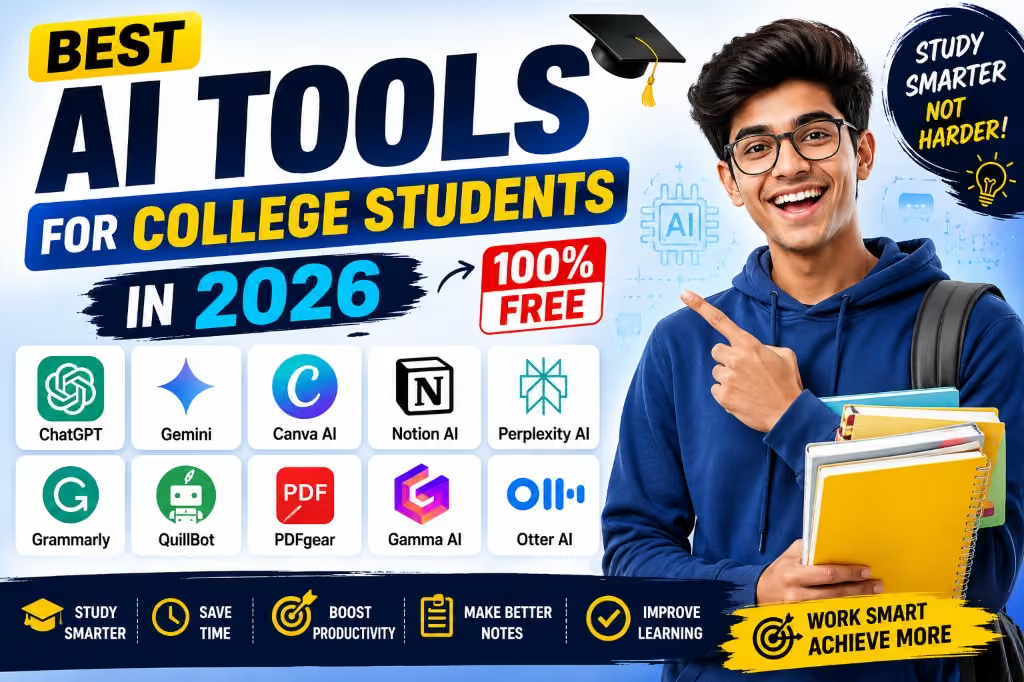
One of the biggest changes I have noticed is how quickly artificial intelligence has become part of everyday student life. You no longer need expensive software or a powerful computer to benefit from AI. Several useful AI tools now offer free plans that can help students understand difficult subjects, organize information, improve writing, research topics, create study materials and manage their workload.
For students in Nigeria, free tools can be particularly useful because paying for several different subscriptions every month can quickly become expensive. The important thing is to choose tools that provide genuine value instead of simply downloading every AI application you come across.
In this guide, I will look at some of the best free AI tools for college students in 2026, what each tool is good for, and how students can use them responsibly.

What Can AI Actually Do for College Students?
AI can be useful in several parts of student life. For example, a student can use an AI assistant to break a difficult concept into simpler language, generate practice questions, organize notes, brainstorm ideas for a project or identify areas that require further research.
That does not mean AI should do all your academic work for you. In fact, relying completely on generated answers can make learning harder because you may submit something you do not actually understand.
I see AI as more useful when it acts like a study assistant rather than a replacement for the student.
This is similar to the way other digital skills can improve productivity. For example, learning data analysis or graphic design can give students practical skills beyond their coursework.
1. ChatGPT
Best for: Understanding concepts, brainstorming, study planning, practice questions and writing assistance.
ChatGPT is one of the most versatile AI tools available to students. It can explain complicated topics in simpler language, help create revision questions, summarize information you provide, and help you structure a study plan.
One feature that makes ChatGPT particularly interesting for students is Study Mode. OpenAI describes Study Mode as a learning experience designed to guide students through problems step by step rather than simply giving them the final answer. It can ask questions, check understanding and work with uploaded study materials such as notes and PDFs.
For example, instead of asking:
“Give me the answer to this assignment.”
You could ask:
“Teach me how to solve this type of problem, then give me a similar practice question.”
That approach can turn AI into a much more useful learning tool.
OpenAI also has resources specifically focused on higher education, including guidance on learning concepts, reviewing papers, preparing for exams and working with course materials.
You can learn more about using ChatGPT for education through the official OpenAI education resources.
If you are already interested in AI productivity, you may also find our guide on getting more value from ChatGPT useful.
2. Google Gemini
Best for: Research, brainstorming, explanations and students already using Google’s ecosystem.
Google Gemini is another major AI assistant that students can use for learning and productivity. It can help explain concepts, brainstorm project ideas and work with information in different formats depending on the features available to your account.
One advantage for students who already use Google services is the broader Google ecosystem around Gemini. Google has also been adding AI-powered study features designed specifically for learners.
However, students should always verify important information rather than assuming that an AI-generated response is automatically correct. This is particularly important when working on academic research.
For factual information, I recommend checking the original source, textbook, lecturer’s materials or reputable academic resources before using information in an assignment.
3. NotebookLM
Best for: Studying from your own notes, documents and course materials.
NotebookLM is particularly interesting because it focuses heavily on the sources you provide. Instead of simply asking a general AI chatbot about a topic, you can give it relevant documents and use those materials as the basis for your study session.
This can be useful when preparing for examinations because you may have lecture notes, course documents or other materials that you want to review.
A student could, for example, organize materials for a particular course and use AI to generate questions or help identify important concepts for revision.
The important distinction is that your lecturer’s materials should remain the primary source when they are relevant to your course. AI should help you interact with those materials, not replace them.
4. Grammarly
Best for: Checking grammar, clarity and writing style.
Students write constantly. Assignments, emails, applications, project reports and presentations all require clear communication.
Grammarly can help identify grammar, spelling, punctuation and style issues in writing.
This makes it useful for students who already have something written but want to improve its clarity before submitting it.
I particularly recommend using writing tools as a final review rather than allowing them to completely rewrite your work. Your assignment should still sound like you and represent your own understanding.
If you are interested in improving your writing skills, you can also check our guide on learning copywriting.
5. Perplexity
Best for: Research assistance and finding sources to investigate further.
Perplexity is another AI-powered research tool that can be useful when you want to explore a subject and find supporting sources.
This can save time during the initial stage of research. Instead of starting with a completely blank search box, you can use an AI research tool to understand the major areas surrounding a topic.
However, there is an important rule I would recommend: never treat an AI-generated citation as proof that a claim is correct.
Open the original source and check it yourself. Look at the author, publication date, organization and actual information presented on the page.
This habit is especially important for university research because an attractive-looking AI answer can still contain inaccurate information.
6. Canva’s AI Features
Best for: Presentations, posters, graphics and visual projects.
Not every student needs AI for essays. Sometimes the bigger challenge is creating a presentation or visual project.
Canva combines design tools with AI-powered features that can help users create and edit visual content.
Students can use it for presentation slides, posters, project graphics, social media materials for student organizations and other visual work.
There is also a broader lesson here. Learning basic design skills can remain valuable even as AI becomes more powerful. AI can help speed up the process, but knowing how to judge layout, readability and visual communication still matters.
Our guide on learning graphic design from home is a useful starting point if you want to build that skill.
7. Microsoft Copilot
Best for: Students who already use Microsoft products.
Microsoft Copilot can be useful for students working within the Microsoft ecosystem. Depending on the version and account, AI features can assist with tasks such as writing, brainstorming, summarizing and productivity.
If your school already uses Microsoft 365, it is worth checking which AI features are available through your account before paying for another service.
The same principle applies to other software: check what you already have access to before spending money on another subscription.
8. QuillBot
Best for: Rephrasing and improving the readability of your own writing.
QuillBot can be useful when you are struggling to make a sentence clearer or want to see alternative ways of expressing an idea.
However, students should be careful with paraphrasing tools. Changing the wording of another person’s work does not automatically make it your original idea.
If you use information from another author, book, paper or website, follow the citation requirements of your institution.
9. Otter.ai and AI Transcription Tools
Best for: Turning permitted recordings or spoken information into searchable text.
Transcription tools can be useful when students need to organize information from lectures, interviews or study discussions, provided that recording is permitted.
For example, instead of manually searching through a long transcription, AI can help identify sections that discuss particular topics.
Students should always respect their institution’s policies and obtain appropriate permission before recording lecturers, classmates or other people.
10. AI Tools Built Into Everyday Apps
Best for: Everyday productivity.
One thing I have learned about technology is that you do not always need a separate application for every task.
Many productivity platforms are adding AI features directly into tools people already use. This can include email, word processors, presentation software, browsers and note-taking applications.
Before installing another AI application, check whether the software you already use has a useful feature that does the same job.
My Recommended Free AI Toolkit for a College Student
If I were putting together a simple AI toolkit for a student without wanting to pay for several subscriptions, I would keep it straightforward.
- ChatGPT: learning, explanations and brainstorming.
- Gemini: general AI assistance and research exploration.
- NotebookLM: working with your own study materials.
- Grammarly: proofreading and writing improvement.
- Canva: presentations and visual projects.
- Perplexity: research exploration and source discovery.
- Microsoft Copilot: useful if you already work heavily with Microsoft tools.
You do not need all of them. In fact, learning two or three tools properly is probably more useful than having ten AI apps you barely understand.
How Nigerian Students Can Use AI Without Spending Too Much
For students in Nigeria, subscription costs can be an important consideration. Exchange rates and recurring foreign-currency charges can make several premium subscriptions expensive.
That is why I would start with free versions and only consider paying for a service when you have identified a specific feature you genuinely need.
Students can also save money by using tools that overlap rather than subscribing to multiple services that perform almost exactly the same task.
Your laptop or phone matters too. You do not necessarily need an expensive flagship device just to use cloud-based AI services. A reasonably capable smartphone with a reliable internet connection can handle many web-based AI tasks.
If you are looking for a laptop for school, our 2026 laptop buying guide can help you understand what to look for.
Students can also benefit from learning how to protect their files. Our article on cloud storage versus USB drives explains why keeping important academic files backed up can be useful.
AI Should Help You Learn, Not Replace Your Brain
This is probably the most important point in this entire article.
It can be tempting to copy an assignment question into an AI chatbot and submit whatever comes back. That might save time today, but it does not necessarily help you become better at the subject.
Instead, use AI to ask questions such as:
- Can you explain this concept in simpler language?
- Can you give me an example?
- Can you quiz me on this topic?
- What are the important concepts I should understand before my exam?
- Can you identify weaknesses in my explanation?
- Can you help me create a revision timetable?
That type of interaction encourages you to think rather than simply copy.
OpenAI’s current Study Mode guidance similarly emphasizes step-by-step learning, questions, feedback and checking understanding rather than simply receiving an answer.
Always Check AI-Generated Information
AI tools can produce incorrect information. They can misunderstand questions, make factual errors or provide outdated information.
This becomes particularly important when researching medicine, law, engineering, science, history or current events.
When something matters academically, verify it against reliable sources.
Useful places can include your university library, textbooks, peer-reviewed papers, official government websites and reputable educational institutions.
AI should make research easier, but it should not remove the research process itself.
Be Careful With Personal and Academic Information
Another issue students should consider is privacy.
Do not casually upload sensitive personal information, passwords, private conversations, financial information or confidential documents into AI services.
You should also be careful with unpublished research, examination materials and other information belonging to your school or another person.
Read the privacy and data-use information for any AI service before using it for sensitive material.
What About AI Detection?
Students sometimes become obsessed with whether an AI detector will identify their work.
I think the better approach is to focus on producing genuine work that you understand.
If your institution allows AI assistance, follow its rules. If your lecturer says AI-generated content is prohibited for a particular assignment, do not use AI to bypass that requirement.
The safest academic strategy is to understand the material, write your own work and use permitted AI tools mainly for learning, organization, brainstorming and proofreading.
Final Verdict: Which Free AI Tool Is Best?
There is no single AI tool that is perfect for every college student.
ChatGPT is an excellent all-round study assistant, particularly when you use its learning-focused features. Gemini is worth considering if you already use Google’s ecosystem. NotebookLM is particularly interesting for students who want to work with their own course materials. Grammarly can help polish writing, while Canva is useful for presentations and visual projects. Perplexity can help with research exploration, and Microsoft Copilot can fit naturally into a Microsoft-based workflow.
The biggest advantage is that many of these tools can be started without immediately paying for a premium subscription.
For Nigerian college students, that makes AI more accessible. Instead of spending money on every new application, start with a small collection of free tools and learn how to use them effectively.
Most importantly, remember that the goal is not to let AI become your student replacement. The goal is to use technology to become a more organized, informed and capable student.
Related Articles on Infolandia
- How to Get More Value From ChatGPT
- Best ChatGPT Prompts
- Phone Requirements for Different Professions
- Best Tablets for Students in Nigeria
- Best Phones for University Students
- How to Learn Data Analysis in Nigeria
- How to Learn Graphic Design From Home
- Why Cloud Storage Is Safer Than USB Sticks for Students
Useful Official Resources
- OpenAI Education – Information about using ChatGPT for education.
- OpenAI Study Mode Guide – Official information about ChatGPT’s learning-focused Study Mode.
- Google Gemini – Google’s AI assistant.
- Google NotebookLM – AI-assisted research and study using your own sources.
- Grammarly – Writing and grammar assistance.
- Canva – Design and presentation tools.
- Perplexity – AI-powered research and search.
- Microsoft Copilot – Microsoft’s AI productivity tools.
Disclaimer: AI tools change frequently, and free-plan features, usage limits and availability can change without notice. Always check the official service website for the current features available to your account. Students should also follow their school’s academic-integrity and AI-use policies.