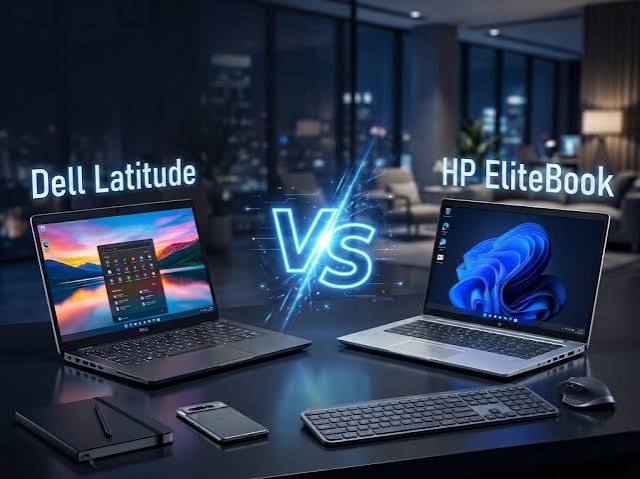
If you are shopping for a reliable business laptop, two names will probably appear repeatedly: HP EliteBook and Dell Latitude.
Both families are designed primarily for professional users, offices, students, remote workers, business owners, and people who want something more practical and durable than a typical consumer laptop. However, choosing between them can become confusing because neither EliteBook nor Latitude is a single laptop. Each brand has multiple generations, screen sizes, processors, configurations, and price levels.
That is especially important in Nigeria, where the market contains both brand-new machines and imported UK-used or refurbished laptops. A two- or three-year-old EliteBook can sometimes have better specifications than a newer Latitude at the same price, while the opposite can also happen.
In this guide, I will compare HP EliteBook and Dell Latitude across build quality, performance, display, keyboard, battery life, ports, security, upgradeability, used-market value, and everyday usability. I will also explain what I would check before buying either one.
If you are already looking for a broader laptop guide, you can also read our complete guide to the best laptops to buy in Nigeria before making your decision.

What Are HP EliteBook and Dell Latitude?
HP EliteBook is HP’s business-oriented laptop family. Dell Latitude plays a similar role in Dell’s lineup.
These laptops are designed around professional requirements such as security, manageability, durability, connectivity, and long-term workplace use. HP currently describes EliteBook as a business range with different tiers, including EliteBook Ultra, X, 8, and 6 series. Dell likewise positions Latitude as a business laptop family covering different users and workloads.
That means comparing only the brand name can be misleading.
For example, an older EliteBook 840 should not automatically be compared with the cheapest Latitude available today. Instead, compare laptops with similar generations, processors, RAM, storage, display quality, condition, and price.
HP EliteBook vs Dell Latitude at a Glance
| Feature | HP EliteBook | Dell Latitude |
|---|---|---|
| Primary purpose | Business and professional computing | Business and professional computing |
| Build quality | Generally business-focused and durable | Generally business-focused and durable |
| Security | Strong business security features, including HP Wolf Security on many current models | Strong business security and management features on supported models |
| Processors | Varies by generation and model | Varies by generation and model |
| RAM | Depends heavily on model | Depends heavily on model |
| Storage | Usually SSD on modern models | Usually SSD on modern models |
| Screen sizes | Multiple sizes depending on series | Multiple sizes depending on series |
| Used market | Widely available in Nigeria | Widely available in Nigeria |
The table gives you the basic picture, but the real differences become clearer when you look at individual features.
Build Quality: HP EliteBook vs Dell Latitude
Both EliteBook and Latitude belong to business laptop families, so build quality is one of their biggest attractions.
However, the exact construction depends on the model and generation. A premium Latitude 7000 or 9000-series machine should not be judged against an entry-level business configuration in exactly the same way.
The same applies to EliteBook. HP’s current lineup includes EliteBook 6, 8, X, and Ultra families, with different levels of portability, configuration, and premium features.
For buyers of used laptops, I would pay more attention to the actual condition of the machine than the logo on the lid.
Check the hinges. Inspect the palm rest. Look at the keyboard. Examine the screen for pressure marks. Test every USB port. Also check whether the charging port feels loose.
A well-maintained Latitude can be a better purchase than a badly abused EliteBook, and the reverse is equally true.
Performance: Which One Is Faster?
There is no universal performance winner between EliteBook and Latitude.
The processor matters much more than the brand name.
For example, an EliteBook with an Intel Core Ultra processor can deliver a very different experience from an older EliteBook equipped with an 8th-generation Core i5. The same principle applies to Latitude.
HP’s current EliteBook range includes Intel, AMD, and Snapdragon options depending on the series. Dell’s current business lineup also offers different processor configurations depending on the model.
For normal tasks such as Microsoft Office, browsing, online classes, programming, accounting software, email, and content management, a modern Core i5 or equivalent processor with sufficient RAM can be perfectly practical.
For heavier work, look beyond the processor’s marketing name. Check the exact CPU generation, number of cores, cooling system, RAM configuration, and graphics hardware.
If you are buying a laptop specifically for programming, you can also see our guide on hardware requirements for web developers for a broader look at the type of specifications that matter for development work.
RAM and Storage
RAM and storage can make a much bigger difference to your everyday experience than many first-time buyers expect.
I would generally avoid buying a modern Windows laptop with very limited RAM if you intend to keep many browser tabs and applications open simultaneously.
For everyday productivity, 16GB of RAM is a comfortable target for many users. However, the right amount depends on your workload and the laptop’s upgrade options.
Some EliteBook models provide accessible SODIMM slots. For example, HP’s specifications for the EliteBook 840 G11 list two SODIMM slots and configurations reaching 64GB of DDR5 memory.
Storage is another area where you should be careful when buying a used machine. An SSD will generally make Windows feel considerably more responsive than an older mechanical hard drive.
Our HDD vs SSD comparison explains why the type of storage matters.
If you are deciding between 256GB and 512GB, our guide on 256GB SSD vs 512GB SSD can help you decide based on your actual usage.
Display Quality
Don’t assume every EliteBook or Latitude has the same screen.
This is one of the most important lessons when shopping for used business laptops.
Two laptops with almost identical names can have different display panels. One may have a basic 1366 × 768 panel, while another configuration offers a sharper Full HD or WUXGA screen with better brightness and viewing angles.
For current EliteBook models, HP lists multiple display options depending on the configuration. The EliteBook 840 G11, for example, has been offered with WUXGA panels and higher-end display options on certain configurations.
For office work, coding, writing, browsing, and studying, I would pay close attention to resolution and brightness.
You can also read our article on matte vs glossy laptop screens if you are unsure which type suits your workspace.
Keyboard and Trackpad
Business laptops are often popular with writers, programmers, accountants, and professionals because manufacturers tend to take keyboards seriously.
EliteBook and Latitude models can both offer comfortable keyboards, but the experience varies between generations.
If you are buying a used laptop, do not rely entirely on online photographs. Test every key.
Open a document and type for several minutes. Check the spacebar, Enter key, Shift keys, arrow keys, and function row. Then test the trackpad for clicking, scrolling, and multi-touch gestures.
For someone who spends several hours writing or coding every day, keyboard comfort can matter more than a small difference in processor performance.
Battery Life
Battery life is another area where the exact configuration matters.
A newer processor does not automatically guarantee that every laptop configuration will provide the same battery endurance. Screen resolution, panel brightness, processor choice, battery capacity, background applications, and battery health can all affect real-world results.
Current HP EliteBook models include configurations designed around longer battery life and mobile productivity. HP describes the EliteBook X series as offering long battery life and configurations under 1kg, while the wider EliteBook range includes several different form factors.
Dell also emphasizes mobility and battery life across its Latitude business range.
For a used laptop in Nigeria, however, battery health deserves special attention.
A machine that originally delivered many hours of battery life may provide much less after years of use. Always test the battery rather than assuming the original specification still applies.
Security Features
This is one area where business laptops have a major advantage over many ordinary consumer models.
HP’s current EliteBook range includes HP Wolf Security for Business on many models, alongside enterprise security and management features.
Dell also positions Latitude around business security and manageability.
Depending on the model, you may find features such as fingerprint readers, IR cameras, TPM security, BIOS protection, smart-card support, privacy screens, and enterprise management technologies.
Not every configuration includes every feature, though. Always check the exact model specification before paying extra for a particular security feature.
If cybersecurity is important to you, our guide to cybersecurity in Nigeria covers additional steps you can take to protect your devices and accounts.
Ports and Connectivity
Ports can be surprisingly important when choosing between business laptops.
If you frequently connect projectors, external monitors, Ethernet cables, USB devices, memory cards, or other accessories, check the actual port selection before buying.
Older business laptops sometimes offer ports that newer ultra-thin laptops have removed. At the same time, newer machines increasingly rely on USB-C and modern wireless connectivity.
Dell highlights connectivity and flexible workplace use among Latitude’s business features.
HP also offers different port configurations across EliteBook series and generations.
For Nigerian users who may connect laptops to external monitors, projectors, routers, printers, or other equipment, this can be more important than a small difference in benchmark performance.
HP EliteBook vs Dell Latitude for Students
Both can work well for students.
If your workload consists of Microsoft Office, browsing, research, programming, online learning, presentations, and general schoolwork, you do not necessarily need a premium flagship configuration.
A clean business laptop with a good Full HD or WUXGA display, SSD storage, adequate RAM, healthy battery, and a comfortable keyboard can be a very practical student computer.
You can also check our guide to the best laptops to buy in Nigeria and our student tablet guide if you are considering other options.
HP EliteBook vs Dell Latitude for Programming
For programming, I would focus on specifications rather than the badge.
Look for enough RAM, a modern processor, a comfortable keyboard, a good display, SSD storage, and useful ports.
Developers working with Android Studio, virtual machines, large projects, emulators, or local databases should pay particular attention to RAM and CPU performance.
If you are building Android applications, for example, 16GB of RAM can provide a much more comfortable starting point than an entry-level configuration with limited memory.
For heavier development work, look at the exact processor and upgrade options before choosing between two machines.
HP EliteBook vs Dell Latitude for Business
This is where both families make the most sense.
HP and Dell build these product families specifically around business requirements. Their current business ranges emphasize security, manageability, mobility, and different levels of performance.
For a small business, freelancer, consultant, remote worker, or office employee, either brand can provide an appropriate machine.
The more important questions are:
- What applications will you run?
- How much RAM do you need?
- Do you need a high-quality display?
- How important is battery life?
- Which ports do you need?
- Will you carry the laptop every day?
- Are you buying new, used, or refurbished?
- How much warranty or after-sales support is available?
Buying a Used HP EliteBook or Dell Latitude in Nigeria
This is where the comparison becomes especially interesting.
Both brands are common in Nigeria’s used laptop market. You will find machines imported from countries such as the United Kingdom and United States, alongside locally used devices.
If you are considering a UK-used machine, do not buy based solely on the words “Core i5,” “EliteBook,” or “Latitude.”
Check the complete specification.
For example, look at the processor generation, RAM, SSD capacity, screen resolution, battery condition, keyboard layout, charger, webcam, Wi-Fi, Bluetooth, ports, hinges, and physical condition.
Our guide on buying a UK-used laptop in Nigeria provides a more detailed checklist.
You should also read how to identify a refurbished laptop before buying from an unfamiliar seller.
If you are comparing UK-used and Nigerian-used machines, our UK-used vs Nigerian-used laptop guide goes deeper into the differences.
EliteBook 840 vs Latitude 7400-Series: A Useful Example
One common comparison in the used market involves models such as the HP EliteBook 840 and Dell Latitude 7400-series.
However, you should compare the exact generation rather than assuming every 840 or Latitude 7400 is equivalent.
Processor generations changed significantly over time. RAM and SSD configurations also differ. Screen options can vary, and battery health will obviously depend on the individual used machine.
This is why I would rather buy a carefully inspected EliteBook with the right specifications than choose an EliteBook simply because it carries the EliteBook name.
The same rule applies to Latitude.
Which Is Easier to Upgrade?
Upgradeability depends on the exact model.
Some business laptops provide accessible RAM slots and replaceable SSDs, while thinner modern machines can have more components integrated or limited upgrade paths.
For example, HP’s EliteBook 840 G11 specifications list two SODIMM slots and support for up to 64GB of memory on supported configurations.
Before buying any laptop, look up the official service manual or specification sheet for that exact model.
That simple step can save you from buying a laptop that cannot be upgraded in the way you expected.
What About Price?
Prices change constantly, particularly in Nigeria, so I would not judge either brand using a fixed price list.
Exchange rates, import costs, condition, processor generation, RAM, SSD size, battery health, screen quality, and seller warranty can all affect the final price.
Instead of asking, “How much is an EliteBook?” ask, “How much does this exact EliteBook configuration cost compared with an equivalent Latitude?”
That gives you a much more meaningful comparison.
If you are buying through an affiliate or referral partner, always check the current product listing and seller terms before purchasing. Referral availability can change, so I recommend using the relevant product or seller links attached to the specific laptop listing rather than assuming every EliteBook or Latitude has the same offer.
HP EliteBook vs Dell Latitude: What Should You Check Before Buying?
Whether you choose HP or Dell, use this checklist:
- Processor: Confirm the exact model and generation.
- RAM: Check the installed memory and whether you can upgrade it.
- SSD: Confirm the capacity and health of the drive.
- Display: Check resolution, brightness, viewing angles, and dead pixels.
- Battery: Test battery health instead of trusting the advertised runtime.
- Keyboard: Test every important key.
- Trackpad: Check clicking, scrolling, and gestures.
- Ports: Test USB, USB-C, HDMI, audio, Ethernet, and other available connections.
- Webcam: Test the camera and microphone.
- Wi-Fi: Connect to a reliable network and test stability.
- Hinges: Open and close the display carefully.
- Charger: Make sure the correct charger is included and works properly.
- BIOS: Check for BIOS passwords or corporate management restrictions on used machines.
- Serial number: Verify the machine through the manufacturer’s support system where possible.
- Warranty: Ask exactly what the seller’s warranty covers.
HP EliteBook vs Dell Latitude: My Practical Take
HP EliteBook and Dell Latitude are both established business-laptop families, so the decision should not come down to brand loyalty alone.
Instead, compare the specific machines in front of you.
If one laptop has a better processor, more RAM, a healthier battery, a better display, and a cleaner physical condition at a similar price, those details matter more than whether the lid says HP or Dell.
For a used laptop buyer in Nigeria, this approach is particularly important because the condition of individual machines can vary significantly.
For someone who wants a modern business laptop, current EliteBook and Latitude families both provide a wide range of configurations. HP’s current EliteBook lineup includes multiple tiers aimed at different professional workloads, while Dell continues to position Latitude around business productivity, mobility, connectivity, security, and manageability.
Final Thoughts
The HP EliteBook vs Dell Latitude debate does not have to be complicated.
Both are business-focused laptop families with models designed for professional users. The better purchase for you depends on the exact configuration, generation, condition, price, and workload.
For everyday work, programming, studying, business, remote work, browsing, and productivity, focus on getting the right combination of processor, RAM, SSD storage, display, battery condition, and build quality.
If you are buying used, inspect the individual machine carefully. A clean, well-maintained laptop with the right specifications can give you years of useful service, regardless of whether it carries an HP or Dell logo.
And if you are still researching before buying, you can explore more laptop guides on Infolandia’s laptop buying guide, including articles about ThinkPad durability, laptop generations, and how to inspect Nigerian-used laptops.
For official specifications and current product information, check HP’s official EliteBook page and Dell’s official business laptop page before making a purchase.
You can also visit the Infolandia Bookstore for additional guides and resources.