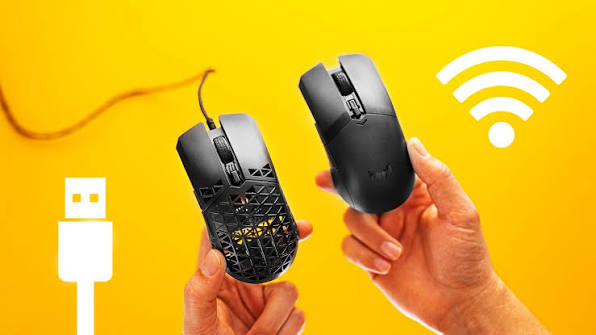
If you work from a laptop, move between locations, use a small desk or simply dislike cables, a wireless mouse can make your setup feel much cleaner. On the other hand, if you want something straightforward that you plug in and use without worrying about batteries, pairing or charging, a wired mouse still makes a lot of sense.
I have found that the right choice is less about saying one technology is universally better and more about looking at how you work, where you use your computer, how portable your setup is, and how much convenience you value.
This guide compares wireless and wired mice across connection reliability, latency, battery life, portability, gaming, office work, programming, compatibility, durability, price and long-term ownership. I will also explain the difference between Bluetooth and 2.4 GHz wireless mice because not every wireless mouse behaves the same way.
If you are also choosing a laptop, you may want to read our complete guide to the best laptops to buy in Nigeria before deciding which mouse makes sense for your setup.
Wireless Mouse vs Wired Mouse at a Glance
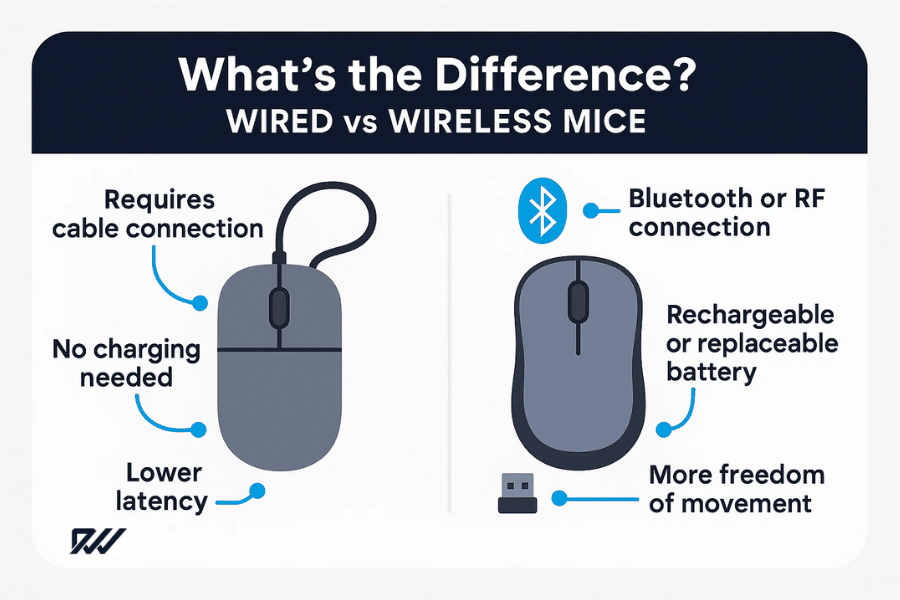
Here is the basic difference:
| Feature | Wireless Mouse | Wired Mouse |
|---|---|---|
| Connection | Bluetooth or wireless USB receiver | USB cable |
| Cable clutter | Very little | Yes |
| Battery/charging | Required on most models | Not required |
| Portability | Excellent | Good, but cable must be carried |
| Latency | Can be extremely low on good models | Generally very low and consistent |
| Interference | Possible depending on wireless environment | Not affected by wireless interference |
| USB port requirement | Bluetooth models may not need one | Usually requires USB |
| Charging/battery concern | Yes | No |
| Desk appearance | Cleaner | More cables |
| Gaming | Excellent on suitable gaming models | Excellent |
| Office work | Excellent | Excellent |
| Travel | Excellent | Acceptable |
The interesting part is that the gap between wireless and wired performance has become much smaller. Modern wireless mice can offer very responsive connections, while some Bluetooth models prioritize low power consumption and convenience instead of maximum responsiveness.
What Is a Wired Mouse?
A wired mouse connects directly to your computer, usually through USB. The cable carries the data between the mouse and the computer and, in normal USB operation, also supplies power.
That simplicity is one of its biggest advantages.
You do not need to pair the mouse. You do not need to install a wireless receiver. You normally do not need to charge it. Plug it in and start using it.
For a desktop computer that stays in one location, this can be perfectly practical.
A wired mouse can also be useful when you want a predictable connection. Because the mouse communicates through a physical cable, nearby Wi-Fi or Bluetooth devices do not have to compete with it for a wireless connection.
This does not mean every wired mouse is automatically faster or better. Sensor quality, firmware, polling rate, ergonomics and other design factors still matter. A cheap wired mouse can feel worse than a good wireless one.
What Is a Wireless Mouse?
A wireless mouse sends information to the computer without a physical data cable. There are two common approaches: Bluetooth and 2.4 GHz wireless using a USB receiver.
Bluetooth mice communicate directly with a computer that supports Bluetooth. This can be especially convenient with modern laptops because you may not need to occupy a USB port.
A 2.4 GHz wireless mouse normally comes with a small USB receiver. You plug the receiver into the computer and the mouse communicates with it wirelessly.
For example, Logitech’s wireless products use both Bluetooth and proprietary wireless technologies depending on the model. Logitech says its Logi Bolt technology operates in the 2.4 GHz band and is designed for secure, responsive connections.
The important point is this: wireless does not automatically mean Bluetooth.
Bluetooth vs 2.4 GHz Wireless Mouse
If you decide to buy a wireless mouse, you should pay attention to the type of wireless connection it uses.
Bluetooth Mouse
A Bluetooth mouse connects directly to your computer’s Bluetooth system.
The biggest advantage is convenience. You do not necessarily need a USB receiver, which is particularly useful when your laptop has only a few ports.
Microsoft, for example, lists Bluetooth mice that connect directly to compatible Windows computers and provide wireless ranges of around 10 metres in open conditions, although typical office environments can reduce the practical range.
Bluetooth can also be useful when you regularly switch between compatible devices.
However, Bluetooth mice can behave differently from one model to another. Some enter low-power states after inactivity, and Microsoft notes that certain Bluetooth mice can take a moment to respond when waking from hibernation.
2.4 GHz Wireless Mouse
A 2.4 GHz wireless mouse normally uses a dedicated USB receiver.
The receiver is designed specifically to communicate with the mouse. Good implementations can provide very responsive performance.
Logitech’s published Logi Bolt documentation, for example, reports latency below 8 milliseconds in a clean environment for its tested connection, while also explaining that radio interference can affect wireless performance.
This is why it is misleading to say that every wireless mouse has noticeable lag. Modern wireless technology can be very responsive.
1. Connection Reliability: Wired Has the Simpler Advantage
If connection reliability is your number-one priority, a wired mouse has a straightforward advantage: there is no wireless link to maintain.
The cable connects the mouse directly to the computer.
A wireless mouse introduces another layer. The mouse needs to communicate with either a Bluetooth radio or a USB receiver. The quality of that connection depends on the mouse, receiver, computer and surrounding wireless environment.
That does not mean a wireless mouse constantly disconnects. A good wireless mouse can work reliably for months or years.
Still, there are more variables.
Wireless mice can also experience problems if the receiver is blocked, placed far from the mouse or surrounded by significant radio interference. Logitech’s documentation acknowledges that Wi-Fi and Bluetooth activity can affect devices operating in the same 2.4 GHz band.
For normal home and office use, however, a quality wireless mouse should provide a stable connection when used within its intended range.
2. Latency: Is a Wired Mouse Actually Faster?
This is one of the most common arguments in the wired-versus-wireless debate.
Historically, wired mice had an obvious advantage because wireless technology was slower and less consistent. Modern wireless mice have changed that situation considerably.
A good gaming-focused wireless mouse can have extremely low latency. Some proprietary wireless systems are specifically designed to reduce delays and maintain a consistent connection.
At the same time, Bluetooth is not necessarily designed for exactly the same priority. Battery efficiency and general-purpose connectivity can be more important.
So if you are buying a wireless mouse specifically for competitive gaming, do not simply look at the words “wireless” on the box. Look at the manufacturer’s specifications for polling rate, connection technology and latency.
For ordinary browsing, writing, coding, spreadsheets and general productivity, the difference is unlikely to be the factor that determines whether you enjoy using the mouse.
If you are building a computer primarily for gaming, you should also consider the rest of the setup. Our guide to device requirements for gaming explains why hardware requirements depend heavily on the games and workloads involved.
3. Battery Life: The Biggest Wireless Trade-Off
Wireless freedom comes with one obvious responsibility: power.
Depending on the mouse, you may need disposable AA or AAA batteries, or you may need to recharge an internal battery.
This is not necessarily a major inconvenience.
Some wireless mice can run for many months on one battery. Logitech, for example, lists some wireless mouse models with battery-life estimates ranging from weeks to many months or even longer depending on the model and usage.
But the battery still exists.
Eventually, you have to replace or recharge it.
A wired mouse has no separate mouse battery to monitor. As long as the computer supplies power through the USB connection, the mouse can continue working.
For someone who works long hours and hates interruptions, that simplicity can be valuable.
4. Portability: Wireless Wins for Laptop Users
This is where I think wireless mice make the most sense for many laptop users.
Imagine carrying your laptop between your home, office, school, coworking space and a friend’s house. A wired mouse means you have another cable to fold, pack and manage.
A wireless mouse removes that cable from the equation.
Bluetooth models can be particularly convenient because you may not need to carry a USB receiver at all.
This matters even more with modern thin laptops that have fewer traditional USB-A ports.
If your laptop already relies heavily on USB-C accessories, a Bluetooth mouse can help keep your available ports free.
Of course, remember that the mouse still needs to be charged or have a working battery.
For people who travel frequently, I would generally prioritize a compact wireless mouse with dependable battery life over a bulky desktop model.
You can also read our guide on useful gadgets for Nigerian travellers for more ideas on building a portable tech setup.
5. Desk Setup and Cable Management
If you care about having a clean workspace, wireless has an obvious visual advantage.
There is no mouse cable running across the desk.
That may sound like a small thing, but it becomes noticeable when you have several devices connected to one computer.
You might already have a laptop charger, monitor cable, keyboard cable, external drive, phone cable and other accessories on your desk. Removing one more cable can make the setup feel less crowded.
A wired mouse can still be perfectly tidy if the cable is routed properly.
So this is mostly a convenience and workspace preference rather than a performance issue.
6. Gaming: Wired or Wireless?
Gaming is where this comparison becomes more complicated.
Competitive gamers often care about latency, polling rate, sensor performance, consistency and weight.
A wired mouse gives you a direct physical connection and eliminates battery management. That makes it easy to understand why many gamers continue to use wired mice.
However, modern gaming wireless mice can offer very responsive performance.
For example, Logitech’s professional wireless gaming documentation has historically focused on low-latency connections and high polling performance. Its PRO Wireless documentation also illustrates how gaming mice can be designed around rechargeable batteries while maintaining high report rates.
So the real question is not simply:
“Is wireless good for gaming?”
It is:
“Is this particular wireless gaming mouse designed for the level of gaming I do?”
For casual gaming, the distinction may be barely noticeable.
For competitive gaming, specifications and testing matter much more.
7. For Office Work and Productivity
For office work, either type can work extremely well.
If you spend your day writing documents, working with spreadsheets, browsing websites, managing emails or using business software, you probably do not need an expensive gaming mouse.
Instead, focus on:
- Comfortable shape
- Good tracking
- Reliable scrolling
- Quiet clicks if you work around other people
- Useful programmable buttons if you need them
- Good battery life if wireless
- Suitable compatibility with your computer
A wireless mouse can make a laptop workstation more comfortable because you do not have to deal with the cable.
A wired mouse can make sense in a permanent office workstation because you simply plug it in and leave it there.
If your work involves a lot of writing, you may also want to check out our guide to laptops for professional writers and bloggers in Nigeria.
8. For Programming and Web Development
Programmers often spend many hours at a computer, so comfort matters more than the wired-versus-wireless label.
If you work with code editors, terminals, browsers, databases and development tools for several hours each day, an ergonomic mouse can be more important than the connection type.
A wireless ergonomic mouse can reduce cable clutter around your workstation.
A wired ergonomic mouse removes the need to think about battery life.
Either can work.
For developers who move between different computers, wireless becomes particularly attractive because it is easier to carry around.
If you are building a portable development setup, you can also compare your mouse choice with the hardware requirements discussed in our guide to device requirements for web developers.
9. For Students
Students have a slightly different set of priorities.
You may be moving between lectures, libraries, hostels, home and other study locations. In that situation, portability can be important.
A compact wireless mouse is convenient because it can disappear into a laptop bag without a long cable getting tangled around other accessories.
However, if your mouse is going to stay beside a desktop computer most of the time, a wired model can save you the trouble of charging or replacing batteries.
Students should also avoid spending more than necessary.
A basic wired mouse can handle everyday browsing, Microsoft Office, school research and general computer use without needing premium features.
For more computer-buying advice, our student tablet buying guide may also be useful if you are comparing different study devices.
10. Compatibility Matters More Than Many Buyers Realize
Before buying a wireless mouse, check what your computer actually supports.
A Bluetooth mouse requires Bluetooth support on the host device.
A 2.4 GHz mouse with a USB receiver needs a compatible USB port or appropriate adapter.
A wired mouse also normally requires a compatible USB connection.
This is especially important with modern laptops that may have a mixture of USB-A and USB-C ports.
Some wireless mouse manufacturers now offer USB-C receivers or adapters, while others continue to use USB-A receivers.
Logitech, for example, documents Logi Bolt receivers in both USB-A and USB-C versions and also supports direct Bluetooth connections on compatible devices.
Therefore, don’t buy based only on the mouse itself. Think about the ports on the computer you actually use.
11. What Happens If the Wireless Battery Dies?
This is probably the most annoying wireless-mouse situation.
You sit down to work, move the mouse and nothing happens.
Then you remember that you forgot to charge it.
If you use a rechargeable wireless mouse, the solution is usually simple: connect the charging cable.
Depending on the model, you may be able to continue using the mouse while it charges. Other models may be less convenient.
If the mouse uses replaceable batteries, you need a spare battery available.
Windows also supports battery reporting for compatible Bluetooth accessories, allowing supported devices to communicate battery information to the operating system.
Still, there is no battery problem with a conventional wired mouse.
12. Is a Wireless Mouse More Expensive?
Not necessarily.
You can find affordable wireless mice as well as very expensive wireless gaming and productivity mice.
The same is true for wired mice.
The biggest price differences usually come from the features rather than the fact that a mouse is wireless.
For example, premium mice may offer:
- Higher-quality sensors
- Ergonomic designs
- Multiple programmable buttons
- Multi-device switching
- Rechargeable batteries
- High polling rates
- Advanced wireless receivers
- Silent switches
- Adjustable scrolling
- Premium materials
If you are buying on a tight budget, do not assume that wireless automatically means you need to spend a lot.
Instead, decide which features you actually need.
Our article on useful tech gadgets under ₦30,000 can also help if you are building an affordable setup.
13. Durability and Cable Problems
One interesting advantage of wireless mice is that there is no mouse cable to eventually develop a connection problem.
With wired mice, the cable is constantly moving as you move the mouse. Over a long period, the cable can become damaged, especially if it is sharply bent or repeatedly pulled.
That does not mean wireless mice are automatically more durable.
Wireless mice have batteries, switches, sensors and wireless electronics that can also eventually fail.
Rechargeable batteries have a finite lifespan too.
Microsoft’s accessory documentation notes that rechargeable batteries age over time and that battery characteristics change as batteries go through their lifespan.
So both designs have components that can eventually wear out.
14. USB Port Usage
This is an easy factor to overlook.
If you use a wired mouse, one USB port is occupied.
A wireless mouse with a USB receiver also occupies a port.
A Bluetooth mouse may not need one.
For someone using a laptop with multiple accessories, that can make a noticeable difference.
Imagine connecting:
- External SSD
- USB flash drive
- Phone
- Webcam
- External monitor adapter
- Mouse
You can quickly run out of ports.
In that situation, Bluetooth can be particularly convenient.
If you regularly work with external storage, you may also find our article about cloud storage versus USB storage useful when deciding how to manage your files.
15. Wireless Mouse Security
Security is another reason to avoid assuming that all wireless mice are identical.
Modern wireless technologies can incorporate security features. For example, Logitech says its Logi Bolt wireless connection uses security mechanisms for pairing, bonding, encryption and signing.
That does not mean every wireless mouse offers the same level of security.
If you are buying a mouse for a business environment, look at the manufacturer’s security documentation rather than relying on the word “wireless.”
For ordinary home use, a reputable mouse from a known manufacturer is generally a sensible starting point.
You can also read our broader guide on cybersecurity and staying safe online in Nigeria for additional digital-security advice.
16. The Problem With Cheap Wireless Mice
Price alone does not determine quality, but extremely cheap wireless mice can involve compromises.
You may encounter issues such as:
- Short battery life
- Unreliable wireless connections
- Poor-quality switches
- Inconsistent tracking
- Cheap scroll wheels
- Limited compatibility
- Weak build quality
That does not mean every inexpensive mouse is bad.
It simply means you should look beyond the appearance of the product.
If you are buying online in Nigeria, check the exact model, connection type, warranty information and compatibility before paying.
This is similar to buying a smartphone. A low price does not tell you everything about the actual product.
Our guide to common smartphone-buying mistakes covers the same broader principle: look beyond the headline specification.
17. Wired Mouse Advantages
Let’s summarize the main reasons you might choose wired.
Simple setup
Plug it in and use it.
No battery
You do not have to remember to recharge or replace batteries.
Consistent connection
The physical cable eliminates wireless connection issues.
Good for fixed workstations
If your computer stays on one desk, the cable may not bother you.
Excellent for many gaming setups
A wired mouse can provide predictable low-latency performance without battery management.
Often affordable
You can get capable wired mice without paying for wireless hardware or batteries.
18. Wireless Mouse Advantages
Wireless mice have their own strong advantages.
No cable across your desk
This gives you a cleaner and less restrictive workspace.
Better portability
A wireless mouse is easy to pack with a laptop.
More freedom of movement
You can move the mouse without dragging a cable around.
Bluetooth can save USB ports
A Bluetooth mouse can connect directly to compatible computers.
Modern wireless can be very responsive
Good wireless technologies can provide low-latency performance suitable for demanding use.
Multi-device features
Some wireless mice allow you to switch between multiple computers or devices.
For example, Logitech’s M585 supports both Bluetooth Low Energy and 2.4 GHz wireless and includes switching between two channels.
19. Wired Mouse Disadvantages
The main disadvantages are fairly straightforward.
- The cable can clutter your desk.
- The cable can become tangled.
- Moving the mouse can pull the cable.
- Portability is less convenient.
- The cable can eventually wear out.
- You need an appropriate physical port.
For a permanent desktop setup, however, some of these disadvantages may barely matter.
20. Wireless Mouse Disadvantages
Wireless mice also have compromises.
- You need to monitor battery life.
- Rechargeable batteries eventually age.
- Some models require a USB receiver.
- Bluetooth can occasionally take time to reconnect after sleep.
- Wireless performance can be affected by environmental interference.
- There are more components involved than a simple wired connection.
Again, the severity depends heavily on the quality of the mouse.
21. Which Mouse Is Better for a Laptop?
For most laptop users, I would look closely at wireless options.
A laptop is designed around portability, and a wireless mouse fits that philosophy.
If your laptop has Bluetooth, a Bluetooth mouse is particularly convenient because it can leave your USB ports available for other accessories.
However, if you mainly use the laptop at a desk and want maximum simplicity, a wired mouse remains perfectly reasonable.
The best choice depends on your working habits.
22. Which Mouse Is Better for a Desktop PC?
This one is more balanced.
If your desktop stays in one place, there is little practical reason to avoid a wired mouse simply because it has a cable.
But if your desktop setup has a large monitor, keyboard, speakers and other accessories, a wireless mouse can help keep the desk cleaner.
So for desktop computers, choose based on your workspace rather than assuming one connection is automatically superior.
23. Which Mouse Is Better for Gaming?
For gaming, examine the individual mouse rather than choosing purely by connection type.
A good wired gaming mouse can provide extremely consistent performance.
A good wireless gaming mouse can also provide excellent responsiveness while giving you a cable-free setup.
If you play competitive games, pay particular attention to:
- Polling rate
- Sensor performance
- Click latency
- Wireless protocol
- Battery life
- Weight
- Shape
- Grip style
- Software support
For casual gaming, these differences may matter considerably less.
24. Which Mouse Is Better for Work From Home?
For remote workers, I lean toward considering wireless first.
When your workspace changes regularly, removing one cable makes the setup easier to move.
It can also make a small desk less cluttered.
But there is a practical exception.
If you work eight or more hours a day at the same desk and rarely move your mouse, a comfortable wired ergonomic mouse may be all you need.
Comfort should come before the desire to eliminate one cable.
If reliable electricity is also part of your remote-work concern, our article on solar gadgets for remote workers discusses some of the equipment considerations I have looked at for working without reliable power.
25. What About Mouse Weight?
Weight is especially important if you use the mouse for gaming or long periods.
Wireless hardware historically added weight because of batteries and radio components.
However, modern designs have become much lighter.
Some gaming wireless mice are designed specifically to minimize weight.
At the same time, some users actually prefer heavier mice because they feel more planted on the desk.
Therefore, do not assume that wireless equals heavy.
Check the actual weight of the model you are considering.
26. Ergonomics Matter More Than Wired vs Wireless
This is probably the biggest lesson I would give anyone shopping for a mouse.
Do not spend 30 minutes debating wireless versus wired and then choose a mouse that hurts your hand.
If you use a mouse for hours every day, the shape matters.
Look at:
- Hand size
- Grip style
- Mouse height
- Mouse width
- Weight
- Button placement
- Scroll-wheel position
- Surface texture
A comfortable wired mouse can be a better everyday tool than an uncomfortable premium wireless mouse.
The reverse is also true.
27. A Simple Decision Guide
Use this quick guide if you are still undecided.
Choose a wireless mouse if:
- You use a laptop regularly.
- You move between locations.
- You dislike cable clutter.
- Your computer has limited USB ports.
- You want a cleaner desk.
- You need to switch between devices.
- You are comfortable charging or replacing batteries.
Choose a wired mouse if:
- Your computer stays on one desk.
- You do not want to charge a mouse.
- You want the simplest possible connection.
- You want to avoid wireless interference.
- You prefer a plug-and-use accessory.
- You are building a straightforward budget setup.
28. What I Would Check Before Buying Either Type
Before you spend your money, I would check these specifications first:
- Sensor: Make sure the tracking quality is suitable for your work.
- Shape: Confirm that the mouse fits your hand.
- Weight: Check whether you prefer something light or substantial.
- Connection: Determine whether it uses USB, Bluetooth or a proprietary wireless receiver.
- Battery: If wireless, check the manufacturer’s battery-life estimate.
- Compatibility: Confirm that it works with your operating system.
- Warranty: Check how long the manufacturer covers the device.
- Buttons: Decide whether you need additional programmable buttons.
- Software: Check whether configuration software supports your operating system.
- Price: Compare the actual features instead of paying for specifications you will never use.
29. Do You Need a Premium Mouse?
Not necessarily.
If your main activities are browsing, writing, online learning, spreadsheets and general computer use, you can get excellent results from a basic mouse.
Premium models become more interesting when you specifically need advanced ergonomics, silent operation, multiple-device switching, gaming performance, additional buttons or professional productivity features.
This is similar to buying a laptop.
You do not necessarily need the most expensive computer to browse the web and write documents. Our article on why I stopped judging laptops by Core i5 alone explains the broader lesson: one specification rarely tells the whole story.
30. Wireless Mouse vs Wired Mouse: My Practical Take
If I were setting up a permanent desktop workstation today, I would be comfortable using either.
If the desk were clean and the cable could be managed properly, a wired mouse would give me simple, dependable operation.
If I were using a laptop and moving between different locations, I would strongly consider wireless.
That is because portability changes the equation.
When you carry a laptop around frequently, the freedom from a cable becomes genuinely useful.
I would also pay attention to whether the wireless mouse uses Bluetooth or a dedicated 2.4 GHz receiver.
For normal productivity, Bluetooth can be extremely convenient. For demanding gaming, I would look for a wireless model specifically designed around low latency and high polling performance rather than buying any generic Bluetooth mouse.
31. Final Verdict: Wireless or Wired?
There is no universal winner between a wireless mouse and a wired mouse.
Wireless is mainly about freedom and convenience. You get a cleaner desk, easier portability and, with Bluetooth, the ability to connect without occupying a USB port.
Wired is mainly about simplicity and consistency. You plug it in, avoid battery management and maintain a direct physical connection to your computer.
For a laptop user who travels or changes work locations regularly, wireless is often the more convenient choice.
For a fixed desktop workstation where reliability and simplicity matter most, wired remains an excellent option.
For gaming, do not make the decision based on the words “wired” or “wireless” alone. Look at the actual mouse’s sensor, polling rate, latency, wireless technology, weight and battery system.
Ultimately, the mouse that fits your hand, works reliably with your computer and matches the way you work is the one that makes the most sense.
And if you are building a complete computer setup, remember that the mouse is only one part of the equation. You can explore more of our laptop buying guide, compare smartphones in Nigeria, or browse the Infolandia Bookstore for more resources.
Frequently Asked Questions
Is a wireless mouse better than a wired mouse?
Neither is universally better. Wireless mice offer portability and a cleaner workspace, while wired mice provide simple plug-and-use connectivity without battery management.
Does a wireless mouse have more lag?
It depends on the wireless technology and the mouse. Modern high-quality wireless mice can have very low latency. Bluetooth models may prioritize power efficiency and convenience, while dedicated gaming wireless technologies are often designed for high responsiveness.
Do wireless mice need batteries?
Most wireless mice require some form of battery power. Depending on the model, this may be a replaceable AA or AAA battery or a rechargeable internal battery.
Can I use a wireless mouse without a USB receiver?
Yes, if the mouse supports Bluetooth and your computer supports Bluetooth. Some wireless mice rely specifically on a USB receiver, so check the specifications before buying.
Is Bluetooth or 2.4 GHz better for a mouse?
It depends on your needs. Bluetooth is convenient because it can connect directly to compatible computers without a receiver. A dedicated 2.4 GHz connection can be preferable when you want a specialized, highly responsive connection.
Can I use a wireless mouse while charging?
Some rechargeable mice support wired use while charging, while others may have limitations. Check the manufacturer’s specifications for the exact model.
Is a wired mouse better for gaming?
A wired mouse provides a direct connection and avoids battery concerns, making it a strong option for gaming. However, modern gaming wireless mice can also provide very responsive performance, so the specific model matters.
What is the best mouse for a laptop?
There is no single model that suits everyone. For laptop users, consider a compact wireless mouse, especially a Bluetooth model if you want to preserve your USB ports. Prioritize comfort, battery life, compatibility and tracking quality.
Is a wireless mouse good for office work?
Yes. A wireless mouse can be excellent for office work because it reduces cable clutter and makes it easier to move your workstation. A wired mouse is equally suitable if your computer stays in one location.
How long can a wireless mouse battery last?
Battery life varies substantially by model. Some wireless mice are designed to operate for months or longer on a battery, while rechargeable performance depends on the internal battery, usage and power-saving features. Always check the manufacturer’s published estimate for the exact mouse.
Sources and Further Reading
For technical information about wireless mouse connectivity, battery behavior and manufacturer specifications, see Logitech’s Logi Bolt wireless technology documentation, Logitech’s battery-life guidance, Microsoft’s mouse troubleshooting documentation, and Microsoft’s Bluetooth accessory battery guidance.