At first glance, they can look almost identical. Both have keys, both connect to your computer, and both can handle everyday tasks such as typing documents, browsing the web, programming, gaming and working online. However, the technology underneath those keys is quite different, and that difference affects how the keyboard feels, sounds, performs and ages.
I used to think that a keyboard was simply a keyboard. As long as the letters worked and I could type without problems, there was not much else to consider. But once you spend more time writing, coding, researching, editing or working from a computer every day, the keyboard becomes much more important.
That is especially true if you are building a workstation in Nigeria where every accessory purchase needs to make sense. You may not want to spend a large amount of money on a premium mechanical keyboard when an affordable membrane keyboard already handles your work. On the other hand, buying the cheapest keyboard available can become frustrating if you type for several hours every day.
So, mechanical vs membrane keyboard: which should you choose?
The answer depends on what you do, how frequently you type, how much noise you can tolerate, your budget and how much you care about customization.
In this guide, I will explain the difference in simple terms, compare the two technologies, discuss typing, gaming, programming, durability, noise, maintenance and price, and then look at which type makes more sense for different users.
Quick Answer: Mechanical vs Membrane Keyboard
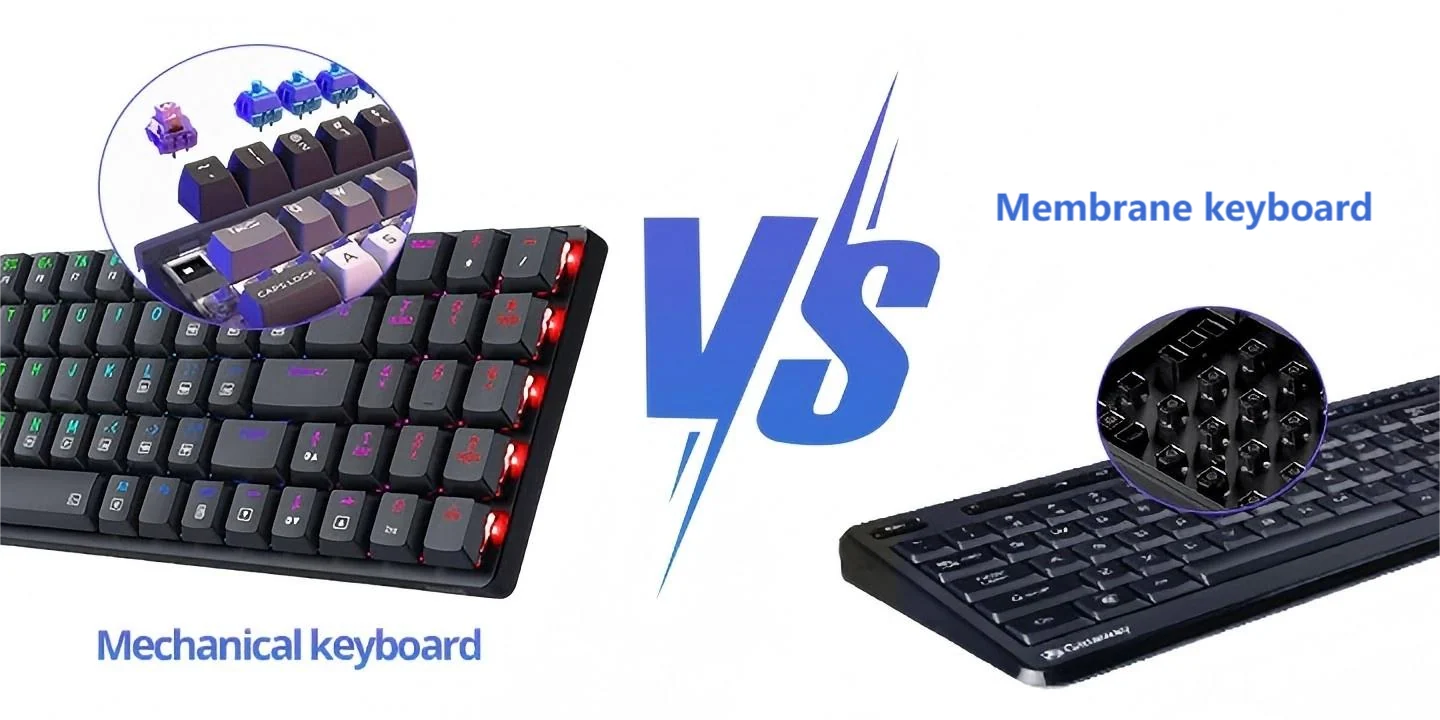
A mechanical keyboard uses an individual physical switch underneath each key. A membrane keyboard uses flexible membrane layers and usually rubber domes to register a keypress.
Mechanical keyboards generally provide a more defined and customizable typing experience, while membrane keyboards are usually quieter, lighter and less expensive.
Neither technology is automatically right for everyone.
| Feature | Mechanical Keyboard | Membrane Keyboard |
|---|---|---|
| Technology | Individual physical switches | Membrane layers and rubber domes |
| Typing feel | More defined and customizable | Softer and generally less defined |
| Noise | Ranges from quiet to loud | Usually quieter |
| Durability | Often very high | Generally lower |
| Price | Usually more expensive | Usually cheaper |
| Customization | Usually much greater | Limited |
| Gaming | Popular among gamers | Suitable for casual gaming |
| Office work | Excellent, depending on noise | Excellent for quiet environments |
| Programming | Popular among programmers | Completely usable |
| Portability | Often heavier | Often lighter |
These differences come from the physical design of the two keyboard types. Logitech and HP both describe mechanical keyboards as using individual switches, while membrane keyboards use flexible layers and rubber-dome mechanisms to register keys.
What Is a Mechanical Keyboard?
A mechanical keyboard has a separate switch beneath each key.
When you press a key, that switch moves and registers the input. Depending on the switch, you may feel a tactile bump, hear a click or experience a smooth keypress.
This is one of the biggest reasons mechanical keyboards feel different from the keyboards many people grew up using.
Instead of relying on one flexible membrane system underneath a large group of keys, each key has its own switch mechanism.
Traditional mechanical switches commonly contain components such as a housing, spring, stem and electrical contacts. The exact construction varies between switch designs, but the basic principle is that each key has an independent switching mechanism.
According to Logitech, mechanical switches are available in three familiar categories: linear, tactile and clicky.
Linear switches
Linear switches move smoothly from the top of the keypress to the bottom without a deliberate tactile bump.
This makes them popular with people who prefer a smooth and consistent movement.
They are also common among gamers, although gaming performance depends on much more than the switch alone.
Tactile switches
Tactile switches provide a noticeable bump during the keypress.
That bump gives you physical feedback that the key has reached its actuation point.
If you spend much of your day writing, programming or entering information, you may enjoy this type of feedback because every press feels more deliberate.
Clicky switches
Clicky switches add an audible click to the tactile experience.
For some people, the sound is part of the appeal of mechanical keyboards. For someone working in a shared room, however, that same sound could become annoying.
Therefore, do not assume that every mechanical keyboard sounds the same. Switch selection makes a significant difference.
Corsair also explains that linear, tactile and clicky switches have different characteristics and are designed around different typing experiences.
What Is a Membrane Keyboard?
A membrane keyboard uses a different method to detect your keystrokes.
Instead of putting an individual mechanical switch underneath every key, it typically uses flexible membrane layers with conductive traces and rubber domes.
When you press a key, the rubber dome compresses and the relevant layers make contact. The keyboard then sends the corresponding signal to the computer.
This design is relatively simple compared with the individual-switch construction of a mechanical keyboard.
It is also one reason membrane keyboards are common in inexpensive desktop keyboards and many everyday computing environments.
The feel is normally softer than a mechanical keyboard. Some people describe inexpensive membrane keyboards as slightly mushy, although the exact experience varies significantly between models.
HP describes the basic membrane design as using a flexible pressure layer and rubber dome mechanism, while Logitech similarly explains that membrane keyboards use membrane layers and rubber domes beneath the keys.
Mechanical vs Membrane: How Do They Actually Feel?
This is probably the biggest difference you will notice immediately.
Press a key on a typical membrane keyboard and you get a softer movement. Press a mechanical keyboard and the response can feel much more defined.
However, saying that mechanical keyboards always feel better would be misleading.
Typing feel is personal.
Some people prefer a soft keyboard because it feels familiar and does not produce much noise. Others prefer the physical feedback of a mechanical switch because they feel more connected to each keystroke.
There is also a major difference between different mechanical keyboards. A linear mechanical keyboard can feel completely different from a clicky mechanical keyboard.
That is why someone who says, “I tried a mechanical keyboard and didn’t like it,” may simply have tried the wrong switch type for their preference.
Mechanical vs Membrane Keyboard for Typing
If you write articles, work on documents, send emails, manage websites or spend hours entering information, the keyboard can have a noticeable effect on your daily experience.
Mechanical keyboards are popular with writers because the individual switches can provide consistent feedback.
For example, a tactile switch can give you a physical bump as you press a key. This can make the typing experience feel more deliberate.
However, a membrane keyboard can still be perfectly adequate for writing.
If you already type comfortably on a membrane keyboard, there is no technical requirement that forces you to upgrade to mechanical.
In fact, if you work in a quiet environment or share a room with someone, the quieter nature of many membrane keyboards could be more useful than the additional customization offered by a mechanical keyboard.
RTINGS notes that mechanical keyboards generally offer more consistent key feel, while membrane keyboards typically provide softer feedback and are often quieter.
Mechanical vs Membrane for Programming
Programmers spend a lot of time using their keyboards, which makes keyboard comfort particularly important.
Mechanical keyboards are popular among programmers because of their typing feel, switch variety and customization possibilities.
But you do not need a mechanical keyboard to become a good programmer.
Your programming language, development environment, computer specifications and ability to concentrate matter much more than whether the keyboard uses mechanical switches.
If you are learning web development, for example, you may be better off spending extra money on a capable laptop before spending heavily on a premium keyboard.
Our guide on the best laptops to buy in Nigeria can help you think about the computer itself before spending too much of your budget on accessories.
Likewise, if you are already working with a laptop and simply need a comfortable external keyboard, an affordable membrane model may be enough.
If you want to understand how your phone hardware affects development work, you can also read our guide to phone requirements for web developers. A phone cannot replace a development computer, but understanding hardware requirements is useful when building a complete work setup.
Mechanical vs Membrane for Gaming
Mechanical keyboards are extremely common in gaming setups.
There are several reasons for this popularity, including switch variety, customizable designs and support for features such as anti-ghosting and n-key rollover on many models.
However, the presence of mechanical switches does not automatically make someone better at gaming.
A skilled player using a membrane keyboard can still perform very well.
The importance of keyboard technology also depends on the game. A competitive player who spends many hours playing fast-paced games may care much more about key response, rollover and switch characteristics than someone who occasionally plays games for entertainment.
If gaming is your main concern, look beyond the word “mechanical.”
Check the keyboard’s rollover capability, latency, layout, switch characteristics, software support and build quality.
Also consider the rest of your system. A keyboard upgrade will not compensate for a computer that struggles to run the games you want to play.
If you are choosing a computer specifically for gaming, you may find our guide to phone requirements for gaming useful for mobile gaming, while your desktop or laptop gaming setup should be evaluated separately.
Mechanical vs Membrane: Which Is Quieter?
Generally, membrane keyboards are quieter.
That makes them attractive in offices, libraries, classrooms, shared bedrooms and other places where keyboard noise matters.
But there is an important detail here.
Not every mechanical keyboard is loud.
A mechanical keyboard with clicky switches can be quite noticeable. A mechanical keyboard with a quieter switch and appropriate case and keycap design can produce significantly less noise.
Logitech specifically notes that mechanical keyboards can range from quiet to loud depending on the switch, while membrane keyboards are generally quieter.
So if you want a mechanical keyboard but regularly work around other people, look for quieter switch options rather than assuming every mechanical keyboard will sound like a typewriter.
Mechanical vs Membrane: Which Lasts Longer?
Durability is one area where mechanical keyboards generally have a significant advantage.
Many mechanical switches are rated for tens of millions of keystrokes. Some manufacturers advertise ratings of 50 million, 80 million, 100 million or even higher depending on the switch technology.
For example, Logitech says some mechanical switches can be rated for as many as 100 million keystrokes.
Membrane keyboards generally have shorter rated lifespans because their rubber-dome components can wear down over time.
That does not mean every membrane keyboard will fail quickly.
A good membrane keyboard can last for years when treated properly.
Likewise, a mechanical keyboard is not indestructible. Switches can develop problems, stabilizers can become noisy and electronic components can fail.
The important point is that mechanical switches are generally designed with long-term repeated use in mind.
Mechanical vs Membrane: Maintenance and Repairs
Maintenance is another important difference.
Many mechanical keyboards are designed with removable keycaps, making it relatively easy to remove dust and debris from around the switches.
Some modern mechanical keyboards also use hot-swappable switch sockets. That means compatible switches can be replaced without desoldering them.
Logitech notes that some mechanical keyboards support hot-swappable switches, allowing users to change switches without soldering or desoldering.
Membrane keyboards are generally less modular.
If the membrane or internal electronics develop a serious problem, replacing the entire keyboard can often be more practical than repairing it.
This is one reason enthusiasts enjoy mechanical keyboards: the keyboard can sometimes be treated more like a collection of replaceable components rather than a sealed accessory.
Mechanical vs Membrane: Customization
If customization matters to you, mechanical keyboards are in another category.
You can find mechanical keyboards with different:
- Switch types
- Keycap profiles
- Keycap materials
- Keyboard layouts
- Case materials
- Lighting systems
- Connection methods
- Mounting styles
- Stabilizers
Some keyboards allow you to change switches. Others let you replace keycaps, modify stabilizers or add sound-dampening materials.
Membrane keyboards usually offer far fewer options.
You might be able to replace some keycaps, but the design is often proprietary and does not provide the same ecosystem found around mechanical keyboards.
This difference matters if you enjoy building or modifying your setup.
Mechanical vs Membrane: Price
Price is one of the strongest arguments in favor of membrane keyboards.
You can find inexpensive membrane keyboards that provide everything a typical office user needs.
Mechanical keyboards range from relatively affordable entry-level models to premium enthusiast keyboards that cost considerably more.
Therefore, you should not assume that mechanical automatically means expensive.
There is a broad market between the cheapest membrane keyboard and the most expensive custom mechanical keyboard.
Still, if your only requirement is typing emails, browsing websites and occasionally writing documents, spending a lot more on a mechanical keyboard may not provide enough practical benefit to justify the cost.
For someone working on a tight budget, I would first make sure the computer itself is good enough.
For example, if you are considering a used laptop, our guide on how to identify refurbished laptops before buying can help you focus on the condition of the main computer before accessories.
Mechanical vs Membrane for Students
Students have different requirements from professionals and enthusiasts.
If you mainly use a laptop for assignments, research, online classes and browsing, a membrane keyboard can be completely adequate.
A mechanical keyboard can still be useful if you spend many hours typing or programming, but it may not be the best place to put your limited budget.
For students, I would consider the entire setup:
- Laptop performance
- Battery life
- Internet connectivity
- Storage
- Keyboard comfort
- Mouse quality
- Power backup
For example, our article on tablets for students in Nigeria discusses how device choice should be connected to what the student actually needs to do.
The same principle applies to keyboards.
Mechanical vs Membrane for Writers and Bloggers
If you write for several hours every day, the keyboard deserves more attention.
A comfortable keyboard can make long writing sessions more enjoyable.
Mechanical keyboards offer a wide range of switch characteristics, so writers can choose a feel that matches their preferences.
Some writers like tactile switches because they provide a noticeable bump. Others prefer linear switches because they feel smoother.
However, a quiet membrane keyboard can also be a very sensible option if you work around family members or other people.
For bloggers specifically, the computer setup should not stop at the keyboard.
Screen quality, battery life, storage, RAM, keyboard layout and portability all matter. Our guide to laptops for professional writers and bloggers in Nigeria goes deeper into those considerations.
Mechanical vs Membrane for Office Work
For a traditional office, membrane keyboards remain a practical choice.
They are generally affordable, quiet and familiar.
If an organisation needs to buy dozens of keyboards for employees, the cost difference can become significant.
Imagine a small Nigerian business setting up 20 workstations. Spending extra on premium mechanical keyboards may not be the most important use of the company’s equipment budget.
For an employee who types constantly and strongly prefers mechanical switches, however, a mechanical keyboard can make sense.
The key issue is not whether one technology is universally better. It is whether the technology fits the person’s workload.
Mechanical vs Membrane for Remote Workers
Remote workers should think about noise, comfort and portability.
If you regularly attend Zoom or Google Meet meetings from a shared room, a loud clicky keyboard can become a problem.
Even if your microphone has noise cancellation, it is better not to assume that keyboard noise will always be completely removed.
A quiet membrane keyboard or quiet mechanical switch may therefore make more sense.
If you work remotely from Nigeria, power reliability is another consideration.
Our article about solar gadgets for a remote worker on a budget discusses the wider equipment problem from a Nigerian perspective.
The keyboard is only one part of a remote-work setup.
Mechanical vs Membrane for Content Creators
Content creators often move between typing, editing, research, social media management and other tasks.
A mechanical keyboard can be attractive because of its customization options and tactile feedback.
However, content creation does not require mechanical switches.
If you are editing videos or creating graphics, the computer’s processor, RAM, storage, display and graphics capability may have a much larger impact on your workflow.
For example, if you are editing videos on a phone, our phone requirements for video editing guide explains the hardware factors that deserve attention.
The same principle applies to a PC: prioritize the hardware that directly affects your main workload.
Does a Mechanical Keyboard Make You Type Faster?
This is a common claim, but it needs some context.
A mechanical keyboard can provide a consistent and responsive typing experience, and some people type faster or more comfortably after switching to one.
However, buying a mechanical keyboard does not automatically increase your typing speed.
Your typing technique, familiarity with the keyboard layout and practice matter much more.
The switch can influence how a keyboard feels and responds, but it cannot replace typing skill.
Therefore, be careful with marketing claims suggesting that a particular keyboard will instantly transform your productivity.
Are Mechanical Keyboards Better for Gaming?
Mechanical keyboards are widely used for gaming, but “better” depends on what you mean.
Many gaming-oriented mechanical keyboards offer features such as:
- Different switch options
- Anti-ghosting
- N-key rollover
- Programmable keys
- RGB lighting
- Dedicated gaming software
- Low-latency connections
Some advanced mechanical keyboards also use optical or magnetic technologies rather than traditional metal-contact switches.
Hall Effect keyboards, for example, use magnetic sensing and can offer adjustable actuation features on compatible models. Logitech describes Hall Effect switches as using magnets and notes their ability to support custom actuation points.
These are more specialized technologies, though, and they are not necessary for someone who only plays games occasionally.
What About Mechanical Keyboard Sound?
Keyboard sound is often underestimated when buying online.
A keyboard can look excellent in a product photo and then sound completely different from what you expected.
Mechanical keyboard sound depends on several factors:
- Switch type
- Keycap material
- Keyboard case
- Plate construction
- Desk surface
- Typing technique
- Sound-dampening materials
Clicky switches are usually the obvious example because their design intentionally produces an audible click.
Linear switches can be considerably quieter, especially when combined with a keyboard designed to reduce vibration.
Therefore, if you are shopping online, do not simply search for “mechanical keyboard” and buy the first one you see.
Check the exact switch type.
Mechanical vs Membrane for a Shared Room
This is where membrane keyboards can be extremely practical.
If you live with family, roommates or other people and frequently work late at night, a quiet keyboard can make a difference.
You may love the sound of mechanical switches, but the person sleeping nearby might not share that enthusiasm.
In that situation, a membrane keyboard or a quiet mechanical keyboard is worth considering.
This is a good example of why keyboard buying should be based on your environment rather than internet hype.
Are Membrane Keyboards Bad?
No.
This is one of the biggest misconceptions created by the mechanical-keyboard community.
Membrane keyboards are not bad simply because they are less expensive.
They are designed around a different set of priorities.
If you need an inexpensive, quiet keyboard for browsing, office work, schoolwork or occasional gaming, a membrane keyboard can do the job perfectly well.
Millions of people use membrane-style keyboards every day without needing a mechanical upgrade.
The question is not “Is membrane bad?”
The better question is “Does this keyboard give me the experience I need?”
Are Mechanical Keyboards Worth the Extra Money?
They can be.
If you type extensively, program regularly, play games frequently or simply enjoy mechanical switches, the additional cost may be worthwhile.
The value becomes even more obvious if you plan to keep the keyboard for many years and care about switch or keycap customization.
But if your keyboard usage is basic, spending significantly more may not produce an equally significant improvement.
For example, someone who spends eight hours every day writing code has a different keyboard requirement from someone who uses a computer for 30 minutes each evening to browse social media.
Mechanical vs Membrane: What About Durability in Nigeria?
There is another practical consideration for Nigerian buyers: the environment.
Dust can accumulate around computer equipment, especially in rooms that are not regularly cleaned or in areas with significant dust exposure.
Food and drinks are another risk.
Neither keyboard technology should be treated as waterproof unless the manufacturer specifically provides an appropriate rating.
Some membrane designs can have an advantage in resistance to certain spills because of their construction, but you should never deliberately pour liquid on a keyboard to test that theory.
Mechanical keyboards can also be cleaned, and many enthusiasts regularly remove their keycaps to clean dust and debris.
Regardless of which technology you choose, basic care matters.
How to Choose Between Mechanical and Membrane
Instead of asking which keyboard is universally better, ask yourself these questions.
1. How many hours do you type?
If you type occasionally, a membrane keyboard may be enough.
If you type for many hours every day, the feel and comfort of a mechanical keyboard may become more valuable.
2. Do you work around other people?
If noise is important, consider membrane or quiet mechanical switches.
3. Are you on a tight budget?
A good membrane keyboard can leave more money available for your laptop, monitor, internet connection or other equipment.
4. Do you enjoy customization?
If you want to change switches, keycaps and other components, mechanical keyboards provide far more opportunities.
5. Do you play competitive games?
Look closely at switch characteristics, rollover, latency and other gaming features rather than buying a keyboard solely because it says “mechanical.”
6. Do you want something portable?
Many membrane keyboards are light and simple to carry. Mechanical keyboards can be heavier because of their construction.
7. Do you want a specific typing feel?
If you want to experiment with linear, tactile or clicky switches, mechanical is the obvious category to explore.
Mechanical vs Membrane Keyboard: My Practical Recommendation
If I were helping someone choose a keyboard, I would not start by asking whether mechanical keyboards are better.
I would ask what the person actually does with the computer.
For a student who mainly writes assignments, browses the internet and attends online classes, I would consider a comfortable membrane keyboard perfectly reasonable.
For a programmer who spends most of the day writing code, I would seriously consider a mechanical keyboard because the additional switch choices and typing feedback may be valuable.
For a gamer, I would look at a mechanical keyboard alongside the specific gaming features rather than treating the mechanical label as the deciding factor.
For an office worker sharing a room, noise would become an important consideration.
For a writer or blogger who types thousands of words regularly, I would pay close attention to the typing feel and ergonomics.
And for someone on a very limited budget, I would rather see them buy a reliable affordable membrane keyboard than stretch their finances just to own a mechanical keyboard.
Mechanical vs Membrane Keyboard: Pros and Cons
Mechanical Keyboard Pros
- Individual switches provide distinct key feedback.
- Large variety of switch types.
- Many models offer excellent durability.
- High level of customization.
- Many models are suitable for gaming.
- Some models support hot-swappable switches.
- Keycaps and other components can often be replaced.
Mechanical Keyboard Cons
- Usually costs more than basic membrane keyboards.
- Some models can be loud.
- Many models are heavier.
- The wide variety of switches can confuse beginners.
- Some premium models can become expensive very quickly.
Membrane Keyboard Pros
- Generally affordable.
- Usually quieter.
- Simple and familiar typing experience.
- Often lightweight.
- Suitable for general office and school work.
- Available in many inexpensive formats.
Membrane Keyboard Cons
- Generally less customizable.
- Rubber domes can wear over time.
- Typing feel can become less consistent as the keyboard ages.
- Usually offers fewer enthusiast-oriented options.
- Some inexpensive models can feel mushy.
Mechanical vs Membrane: Which One Is Better for You?
There is no universal winner.
A mechanical keyboard makes more sense when you value switch choice, tactile feedback, customization and long-term heavy use.
A membrane keyboard makes more sense when you prioritize affordability, simplicity, portability and quiet operation.
That distinction is more useful than simply saying one technology is “better.”
Personally, I think the biggest mistake is buying based purely on what is popular online. A keyboard should serve your workflow.
If you spend most of your day writing, coding or gaming, it is worth exploring mechanical keyboards. If you simply need something reliable for everyday computer use, there is nothing wrong with choosing membrane.
And remember that the keyboard is only one part of your setup. If your computer is slow, your storage is full or your laptop is struggling with your workload, upgrading the keyboard may not solve the real problem.
For example, if you are experiencing storage problems on your phone, our guide on why phone storage keeps filling up explains how to deal with that problem. Similarly, if your laptop is showing hardware problems, our guide to signs of a failing laptop motherboard covers a much more important hardware issue than the type of keyboard you use.
What to Check Before Buying a Keyboard
Once you decide between mechanical and membrane, do not stop there.
Check the following specifications before paying:
- Layout: Make sure the keyboard has the layout you are comfortable using.
- Connection: Decide whether you want USB, Bluetooth or wireless connectivity.
- Switch type: Mechanical buyers should check whether the switches are linear, tactile, clicky, optical or magnetic.
- Noise: Check reviews or demonstrations if sound matters to you.
- Build quality: Look at the construction rather than focusing only on RGB lighting.
- Warranty: A warranty can matter more than a few flashy features.
- Key rollover: This is particularly relevant for gaming.
- Software: Check whether the manufacturer provides configuration software if you need programmable functions.
- Keycap availability: Mechanical-keyboard users who plan to customize should check compatible replacement keycaps.
If you are buying computer accessories in Nigeria, also consider the local availability of replacement parts. A keyboard that looks impressive online is less useful if you cannot conveniently get compatible components when something eventually needs replacing.
Final Verdict: Mechanical or Membrane?
Choose a mechanical keyboard if: you type heavily, program regularly, play games frequently, want more customization or simply prefer the feel of individual switches.
Choose a membrane keyboard if: you want something affordable, quiet, lightweight and straightforward for everyday computing.
The important lesson is that mechanical does not automatically mean better for every person.
A good keyboard is one that fits your hands, your workload, your environment and your budget.
If you are building a complete computer setup, do not spend your entire budget chasing premium accessories. Get the computer right first, then improve the parts of the setup that actually affect your daily work.
For more practical technology guides, you can also explore our complete laptop buying guide, our guide to useful tech gadgets under ₦30,000, and our article explaining HDD vs SSD storage.
If you are interested in learning more about digital technology and practical computing, visit the Infolandia Bookstore as well.
Frequently Asked Questions About Mechanical vs Membrane Keyboards
Is a mechanical keyboard better than a membrane keyboard?
Not for everyone. Mechanical keyboards generally provide more switch choices, customization and long-term durability, while membrane keyboards are usually cheaper and quieter. The better choice depends on your workload, environment and budget.
Are membrane keyboards good for gaming?
Yes. A membrane keyboard can handle casual and many forms of gaming perfectly well. Competitive gamers may prefer mechanical or other specialized switch technologies because of their features and response characteristics.
Are mechanical keyboards noisy?
Some are. Clicky mechanical switches can be loud, while linear and specially designed silent switches can be much quieter. Membrane keyboards are generally quieter overall.
Do mechanical keyboards last longer?
Generally, yes. Many mechanical switches have ratings in the tens of millions of keystrokes, with some models rated at 100 million or more. Membrane keyboards generally have shorter rated lifespans, although actual lifespan varies by design and usage.
Are mechanical keyboards good for programming?
They can be excellent for programmers because of their switch variety and typing feedback. However, programming does not require a mechanical keyboard. A comfortable membrane keyboard can also work perfectly well.
Which keyboard is better for office work?
Both can work well. If noise and price are your biggest concerns, membrane is often practical. If you type heavily and prefer mechanical switches, a quieter mechanical keyboard can also be suitable.
Can a mechanical keyboard be quiet?
Yes. Mechanical keyboards are available with quieter switch designs. Noise depends on the switch and the keyboard’s construction, not simply on whether it is mechanical.
Can you replace switches on a mechanical keyboard?
On some models, yes. Hot-swappable mechanical keyboards allow compatible switches to be replaced without soldering. However, not every mechanical keyboard is hot-swappable, so check the exact model before buying.
Are membrane keyboards cheaper?
Generally, yes. Membrane keyboards are widely available at lower prices, making them useful for budget-conscious buyers and offices purchasing multiple keyboards.
Should I buy a mechanical keyboard for typing?
If you type frequently and like tactile or customizable switches, it may be worth considering. If you already type comfortably on a membrane keyboard, there is no requirement to upgrade.
What is the main difference between mechanical and membrane keyboards?
The main difference is the mechanism underneath the keys. Mechanical keyboards use individual physical switches, while membrane keyboards use flexible membrane layers and usually rubber domes to register keypresses.
Sources and Further Reading
For readers who want to understand the underlying technology in more detail, useful references include Logitech’s guide to mechanical and membrane keyboards, HP’s technical comparison of mechanical vs membrane keyboards, RTINGS’ detailed mechanical vs membrane keyboard comparison, and Corsair’s explanation of keyboard switch types.
These resources are useful because keyboard specifications and switch technologies continue to evolve. Modern mechanical keyboards can include optical and magnetic technologies that do not behave exactly like traditional mechanical switches, so it is worth checking the specifications of the exact keyboard you are considering.