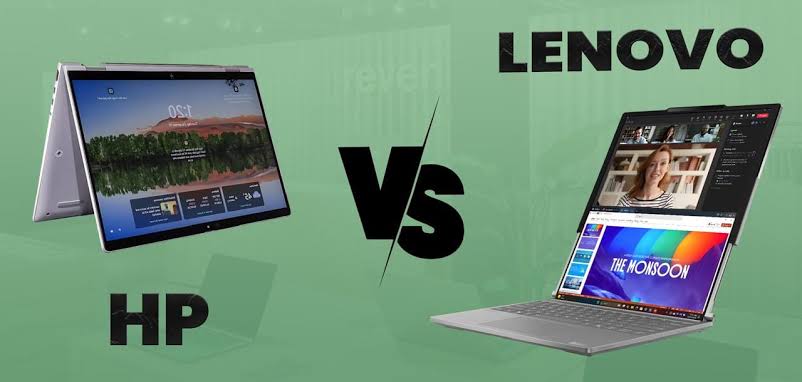
HP vs Lenovo is one of the most common laptop comparisons for students, professionals, freelancers, business owners, programmers, and everyday computer users in Nigeria. Both brands have been producing laptops for years, and both offer everything from affordable everyday machines to premium business laptops and powerful workstations.
However, choosing between HP and Lenovo is not really about picking a brand that is automatically better for everyone. The better choice depends on what you want to do with the laptop, your budget, the specifications available at the price, portability, keyboard preference, upgrade options, battery expectations, and the kind of support you can get after purchase.
If you are currently shopping for a laptop, you may also want to read our complete guide to the best laptops to buy in Nigeria in 2026. It covers laptop selection from a broader perspective instead of focusing on only two brands.
In this HP vs Lenovo comparison, we will look at build quality, performance, keyboards, displays, battery life, business use, student use, programming, content creation, gaming, repairability, pricing, and what to check before buying a laptop in Nigeria.
.jpg)
HP vs Lenovo: A Quick Comparison
| Category | HP | Lenovo |
|---|---|---|
| Budget laptops | Wide range of options | Wide range of options |
| Business laptops | ProBook and EliteBook families | ThinkPad family |
| Premium laptops | OmniBook and premium business models | Yoga and premium ThinkPad models |
| Keyboard experience | Generally comfortable across many models | ThinkPad models are particularly known for their keyboards |
| 2-in-1 options | Several convertible models | Yoga and other convertible models |
| Workstations | ZBook | ThinkPad P Series |
| Business features | Strong security and manageability on business models | Strong business features and support options |
| Nigerian market | Commonly available through retailers and used-laptop sellers | Commonly available through retailers and used-laptop sellers |
This table is only a starting point. Laptop quality can vary significantly between models, so comparing an entry-level HP against a premium Lenovo ThinkPad, for example, would not give you a useful conclusion.
HP Laptops: What Makes Them Popular?
HP has a broad laptop portfolio covering students, home users, professionals, businesses, and demanding creative workloads. Its current consumer range includes the OmniBook family, while its business portfolio includes models such as the ProBook and EliteBook. HP also has ZBook workstations for professional workloads.
HP’s Nigerian laptop catalogue currently includes OmniBook models aimed at different levels of everyday and premium computing, with configurations reaching up to 32GB of memory and 2TB of storage on some models.
You can check HP’s current Nigerian laptop lineup directly through the official HP Nigeria laptop page.
HP for Students
HP can make sense for students who need a laptop for browsing, Microsoft Office, online classes, research, programming, presentations, and entertainment.
The important thing is not simply buying an HP laptop because it has the HP logo. Look for at least a modern processor, sufficient RAM, an SSD, and a display that is comfortable for your workload.
If you are a university student, our guide to the best phones for university students in Nigeria can also help if you are trying to decide how much of your budget should go toward your phone versus your computer.
HP for Business Users
HP’s business range includes ProBook and EliteBook models. HP describes its business PCs as being designed around reliability, security, manageability, and different workstyles.
That makes business-class HP laptops worth considering if you work with confidential files, spend many hours typing, travel frequently, or need a machine designed for professional environments.
HP’s EliteBook range also includes newer AI-capable business laptops. HP’s 2026 EliteBook announcements show that the company is continuing to develop business machines around AI performance, portability, battery life, and enterprise security.
Lenovo Laptops: What Makes Them Popular?
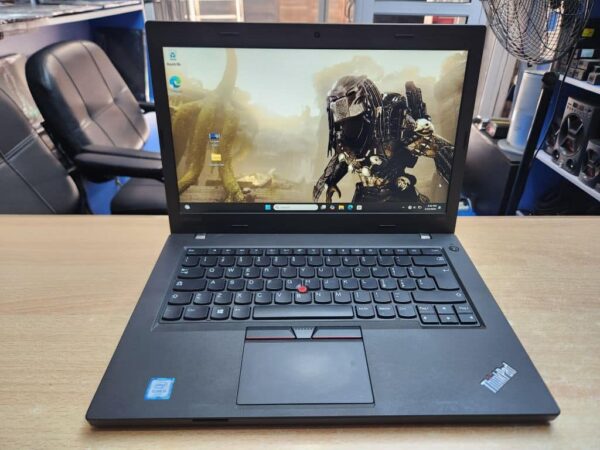
Lenovo also covers a huge portion of the laptop market. Its lineup includes affordable everyday laptops, premium Yoga models, business-focused ThinkPads, and powerful ThinkPad P Series workstations.
The ThinkPad family is particularly important when discussing Lenovo because business users often look at ThinkPad models separately from Lenovo’s consumer laptops. Lenovo’s current business laptop range includes ThinkPad X1, T Series, and P Series machines, among others.
You can explore Lenovo’s business laptop lineup through the official Lenovo business laptop page.
Lenovo for Students
Lenovo offers laptops across several price levels, which gives students plenty of configurations to consider. Depending on your course, you might need anything from an affordable machine for documents and web research to a much more powerful laptop for programming, engineering, design, or data work.
For example, someone studying general business may not need the same hardware as someone working with AutoCAD, Android Studio, video editing software, or large datasets.
If you want to develop a technical skill alongside your studies, you can also explore this Excel course on Selar. It is an affiliate link, so Infolandia may earn a commission if you make a qualifying purchase through it.
Lenovo for Business
Lenovo’s ThinkPad family has a long-standing presence in business computing. The range includes lightweight models for mobile workers, mainstream business laptops, and higher-performance workstations.
Lenovo also provides dedicated support services for business customers. Its Nigeria support pages include warranty, repair, service, parts, and other support resources.
For users who rely heavily on their laptop for work, that support ecosystem can be just as important as the processor or amount of RAM.
HP vs Lenovo Build Quality
Build quality depends heavily on the specific laptop series.
A low-cost HP laptop should not automatically be compared with a premium Lenovo ThinkPad. Likewise, an entry-level Lenovo should not be used to judge the build quality of Lenovo’s business machines.
When comparing two laptops at the same price, inspect the hinge, keyboard deck, display frame, chassis flexibility, ports, weight, and overall construction.
Business models from both brands can offer stronger construction than entry-level consumer laptops. HP’s business range, for example, includes EliteBook models designed with durability and security in mind.
Lenovo’s ThinkPad range similarly targets business users who need machines for regular professional use.
HP vs Lenovo Keyboard and Typing Experience
If you spend hours writing articles, coding, responding to emails, working with spreadsheets, or managing a website, the keyboard deserves more attention than it usually receives.
Both HP and Lenovo produce comfortable keyboards, but Lenovo ThinkPad laptops have a particularly strong reputation for their keyboard designs.
That does not mean every ThinkPad keyboard will suit every person. Keyboard layout, key travel, spacing, backlighting, and personal preference still matter.
Before buying a used laptop, try typing on the exact model whenever possible. A laptop that looks excellent in photographs can feel completely different when you actually use its keyboard.
If you are buying a laptop primarily for writing, you may also find our guide to the best laptops for professional writers and bloggers in Nigeria useful.
HP vs Lenovo for Programming and Web Development
For programming, the brand is less important than the specifications.
A programmer working with Android Studio, Visual Studio Code, databases, browsers, emulators, and other development tools will usually benefit from a capable modern processor, sufficient RAM, fast SSD storage, and good cooling.
For serious development work, 16GB of RAM is a practical target when your budget allows it. A larger SSD can also make a significant difference if you work with large projects and development tools.
You can read our guide to device requirements for web developers for another perspective on choosing hardware for development work.
Lenovo ThinkPad models and HP EliteBook or ProBook models can all be suitable for development when the specifications are appropriate.
If you are learning web development, you could also consider this frontend website development mentorship on Selar. The referral link supports Infolandia if you make a qualifying purchase.
HP vs Lenovo for Graphic Design and Video Editing
Creative work changes the laptop requirements considerably.
For basic Canva work, image editing, social media graphics, and light content creation, a good mid-range laptop can be enough. However, video editing, 3D work, professional design software, and other demanding workloads can require much more processing power.
Pay attention to the processor, GPU, RAM, SSD capacity, display resolution, colour coverage, and cooling system rather than choosing based on brand alone.
HP’s ZBook range is specifically designed for professional workloads such as CAD, video editing, 3D work, data science, and engineering.
Lenovo also offers workstation-class machines through the ThinkPad P Series.
For beginners learning creative skills, our guide to learning graphic design from home is a useful starting point.
HP vs Lenovo for Gaming
Gaming requires a different approach.
The processor and graphics card are especially important, while RAM, SSD speed, cooling, display refresh rate, and power delivery also affect the overall experience.
Do not buy a gaming laptop simply because it has a powerful-looking design. Check the exact GPU and processor model before paying.
Also consider whether you actually need a gaming laptop. If your main activities are schoolwork, browsing, coding, WordPress, office applications, and streaming, a gaming machine may add weight and cost without providing much benefit for your everyday tasks.
HP vs Lenovo for Battery Life
Battery life cannot be judged reliably from the brand name.
The actual result depends on the processor, battery capacity, display brightness, screen resolution, operating system settings, workload, background applications, and power-management features.
Two laptops from the same brand can therefore have very different battery performance.
If battery life is important, check independent reviews of the exact model you are considering. Manufacturer battery figures can be useful for comparison, but real-world usage can produce different results.
HP vs Lenovo for Business Users
Business users should look beyond consumer laptop specifications.
Security, warranty coverage, durability, docking options, manageability, repair options, keyboard comfort, webcam quality, and portability can matter just as much as raw performance.
HP’s EliteBook and ProBook families are designed for professional and business environments. Lenovo’s ThinkPad range serves a similar market.
HP specifically highlights security and manageability as important parts of its business PCs, while Lenovo offers dedicated Premier Support services for supported business customers.
For freelancers, remote workers, and small business owners, either brand can work well when you choose a business-class model with appropriate specifications.
If you are building digital skills to work remotely, you can also explore these freelancing courses on Selar.
HP vs Lenovo for Students in Nigeria
Students should start with their course requirements rather than the logo on the lid.
A student studying English, accounting, business administration, or another course based mainly around documents and web applications may be comfortable with a different laptop from an engineering, computer science, architecture, or multimedia student.
For general schoolwork, focus on:
- A modern processor
- At least 8GB of RAM, with 16GB preferable when affordable
- SSD storage rather than an old mechanical hard drive
- A comfortable keyboard
- A good-quality display
- Reasonable battery life
- Good physical condition if buying used
For more demanding courses, increase the specification according to the software you need to run.
HP vs Lenovo Used Laptops in Nigeria
The used-laptop market changes the conversation considerably.
In Nigeria, you will find many imported used and refurbished HP and Lenovo laptops. These can offer useful specifications at prices below comparable new machines, but condition varies significantly from one unit to another.
Never assume that a used laptop is a good deal simply because it has an attractive price.
Check the battery condition, keyboard, touchpad, display, ports, hinges, webcam, speakers, charger, SSD health, RAM, processor, BIOS status, and overall physical condition.
Also verify the serial number and warranty information where applicable. HP provides an official warranty-checking tool, while Lenovo provides warranty and service resources through its support platform.
For Lenovo specifically, the company’s Nigerian support resources include warranty lookup, repair information, parts information, and service-provider details.
If you are considering a used ThinkPad, our article on why ThinkPad laptops are known for durability gives you more context before buying.
HP vs Lenovo Repair and Support
Support should be part of your buying decision, especially if the laptop will be used for school or income-generating work.
HP has an official Nigeria support and shopping page where customers can find retailers, product support, order assistance, and other services.
Lenovo also provides Nigeria-specific support resources covering warranty, repair, parts, service, and support options.
However, support availability can depend on the exact model, country of purchase, warranty type, and seller. This is another reason to keep your receipt and verify the laptop’s serial number before completing a purchase.
HP vs Lenovo: Which Has Better Value?
There is no universal answer because laptop value depends on the exact configuration.
For example, an HP laptop with 16GB RAM and a modern processor may provide better value than a Lenovo with 8GB RAM at the same price. On the other hand, a Lenovo ThinkPad with a stronger business-oriented build could make more sense for someone who spends all day working on a computer.
Always compare the complete specification.
Look at the processor generation, RAM type and capacity, SSD size, display quality, battery condition, graphics hardware, ports, warranty, and physical condition.
That approach is much more reliable than asking whether HP or Lenovo is better as a brand.
What About Lenovo ThinkPad vs HP EliteBook?
This is a more useful comparison for many professional buyers than simply asking HP vs Lenovo.
ThinkPad and EliteBook are both business-oriented families. They are designed for users who want more than the basic features found on entry-level consumer laptops.
ThinkPad models are particularly attractive to people who value their keyboard and business-focused design. EliteBook models, meanwhile, offer business features, security options, and premium designs across several configurations.
Compare the exact ThinkPad and EliteBook models instead of assuming one entire product family is automatically better.
Referral Courses for People Buying a Laptop to Learn a Skill
A laptop becomes much more valuable when you use it to develop a skill.
For example, someone buying a computer for freelancing could use it for writing, web development, design, data analysis, digital marketing, or other online work.
If you are interested in affiliate marketing itself, you can check this Ultimate Affiliate Sales Formula Course. The link is an affiliate/referral link, meaning Infolandia may receive a commission from a qualifying purchase.
You can also look at this course about succeeding in affiliate marketing if you want a more focused learning option.
For broader learning, this collection of 100+ digital courses may be useful if you want to explore different skills before choosing a specific path.
For cybersecurity learners, there is also this complete cybersecurity course collection.
These links are included because they relate to practical reasons someone may be shopping for a capable laptop. They are not endorsements that every course is suitable for every reader.
How Much RAM Should You Get?
RAM is one of the first specifications you should check.
For basic browsing, documents, schoolwork, and light productivity, 8GB can still be usable. However, 16GB gives you more breathing room for multitasking and demanding applications.
If you regularly use Android Studio, large browser sessions, video editing software, virtual machines, or other memory-intensive applications, more RAM can become increasingly useful.
Before buying, check whether the laptop’s RAM is upgradeable. Some newer laptops use memory that is soldered directly to the motherboard, which can limit future upgrades.
SSD vs HDD: What Should You Buy?
For a new laptop, an SSD should generally be the starting point.
An SSD can make Windows startup, application loading, file access, and general system responsiveness feel much faster than an older mechanical hard drive.
If you are buying an older used HP or Lenovo laptop with an HDD, find out whether the storage can be replaced with an SSD. A storage upgrade can significantly improve the everyday experience of an older computer.
You can also read our guide to cloud storage and safer file storage if you want to understand how local laptop storage fits into a broader backup strategy.
HP vs Lenovo: What Should You Check Before Buying?
Whether you choose HP or Lenovo, use this checklist before handing over your money:
- Check the exact processor model and generation.
- Confirm the RAM capacity.
- Check whether the laptop uses an SSD.
- Inspect the screen for dead pixels, lines, or unusual brightness problems.
- Test the keyboard and touchpad.
- Check every USB and display port.
- Test Wi-Fi and Bluetooth.
- Check the webcam and microphone.
- Listen for unusual fan or hard-drive noises.
- Inspect the hinges carefully.
- Check the battery condition.
- Confirm that the charger is compatible.
- Verify the serial number where appropriate.
- Check warranty status if the seller claims the laptop is covered.
- Compare the price with other machines offering similar specifications.
HP vs Lenovo for Different Types of Users
For students: compare affordable HP and Lenovo models based on processor, RAM, SSD, battery life, display, and weight.
For writers and bloggers: prioritize keyboard comfort, display quality, battery life, portability, and reliability.
For programmers: prioritize the processor, RAM, SSD, cooling, display, and upgrade options.
For business users: look closely at business-class HP EliteBook or ProBook models and Lenovo ThinkPad models.
For designers and editors: prioritize GPU performance, processor performance, RAM, display quality, storage, and cooling.
For frequent travellers: pay particular attention to weight, battery life, charger size, durability, and connectivity.
So, HP or Lenovo?
The practical answer is to compare the laptop model and specification, not just the logo.
HP offers a broad selection ranging from everyday OmniBook laptops to professional EliteBook machines and ZBook workstations. Lenovo similarly covers everyday computing through Yoga and other consumer models while offering business-focused ThinkPads and workstation-class systems.
Both brands have laptops that can work well for students, professionals, programmers, freelancers, business owners, and content creators.
If two laptops have similar prices, compare the processor, RAM, SSD, display, battery condition, build quality, warranty, and upgrade possibilities. Those details will tell you much more about the value of the machine than whether the badge says HP or Lenovo.
For Nigerian buyers, availability and after-sales support should also enter the calculation. HP has Nigeria-specific shopping and support resources, while Lenovo maintains Nigeria-specific support resources for warranty and servicing.
Final Thoughts
The HP vs Lenovo debate becomes much easier when you stop treating it as a competition between two logos.
Instead, start with your workload and budget. Then identify the specifications you need and compare actual models.
A good laptop should make your work easier rather than simply look impressive on a specification sheet. Whether you choose HP or Lenovo, focus on getting enough RAM, fast SSD storage, a suitable processor, a comfortable display and keyboard, reliable battery performance, and a machine that fits the software you intend to use.
If you are still deciding what type of laptop to buy, continue with our 2026 laptop buying guide for Nigeria. You can also explore our guide to laptops for writers and bloggers if your main work involves writing and online publishing.
For readers looking to turn their new laptop into a learning and earning tool, Infolandia also covers digital skills and tutorials, including freelancing, web development, digital marketing, data analysis, and other practical computer skills.
Affiliate disclosure: Some links in this article are affiliate or referral links. If you purchase through one of these links, Infolandia may receive a commission at no additional cost to you. We include affiliate links where the product or learning resource is relevant to the subject being discussed.