Designed for people who enjoy typing on actual keys, the Titan 2 combines a BlackBerry-inspired appearance with modern Android software, 5G connectivity, generous storage and a secondary rear display. It is an unusual smartphone that attempts to bridge the gap between the productivity-focused phones of the past and the applications people depend on today.
But is a physical keyboard enough to justify buying a phone that looks and feels different from almost every mainstream Android device? How good is its performance? Can its unusual square display handle modern applications? Is the camera suitable for everyday photography? Most importantly, should Nigerian smartphone buyers consider importing one?
In this detailed Infolandia review, we examine the Unihertz Titan 2 specifications, design, keyboard, performance, camera system, battery, software, connectivity, advantages, disadvantages and price. We also compare it with conventional smartphones to help you decide whether this device deserves your money.
Unihertz Titan 2: Quick Specifications
The Unihertz Titan 2 is a 5G Android smartphone with a physical QWERTY keyboard. Its most distinctive feature is the combination of a square touchscreen and a second display on the rear.
| Specification | Unihertz Titan 2 |
|---|---|
| Manufacturer | Unihertz |
| Operating system at launch | Android 15 |
| Processor | MediaTek Dimensity 7300 |
| Display | 4.5-inch square LCD |
| Display resolution | 1440 × 1440 pixels |
| Rear display | 2-inch secondary screen |
| RAM | 12GB LPDDR5 |
| Internal storage | 512GB UFS 3.1 |
| Rear cameras | 50MP main + 8MP telephoto |
| Front camera | 32MP |
| Battery | 5,050mAh |
| Charging | 33W wired charging |
| Keyboard | Physical QWERTY keyboard |
| Network | 4G LTE and 5G |
| SIM | Dual nano-SIM |
| Wireless connectivity | Wi-Fi 6, Bluetooth 5.4 and NFC |
| Weight | 235g |
| Dimensions | 137.8 × 88.7 × 10.8mm |
| Memory card | No microSD expansion listed |
| Headphone jack | No 3.5mm jack listed |
These specifications are based primarily on the manufacturer’s published information. You can confirm the full hardware configuration on the official Unihertz Titan 2 product page and consult the official Titan 2 user manual for setup and operating instructions.
What Is the Unihertz Titan 2?
The Unihertz Titan 2 is an Android smartphone designed around a physical keyboard. Unlike regular smartphones, which depend almost entirely on virtual keyboards, it allows users to type messages, emails and documents using individual physical keys.
Its design is inspired by the productivity-focused smartphone era associated with classic BlackBerry devices. However, the Titan 2 is a Unihertz product, not an official BlackBerry smartphone. It does not run BlackBerry OS or belong to the BlackBerry product family.
The phone combines its keyboard with a modern Android operating system, allowing users to access familiar applications, including messaging platforms, email clients, browsers and productivity tools.
This makes it particularly interesting for people who spend a considerable amount of time typing on their phones. Entrepreneurs, writers, office workers and professionals who frequently respond to messages may appreciate having physical keys instead of depending entirely on a touchscreen.
Unihertz has built several unusual smartphones over the years. Its Titan smartphone collection includes different approaches to the physical-keyboard concept. The Titan 2 represents a more modern attempt at combining that design philosophy with contemporary smartphone hardware.
Design and Build Quality: A Smartphone That Looks Different
The first thing you notice about the Unihertz Titan 2 is its shape. It does not look like a typical Samsung Galaxy, iPhone, OPPO or Xiaomi smartphone. Instead, it has a wide rectangular body with a physical keyboard positioned beneath its square display.
The phone measures approximately 137.8 × 88.7 × 10.8mm and weighs 235g. These dimensions make it noticeably wider and heavier than many conventional smartphones.
Its design prioritises functionality rather than thinness. The keyboard requires additional physical space, while the second display and battery contribute to the overall construction.
For someone who wants a slim phone that fits easily into a small pocket, this design may feel inconvenient. However, people who prefer a substantial device with tactile controls may find the layout appealing.
The device also includes a programmable side button, which can be configured for shortcuts. This is useful for people who want quick access to frequently used applications or functions.
Before purchasing, consider how you normally carry your smartphone. If you are accustomed to lightweight devices such as the phones discussed in our best smartphones to buy in Nigeria guide, the Titan 2 may require some adjustment.
Physical QWERTY Keyboard: The Main Reason to Buy This Phone
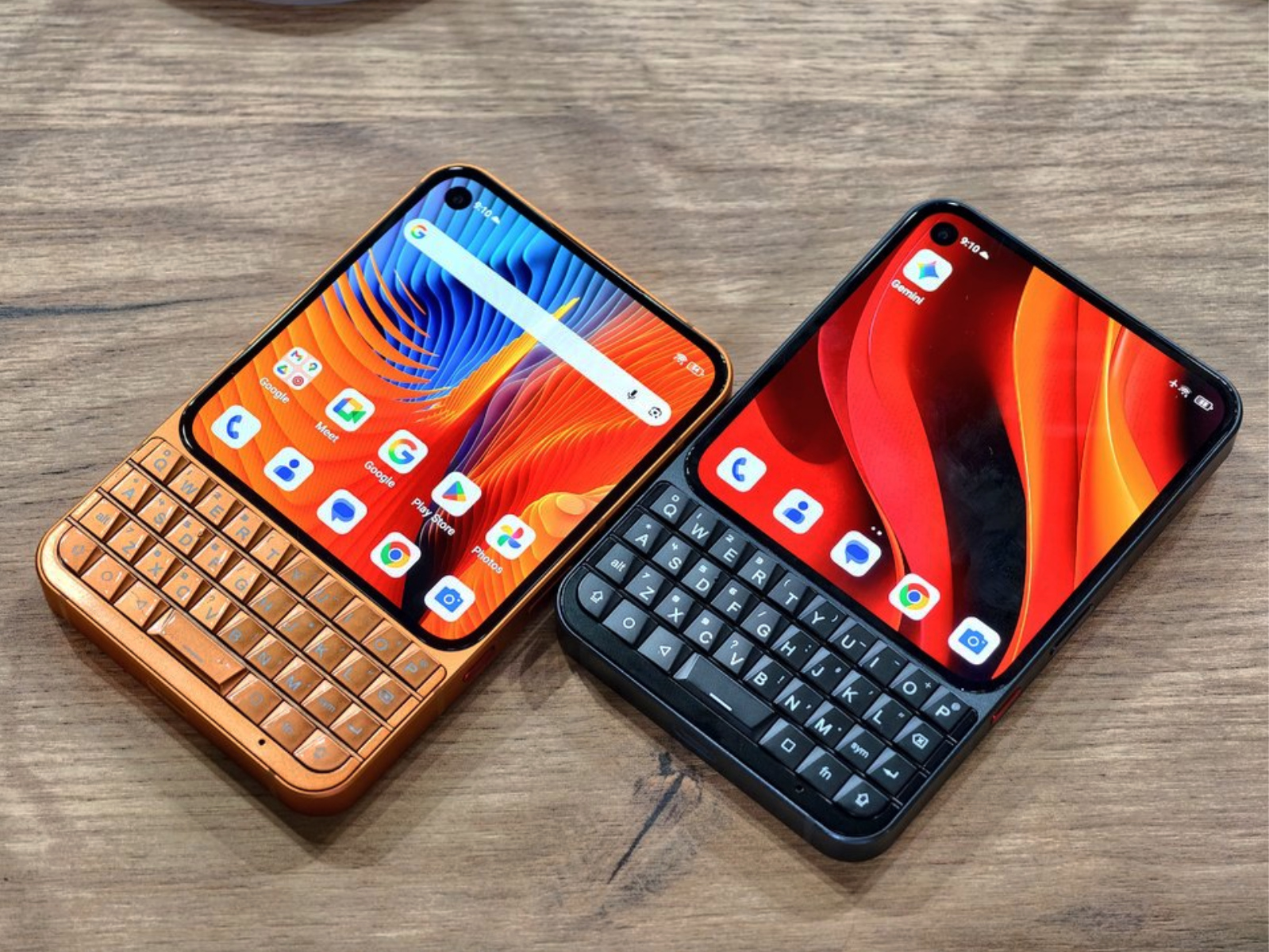
The keyboard is the most important feature of the Unihertz Titan 2. It is not simply decorative. The phone is designed to make the physical keyboard an active part of the smartphone experience.
Instead of typing every message on the screen, users can interact with the physical keys to enter text, access shortcuts and perform other supported functions.
Customisable keyboard shortcuts
The manufacturer advertises customisable A–Z keys, allowing users to assign short-press and long-press shortcuts. This can make frequently used functions easier to access.
For example, a user could configure shortcuts for applications used throughout the working day, reducing the need to repeatedly search through the app drawer.
Keyboard scrolling and cursor control
The Titan 2 also includes keyboard gestures designed to improve navigation. Its Scroll Assistant allows users to swipe across the keyboard surface to browse, while Cursor Assistant provides a way to move the text cursor through keyboard gestures.
These features are particularly relevant when editing messages, correcting spelling mistakes or working with longer text.
Backlit keys
The keyboard includes backlighting, making the keys easier to identify in darker environments. This can be useful when typing at night or in places where the lighting is not ideal.
Multilingual typing
The manufacturer also advertises support for multiple language inputs. This matters to people who regularly communicate in more than one language.
However, prospective buyers should confirm that their preferred language layout and input method are supported before ordering.
Is the physical keyboard actually useful?
That depends on your typing habits. Someone who frequently sends emails, writes long messages, prepares notes and edits documents may appreciate physical keys. Someone who mainly watches videos, plays games, browses social media and takes photographs may not benefit as much.
It is also important to remember that physical keyboards require adaptation. If you have spent years typing on touchscreen smartphones, your initial typing speed on the Titan 2 may be slower until you become comfortable with its layout.
For additional productivity advice, explore our guides on smartphone requirements for web developers and phones for graphic designers. These guides help explain why different professionals need different smartphone capabilities.
Display: A 4.5-Inch Square Screen and a Secondary Rear Display
The Titan 2 uses a 4.5-inch square LCD display with a resolution of 1440 × 1440 pixels. This is one of the most unusual aspects of the device.
Most modern smartphones use tall displays designed for scrolling, watching videos and viewing vertically arranged content. The Titan 2 takes a different approach, using a square screen that gives text-based activities a distinctive layout.
What is good about the square display?
The square screen can be useful for reading messages, viewing certain documents and working with applications that do not depend heavily on a conventional widescreen layout.
Its resolution also provides a relatively high pixel density for its size. Text and interface elements can appear detailed, although the actual experience depends on the application and its optimisation.
Where the display may struggle
The biggest concern is application compatibility and layout. Not every Android application is designed for a square screen.
Some apps may display large unused areas, rearrange interface elements or present content differently from what users expect. Video streaming can also be less immersive because conventional widescreen content does not naturally fill a square display.
This does not mean that every application will perform poorly. It means buyers should not assume that the experience will be identical to using a conventional 6.5-inch or 6.7-inch smartphone.
The secondary rear display
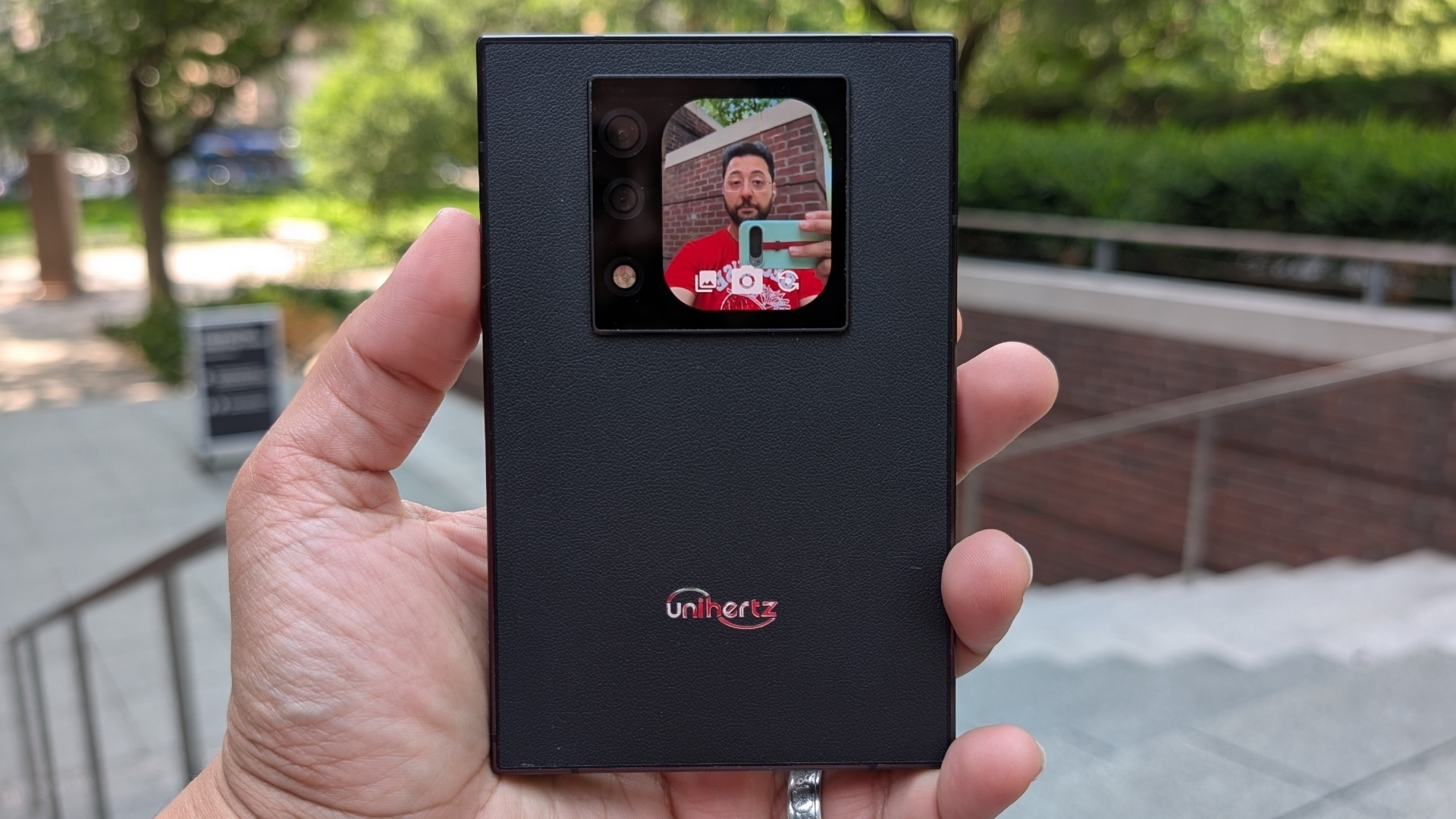
The Titan 2 includes a 2-inch secondary display on its rear, with a published resolution of 410 × 502 pixels. It adds another way to interact with the device and can be used for supported functions such as viewing information and taking selfies with the rear cameras.
For people who enjoy experimenting with unconventional smartphone designs, this is an interesting addition. However, it should be treated as a supplementary feature rather than the primary reason to buy the phone.
To compare conventional smartphone displays and their practical differences, see our guide to the best phones for university students in Nigeria and our broader 2026 smartphone buying guide.
Performance: MediaTek Dimensity 7300 and 12GB RAM
The Unihertz Titan 2 is powered by the MediaTek Dimensity 7300, an octa-core processor designed for mid-range smartphones. It is paired with 12GB of LPDDR5 RAM and 512GB of UFS 3.1 storage.
This configuration gives the phone a reasonable foundation for everyday Android activities, including messaging, browsing, email, document editing, video playback and multitasking.

Everyday performance
For normal productivity activities, the hardware is appropriately positioned. Applications such as email clients, messaging platforms, web browsers, document editors and calendars are the types of software the Titan 2 is designed to accommodate.
The 12GB RAM configuration also provides room for running multiple applications, although actual multitasking performance depends on software optimisation and background app management.
For official information about the processor family, visit MediaTek’s Dimensity 7300 product information.
Gaming performance
The Dimensity 7300 is not positioned as a top-tier gaming processor. Casual games and many ordinary Android titles should be more appropriate for this device than demanding graphics-intensive games.
However, the square display may affect the gaming experience independently of processing power. Games designed around tall or wide screen layouts may not use the available display space as expected.
If gaming is your main priority, compare the Titan 2 with conventional devices in our smartphone buying guide before spending money on a specialist keyboard phone.
Can it handle video editing and content creation?
The phone can handle ordinary mobile productivity, but buyers who regularly edit demanding videos or work with complex creative applications should evaluate its processing capabilities carefully.
Its physical keyboard is useful for text entry, but that does not automatically make it an ideal video-editing device. A conventional smartphone with a larger display and stronger graphics capabilities may be more practical for creators.
Read our guides on phone requirements for video editing and smartphones for graphic design if creative work is an important part of your buying decision.
Storage: 512GB Gives You Plenty of Room
One of the Titan 2’s strongest specifications is its 512GB internal storage. This is generous for a phone that is designed around productivity and everyday work.
It gives users room for applications, documents, photographs, videos and offline files without immediately worrying about filling the device.
The storage uses UFS 3.1 technology, and the device is listed with no microSD expansion. This means buyers should choose carefully because they cannot rely on a memory card to increase the internal capacity later.
For people who store large quantities of documents and media, the 512GB configuration is attractive. However, it is still important to maintain backups.
Our article on why phone storage keeps filling up and what actually works explains how applications, downloads and media files can consume available storage over time.
Camera Review: 50MP Main Camera, 8MP Telephoto and 32MP Selfie Camera
The Unihertz Titan 2 is not primarily marketed as a camera flagship, but it does include a multi-camera setup for everyday photography.
Its rear camera system consists of a 50MP main camera and an 8MP telephoto camera, while the front-facing camera is listed at 32MP.
50MP main camera
The main camera is intended for regular photography, including everyday scenes, people, objects and general snapshots.
However, a 50MP specification alone does not establish image quality. Sensor size, lens quality, image processing, autofocus and software optimisation all influence the final result.
Buyers should therefore avoid judging this phone against flagship camera devices simply by comparing megapixel numbers.
8MP telephoto camera
The secondary 8MP telephoto camera provides an additional focal length for supported zoom photography. It gives the camera system more flexibility than a single-camera arrangement.
However, it should not be confused with the advanced multi-camera systems found in premium photography smartphones.
32MP front camera
The front camera is suitable for selfies and video calls, subject to lighting and software processing. The rear secondary screen also gives users an additional way to frame selfies using the main cameras.
Is the Titan 2 good for content creators?
It can serve people who need basic photography alongside communication and productivity. However, professional content creators may prefer a smartphone with a more advanced camera system, a larger display and stronger video features.
If photography is your priority, compare it with our list of best camera phones in 2026. You can also read our guide to optical zoom versus AI camera processing to understand why camera systems cannot be evaluated by megapixels alone.
For comparison, our reviews of the OPPO Find X9 Ultra, Google Pixel 11 Pro and Samsung Galaxy S26 Ultra provide useful examples of mainstream premium camera-phone priorities.
Battery Life: 5,050mAh Capacity and 33W Charging
The Titan 2 comes with a 5,050mAh non-removable battery and supports 33W wired charging.
Battery capacity is important, but it does not determine actual endurance by itself. Display usage, mobile network conditions, background applications, brightness and individual habits all affect how long a smartphone lasts.
The Titan 2’s 4.5-inch display is relatively small compared with conventional smartphones, but its square layout, processor and software usage patterns also influence power consumption.
Is 5,050mAh enough?
For ordinary communication, messaging, browsing and document-related activities, the battery capacity provides a reasonable starting point. However, buyers should look for independent endurance tests rather than assuming that a particular number of hours is guaranteed.
Heavy mobile data usage, gaming, navigation, video streaming and high screen brightness may reduce battery life.
33W wired charging
The phone supports 33W wired charging. This is useful for topping up the battery, although it is not among the fastest charging systems available in the smartphone market.
There is no wireless charging listed in the manufacturer’s published specifications. Buyers who rely on wireless charging accessories should consider this limitation.
For practical battery management advice, see Infolandia’s guides on 15 ways to extend smartphone battery life and habits that can contribute to fast battery drain.
Software: Android 15 and the Android 16 Update
The Titan 2 launched with Android 15. Unihertz’s product information now also mentions an Android 16 update, including improvements to the secondary display and keyboard functions.
This is an important distinction for anyone researching the device. Android 15 is its launch operating system, but the software experience may differ depending on the update installed on the individual handset.
Before purchasing, confirm the installed software version and check for available system updates through the phone’s settings.
You can read about the operating system through Google’s official Android 15 information and Android 16 information.
Android application compatibility
Because the Titan 2 runs Android, it can access the Android application ecosystem, subject to the device’s compatibility, software certification and individual application requirements.
However, application availability does not guarantee an ideal interface on a square screen. Some applications may be designed primarily for conventional smartphone dimensions.
Before buying, consider the applications you use every day. Test or research their compatibility with the Titan 2’s unusual display layout, especially if your work depends on specific business or financial applications.
Software support matters
A phone is a long-term purchase, so software updates and security support are important. Buyers should check Unihertz’s current update announcements and support information rather than assuming that the device will receive a particular number of Android upgrades.
For a device that may store work documents, email accounts and personal information, security updates should be part of the buying decision.
Connectivity: 5G, Dual SIM, NFC and Other Features
The Titan 2 includes several connectivity features that make it more than a simple retro-style keyboard phone.
5G connectivity
The phone supports 5G network connectivity. However, the presence of 5G hardware does not guarantee that every network operator or location will provide 5G service.
Compatibility depends on supported frequency bands, the regional hardware version, the operator’s network and local coverage.
Nigerian buyers should check the exact frequency bands of the version being purchased and compare them with their intended network operator. Do not rely only on the manufacturer’s general statement that the phone supports global 5G.
For local network and regulatory information, consult the Nigerian Communications Commission and confirm current coverage directly with your mobile network provider.
Dual nano-SIM support
The Titan 2 supports two nano-SIM cards. This can be useful for people who want to separate personal and business communication or use different operators for coverage and data.
However, dual-SIM support does not mean that both SIMs can use every network technology simultaneously under all circumstances. Check the device documentation for the relevant operating modes.
NFC
Near Field Communication (NFC) is included. It can support compatible contactless and device-interaction functions, depending on software, region, banking support and payment-service availability.
Do not assume that NFC automatically guarantees support for every mobile payment service in Nigeria. Confirm the compatibility of your preferred bank or payment application.
For more information about the technology, see the NFC Forum.
Bluetooth 5.4 and Wi-Fi 6
The phone also supports Bluetooth 5.4 and Wi-Fi 6. These features provide modern wireless connectivity for compatible accessories, routers and other devices.
Bluetooth can be useful for wireless earbuds, speakers, keyboards and other supported accessories. Wi-Fi 6 can provide improved wireless network performance when connected to a compatible router.
If you are shopping for smartphone accessories, our guide to useful tech gadgets for Nigerians under ₦30,000 may help you explore affordable additions to your setup.
Infrared port and built-in tools
The Titan 2 also includes an infrared port and a collection of utility tools. The manufacturer’s advertised features include tools such as rulers, sound meters and step counters.
These additions can be convenient for users who appreciate having extra functions available on their phone, although their usefulness will depend on individual needs.
Unihertz Titan 2 Price: How Much Does It Cost?
Price is one of the most important considerations when evaluating the Titan 2. The official Unihertz store lists a price of approximately US$489.99 for the standard Titan 2 at the time of the latest product information checked for this article. Prices and promotional offers may change.
You can check the current price and purchasing options directly through the official Unihertz Titan 2 store page.
For Nigerian buyers, the final cost may be higher than the displayed dollar price. Importation can involve international shipping, currency conversion, bank charges, customs duties or other applicable fees.
What should Nigerians budget for?
Rather than converting an overseas price into naira and treating the result as the final local retail price, calculate the full landed cost.
Consider:
- The current official selling price.
- The exchange rate used by your payment provider.
- International shipping charges.
- Applicable import duties and taxes.
- Payment-processing or foreign transaction charges.
- Any local delivery or handling fees.
- Warranty and after-sales support arrangements.
Because the Titan 2 is a specialist device, it may not be as readily available through Nigerian retailers as mainstream Samsung, Apple, Tecno, Infinix or Xiaomi models.
Before paying a seller, ask whether the phone is new, which regional version is being supplied, whether the device is unlocked, what warranty is provided and how returns are handled.
Is the official store the best place to buy?
Buying directly from the manufacturer can make it easier to confirm the product configuration and available regional options. However, you should still check shipping restrictions, delivery costs, warranty coverage and return conditions before completing payment.
Unihertz also provides a Titan series store collection where you can compare other keyboard smartphones and accessories.
Is the Unihertz Titan 2 Good for Nigerian Users?
The Titan 2 could appeal to a specific group of Nigerian users, particularly professionals who type frequently and prefer physical keys. However, it is important to consider network compatibility, local availability and the price of importing the device.
For entrepreneurs and business owners
Entrepreneurs who spend much of their day responding to customer enquiries, managing messages and writing short business communications may appreciate the keyboard.
The phone can be particularly interesting for people who use messaging platforms, email and document applications as part of their daily operations.
However, it is not a replacement for every business tool. A large conventional smartphone may be more practical for managing spreadsheets, reviewing dashboards and working with complex applications.
If you are building an online business, you may also want to explore our guides on building a business website and selling digital products online.
For writers and content creators
The physical keyboard is an interesting advantage for writers who frequently draft messages, notes and shorter text documents on their phones.
However, the square display and camera capabilities may not be ideal for creators who regularly edit videos, design graphics or manage large visual projects.
For those users, compare the Titan 2 with phones discussed in our camera-phone buying guide and video-editing smartphone guide.
For students
Students who write notes, respond to messages and use productivity applications may find the physical keyboard appealing. The 512GB storage capacity is also useful for storing files and applications.
However, a student who mainly needs a large screen for online lectures, reading PDFs, gaming and entertainment may be better served by a conventional smartphone or tablet.
Our article on the best phones for university students in Nigeria provides additional buying considerations.
For everyday smartphone users
If you mainly use your phone for social media, video streaming, mobile photography and gaming, the Titan 2 may not offer the best balance of features for your money.
Its physical keyboard is its defining advantage, but it also makes the device wider and heavier. You should only pay a premium for that design if you genuinely want the typing experience.
Unihertz Titan 2 vs Regular Android Smartphones
The Titan 2 should not be evaluated as though it were simply another mainstream Android smartphone. It is a specialist device with a particular audience.
| Feature | Unihertz Titan 2 | Typical mainstream Android phone |
|---|---|---|
| Keyboard | Built-in physical QWERTY | On-screen keyboard |
| Display shape | Square | Usually tall rectangular |
| Typing experience | Tactile physical keys | Touchscreen typing |
| Camera focus | Everyday photography | Varies from entry-level to flagship |
| Portability | Wide and relatively heavy | Many models are slimmer |
| Best audience | Keyboard enthusiasts and text-heavy users | General smartphone users |
There is no universal winner. The right choice depends on whether you value physical typing more than the larger displays, camera options and conventional designs found in mainstream phones.
For a broader comparison, explore Infolandia’s articles on the iPhone 18 Pro series, Google Pixel 11 Pro, and Samsung Galaxy S26 Ultra.
Advantages and Disadvantages of the Unihertz Titan 2
Advantages
- Physical QWERTY keyboard: Offers a tactile alternative to touchscreen typing.
- 12GB RAM: Provides a generous memory configuration for everyday multitasking.
- 512GB storage: Offers substantial room for files, applications and media.
- 5G support: Includes modern cellular connectivity, subject to regional compatibility.
- Dual SIM: Supports two nano-SIM cards.
- Secondary rear display: Adds an unusual extra way to interact with the phone.
- Customisable keys: Allows shortcuts to be assigned to physical keys.
- 5,050mAh battery: Provides a reasonable battery capacity for its design.
- NFC and infrared: Adds useful connectivity and utility features.
- Android ecosystem: Gives access to familiar Android applications, subject to compatibility.
Disadvantages
- Unusual display format: Some applications and video content may not be optimised for a square screen.
- 235g weight: Heavier than many conventional smartphones.
- Wide body: May be uncomfortable for users who prefer compact phones.
- Mid-range processor: Not designed to compete with premium flagship chipsets.
- No wireless charging listed: Users who prefer wireless charging will need another option.
- No microSD expansion: Buyers should consider the fixed storage capacity before purchasing.
- Specialist availability: It may be harder to find locally than popular mainstream smartphones.
- Import considerations: Nigerian buyers need to verify shipping, network compatibility and warranty arrangements.
- Software support uncertainty: Future update commitments should be checked with the manufacturer.
Who Should Buy the Unihertz Titan 2?
The Titan 2 makes the most sense for people who genuinely want a physical keyboard rather than simply buying it because it looks different.
You should consider it if:
- You regularly type long messages and emails on your smartphone.
- You prefer physical keys to a touchscreen keyboard.
- You want an unusual Android phone with a distinctive design.
- You value programmable keyboard shortcuts.
- You need substantial built-in storage.
- You are comfortable purchasing a specialist smartphone from an international manufacturer.
It may not be the right purchase if:
- You want the best camera phone for the money.
- You play demanding mobile games.
- You watch a lot of widescreen videos on your phone.
- You prefer lightweight and slim smartphone designs.
- You need the widest possible selection of local accessories and repair services.
- You want guaranteed local warranty coverage without importing.
What to Check Before Buying the Unihertz Titan 2 in Nigeria
Because this is a specialist international smartphone, Nigerian buyers should take a few extra steps before paying.
1. Confirm the exact regional version
Unihertz lists several regional configurations. Check the supported cellular bands for the exact version being supplied. Do not assume that every regional variant has identical network compatibility.
2. Confirm compatibility with your network
Ask your network operator whether the relevant bands and device configuration are supported in your area. A phone can be advertised as 5G-capable and still fail to access a particular operator’s 5G service.
3. Verify the seller
Prefer the manufacturer’s official store or a seller whose business details, stock and return arrangements you can verify. Avoid making payment based solely on social media claims or unusually low prices.
4. Confirm warranty and returns
Ask whether the warranty is manufacturer-backed or provided only by the local seller. Understand who pays for international shipping if the phone develops a fault.
5. Check software updates
Confirm that the device can receive the current supported software update and ask about the manufacturer’s published support arrangements.
6. Calculate the full cost
Include the purchase price, exchange-rate conversion, shipping and other applicable import expenses. A phone that appears affordable at the overseas price may become significantly more expensive after delivery.
For more general purchasing advice, read Infolandia’s guide to five things to check before buying a phone in Nigeria and our article on smartphone buying mistakes Nigerians should avoid.
Unihertz Titan 2 vs the Original Unihertz Titan
The Titan 2 continues the idea behind the original Unihertz Titan: a smartphone that combines Android with a physical QWERTY keyboard.
However, the Titan 2 introduces a more modern hardware configuration, including 5G connectivity, a newer processor, more storage and a secondary rear display.
Its 12GB RAM, 512GB storage and Dimensity 7300 processor make it a substantially different proposition from older keyboard-phone designs.
People who already own an original Titan should consider whether the newer connectivity, software and hardware justify upgrading. If the original device still handles their everyday requirements, replacing it may not be necessary.
To compare the manufacturer’s different keyboard-phone designs, visit the official Unihertz Titan series collection.
Authoritative Resources and Further Reading
Before making a final purchase, it is worth checking the manufacturer’s documentation and independent reviews. The following resources provide additional information about the Titan 2 and the technologies used in the device.
- Unihertz Titan 2 official product page — specifications, features, regional options and purchasing information.
- Unihertz Titan 2 user manual — setup instructions and guidance on using the device.
- TechRadar Unihertz Titan 2 review — independent assessment of the keyboard, display, everyday performance and design.
- Notebookcheck Titan 2 coverage — technical specifications and review information.
- MediaTek Dimensity 7300 information — official processor information.
- Google Android 15 — information about the operating system at launch.
- Google Android 16 — information about the newer Android release.
- Nigerian Communications Commission — official telecommunications and regulatory information.
- NFC Forum — background information about NFC technology.
- Wi-Fi Alliance — information about Wi-Fi standards and wireless connectivity.
Frequently Asked Questions About the Unihertz Titan 2
Is the Unihertz Titan 2 a 5G smartphone?
Yes. The Titan 2 supports 5G connectivity. However, actual network access depends on the regional version, supported bands, network operator and coverage in your location.
Does the Unihertz Titan 2 run Android?
Yes. It launched with Android 15, and Unihertz’s product information advertises an Android 16 update. The software version installed on a particular unit should be checked before purchase.
How much RAM does the Unihertz Titan 2 have?
The standard configuration is listed with 12GB LPDDR5 RAM and 512GB UFS 3.1 internal storage.
Does the Unihertz Titan 2 have a physical keyboard?
Yes. Its built-in physical QWERTY keyboard is its defining feature. It supports customisable letter-key shortcuts, keyboard backlighting and navigation gestures.
What is the Unihertz Titan 2 battery capacity?
The phone has a 5,050mAh non-removable battery and supports 33W wired charging.
Does the Titan 2 support wireless charging?
No wireless charging support is listed in the manufacturer’s published specifications. It is designed around wired USB-C charging.
Is the Unihertz Titan 2 waterproof?
Do not assume that it is waterproof. The manufacturer’s published specification information used in this review does not establish a water-resistance rating. Avoid exposing the device to water unless Unihertz confirms an applicable protection rating for your exact model.
Can I use two SIM cards in the Titan 2?
Yes. It supports two nano-SIM cards. Network functionality still depends on the regional version and operator compatibility.
Does the Titan 2 have expandable storage?
The published specifications do not list a microSD card slot. Its standard internal storage is 512GB.
Is the Unihertz Titan 2 good for gaming?
It can handle everyday applications and may be suitable for casual gaming, but its Dimensity 7300 processor and square display make it less attractive for people who prioritise demanding mobile games.
Is the Unihertz Titan 2 worth buying in Nigeria?
It may be worth considering if you specifically want a physical keyboard, substantial storage and an unusual Android design. However, buyers should calculate the full import cost, confirm network compatibility and verify warranty arrangements before paying.
Where can I buy the Unihertz Titan 2?
You can check availability and current pricing through the official Unihertz store. If purchasing from another seller, verify the regional model, warranty and return policy.
Final Verdict: Should You Buy the Unihertz Titan 2?
The Unihertz Titan 2 is an interesting smartphone because it does not try to compete with every mainstream Android device on the same terms. Instead, it targets people who want something that most manufacturers have stopped producing: a modern Android phone with a built-in physical QWERTY keyboard.
Its 12GB RAM, 512GB storage, 5G support, 5,050mAh battery and Dimensity 7300 processor give it a useful hardware foundation. The programmable keyboard, secondary rear display, NFC and dual-SIM functionality add to its distinctive character.
However, the unusual square screen, 235g weight, mid-range processor and specialist availability are important compromises. Its camera system is suitable for general use, but buyers looking for a flagship photography experience should consider other devices.
For professionals who type frequently, business owners who handle many messages and enthusiasts who genuinely enjoy physical keyboards, the Titan 2 could be a worthwhile purchase. For general users who prioritise photography, gaming, entertainment and conventional smartphone convenience, a mainstream Android phone may offer better overall value.
Our recommendation: Buy the Unihertz Titan 2 because you want its physical keyboard and productivity-focused design, not simply because it looks different. Check the current price, regional network compatibility, software support and warranty before ordering.
Ready to explore the phone? Visit the official Unihertz Titan 2 product page to review the current specifications, regional options and purchasing terms.
For more smartphone reviews and buying advice, continue exploring Infolandia’s smartphone buying guides, camera-phone recommendations and signs that it may be time to replace your smartphone.